Lungs Diagram Generator
Labeled, unlabeled and blank lung anatomy in seconds
Describe the lung anatomy you need and generate a labeled anterior view, an unlabeled diagram for students to complete, or a blank lungs worksheet for biology and medical lessons.
Labeled and Blank Lungs Diagram Examples
Start from a ready-made example or describe your own — from a fully labeled anterior view to a blank lungs worksheet students can fill in.
What is a lungs diagram?
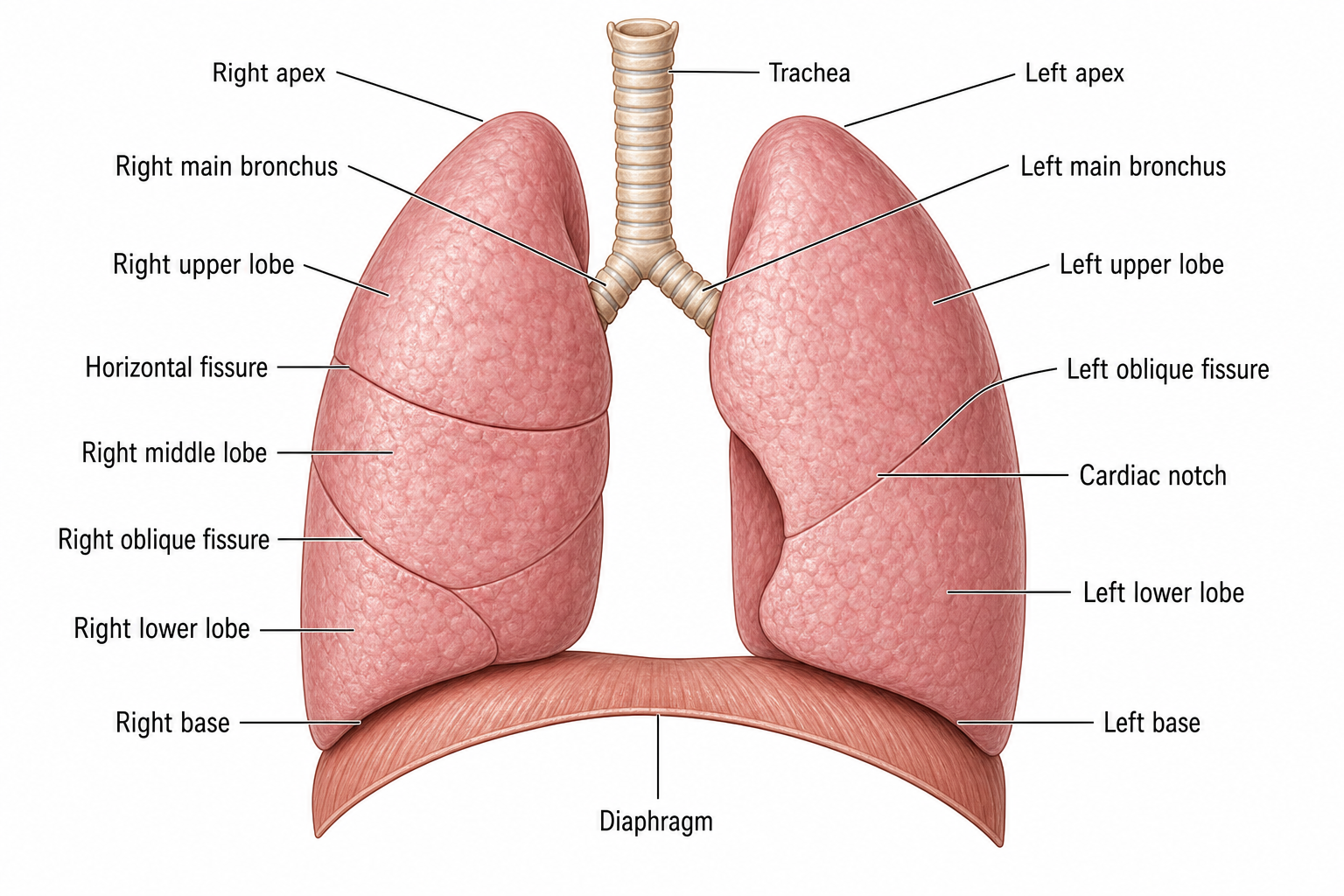
A lungs diagram shows the paired organs in the thorax with the trachea dividing into the two main bronchi, the three lobes of the right lung and the two of the left, and the fissures that separate them. The asymmetry is the point students usually miss: the left lung gives up a lobe and carries a cardiac notch to make room for the heart. SciDraw AI draws that asymmetry correctly from a short description, and can go deeper into a single alveolus or out to the pleural membranes when the lesson needs it. The same description also gives you the classroom version: ask for an unlabeled view with empty leader lines and you get a printable worksheet students can label themselves, then generate the labeled version to hand out as the answer key.
Why you need a lungs diagram
- Learn the lobes and fissures and why the two lungs differ.
- Show where the alveoli sit and how gas exchange happens.
- Explain the pleural membranes and the cavity between them.
- Create figures for worksheets, slides, lab reports and exams.
- Support nursing and medical study with accurate lung anatomy.
How to make a lungs diagram
Describe the view you need — an anterior overview, the bronchopulmonary segments, an alveolar close-up or a thoracic cross-section for the pleura — and say whether you want every structure named or an unlabeled version with blank leader lines for students to complete. Add "clean white background, print-friendly" when the diagram is going onto a worksheet. SciDraw AI generates the figure at 2K resolution ready for slides or handouts, and you can refine and regenerate until it matches your lesson.
Parts of the lungs
- Trachea dividing into the right and left main bronchi.
- Three lobes on the right lung, two on the left.
- Horizontal and oblique fissures.
- The cardiac notch on the left lung.
- Alveoli and the respiratory membrane.
- Visceral and parietal pleura with the cavity between them.
Frequently Asked Questions
How many lobes does each lung have?
The right lung has three lobes — superior, middle and inferior — separated by the horizontal and oblique fissures. The left lung has only two, superior and inferior, divided by a single oblique fissure, and carries a cardiac notch on its medial edge to accommodate the heart.
How do I make a labeled lungs diagram online?
Open the generator above, describe the view you need and name the structures you want labeled. SciDraw AI creates an accurate lung diagram in seconds that you can download in 2K and use anywhere. No drawing skills or design software required.
What is the difference between the visceral and parietal pleura?
The visceral pleura is the membrane bonded to the lung surface itself. The parietal pleura lines the inside of the chest wall, the mediastinum and the top of the diaphragm. Between them is the pleural cavity, holding a thin film of pleural fluid that lets the two surfaces slide over each other as the lungs expand.
Are the lung diagrams anatomically accurate?
Yes. Diagrams are generated with three lobes on the right and two on the left, the fissures in their correct positions, the cardiac notch on the left lung and the bronchi branching in proportion. You can request a specific view, such as the bronchopulmonary segments or an alveolar close-up, and refine the prompt until it is right.
Is the lungs diagram generator free to use?
You can start generating lung diagrams for free. New accounts get 10 credits on signup and 5 more each day, and a standard 2K diagram costs 5 credits. Paid plans add a monthly credit allowance if you produce many figures.
Can I use these lung diagrams in class or coursework?
Yes. The diagrams are designed for biology, nursing and medical education. Use them in lecture slides, worksheets, lab reports, study guides and exam materials, and download in high resolution so labels stay sharp when printed or projected.
Can I generate an unlabeled or blank lungs diagram?
Yes. Describe the structures you want drawn and ask SciDraw AI to leave the labels off, or to use numbered leader lines pointing to empty boxes. You get the same accurate anterior view with no text on it, ready for students to label themselves.
Can I use the generated lungs diagram as a worksheet and answer key?
Yes. Generate the blank view first with empty numbered leader lines and print it as the labeling worksheet, then generate a fully labeled version to use as the answer key. Ask for the same view and the same numbering in both prompts so the two sheets line up.
Explore More Tools
Create your lungs diagram now
Generate a labeled lungs diagram, an unlabeled version to label, or a blank lungs worksheet in seconds. Perfect for biology, nursing and medicine.