Scientific data visualization often fails before the plotting software opens. A column contains formatted text instead of numbers, a confidence interval is mistaken for a standard deviation, or a visually attractive chart answers the wrong research question. The safest workflow starts with a clean table, chooses a chart that matches the analysis, and ends with a figure whose values, encodings, and labels can be verified.
SciDraw SciVis provides that workflow without requiring plotting code: upload one data file or choose a prepared example, generate the appropriate scientific chart, inspect the Python-backed result, and continue editing labels, colors, annotations, scales, and layout. This guide is the index for all 46 active chart workflows.
Common mistakes to avoid before choosing a chart
- Starting from the chart you like: begin with the research question—comparison, association, uncertainty, distribution, time, or overlap.
- Uploading presentation tables: merged cells, decorative headings, totals, and footnotes make column detection unreliable. Use a tidy analysis table instead.
- Asking a chart to calculate the analysis: a forest plot displays effect estimates and confidence intervals; it does not decide the meta-analysis model. A volcano plot displays fold changes and p-values; it does not run differential-expression testing.
- Hiding transformations: document log scales, normalization, clipping, smoothing, and any converted units in the caption or methods.
- Editing until the result looks stronger: visual refinement must not change the scientific meaning of the data.
Which data formats are supported?
The current uploader accepts one file at a time in these formats:
- CSV (
.csv) - TSV (
.tsv) - plain-text tables (
.txt) - Excel (
.xlsxand.xls)
For an Excel workbook, SciDraw imports the first worksheet. A single file is enough for most figures because grouping, series, uncertainty, and labels can be represented as columns in one tidy table. If your data is split across several files or worksheets, join it before upload or export the required sheet as CSV.
JSON upload and multiple simultaneous file upload are not part of this workflow.
How the SciVis workflow works
- Choose a chart-specific tool. Each landing page preselects the appropriate visualization intent.
- Load an example or upload one file. Six datasets on each tool page show realistic column structures and styles.
- Generate the first figure. SciDraw reads the table and creates the selected chart type.
- Continue editing in SciVis. Refine labels, colors, annotations, scales, legends, and layout in the main editor.
- Verify and export. Check plotted values and statistical annotations against the source analysis and your journal requirements.
The tool page handles data entry and examples; iterative editing happens in SciVis, matching the same handoff used by the AI Drawing workflow.
46 active scientific chart tools
SciDraw currently exposes 46 active data-visualization tools. PCA and choropleth-map pages are intentionally offline until their generation workflows meet the same reliability standard.
General comparison, trend, and uncertainty charts
- Bar Chart Maker — grouped, stacked, horizontal, diverging, and error-bar examples.
- Line Graph Maker — time courses, kinetics, spectra, and longitudinal cohorts.
- Error Bar Plot Generator — SD, SEM, confidence intervals, and asymmetric uncertainty.
- Time Series Plot Generator — seasonality, sensor signals, moving averages, and forecasts.
- Regression Plot Generator — linear, grouped, nonlinear, robust, and validation plots.
- Scatter Plot Maker, Box Plot Maker, Violin Plot Maker, and Density Plot Maker.
- Histogram Maker, Dot Plot Generator, Radar Chart Maker, and Ogive Generator.
- Stacked Area Chart Maker, Bubble Chart Maker, and Paired Dot Plot Maker.
- Ridgeline Plot Maker and Hexbin Plot Generator.
Biomedical and assay charts
- Dose–Response Curve Generator — IC50, EC50, multi-compound, cytotoxicity, binding, and hormesis examples.
- Growth Curve Generator — bacterial OD600, cell proliferation, tumor growth, and logistic growth.
- Standard Curve Generator — ELISA, qPCR, Bradford, fluorescence, and instrument calibration.
- Enzyme Kinetics Plot Generator — Michaelis–Menten, Lineweaver–Burk, inhibition, and Hill models.
- Volcano Plot Generator, MA Plot Generator, and Enrichment Plot Generator.
- Kaplan-Meier Plot Generator, ROC Curve Generator, Forest Plot Generator, and Waterfall Plot Generator.
- Precision–Recall Curve Generator, Model Calibration Plot Generator, and Confusion Matrix Generator.
Distribution, cumulative, matrix, and workflow charts
- Raincloud Plot Maker — combines individual observations, distribution shape, and summary statistics.
- Beeswarm Plot Maker — shows every observation without point overlap.
- ECDF Plot Generator — compares empirical cumulative distributions and medians.
- Calendar Heatmap Generator — visualizes daily measurements, throughput, enrollment, and uptime.
- Heatmap Generator, Correlation Matrix Generator, and Dendrogram Maker.
- Sankey Diagram Generator, UpSet Plot Generator, and Stem-and-Leaf Plot Generator.
- QQ Plot Maker, Funnel Plot Generator, Manhattan Plot Generator, and Bland–Altman Plot Generator.
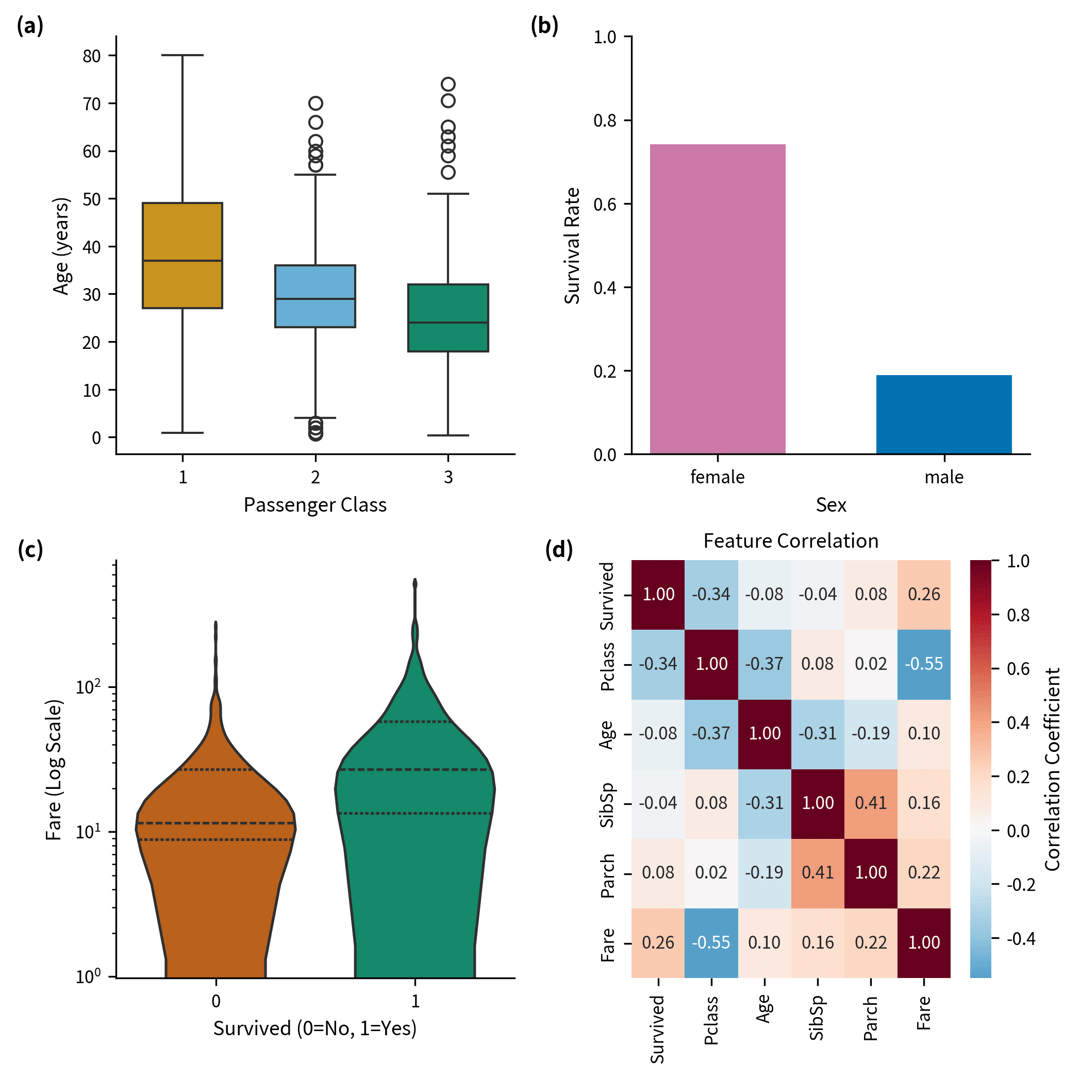
Preparing a file that generates well
Use a tidy structure whenever possible:
- one observation or estimate per row;
- one variable per column;
- a header row with concise, unique names;
- numeric columns stored as numbers rather than decorated strings;
- explicit units in column names or metadata;
- group and series labels written consistently;
- missing values represented consistently and reviewed before upload.
For uncertainty charts, include lower and upper bounds or an error column. For survival plots, include time and event status. For differential-expression plots, include a feature identifier, effect size, and p-value or adjusted p-value. Each tool's six downloadable examples provide a starting schema.
Choosing the right chart
Match the chart to the analytical question:
| Question | Useful chart families |
|---|---|
| Compare groups | Bar, box, violin, raincloud, beeswarm, error-bar |
| Show change over time | Line, time-series, growth curve |
| Assess association | Scatter, regression, correlation matrix |
| Show uncertainty or effect estimates | Error-bar, forest, funnel, Bland–Altman |
| Inspect distributions | Histogram, density, ECDF, QQ, violin |
| Present omics results | Volcano, MA, enrichment, Manhattan, heatmap |
| Show flows or intersections | Sankey, UpSet |
The generator creates a figure from supplied data; it does not replace statistical analysis. Calculate model estimates, confidence intervals, adjusted p-values, pooled effects, or survival statistics with an appropriate analytical method, then verify that the visualization reflects those results.
Tool page or tutorial: which should you open?
Use a chart-specific tool page when your data is ready and you want to generate a figure. Use a tutorial when you still need to understand the required columns, conventions, or interpretation.
| Research task | Start generating | Read the tutorial |
|---|---|---|
| Differential expression | Volcano Plot Generator | How to Make a Volcano Plot |
| Meta-analysis | Forest Plot Generator | How to Make a Forest Plot |
| Survival analysis | Kaplan–Meier Plot Generator | How to Make a Kaplan–Meier Plot |
| Compare distributions | Violin Plot Maker | How to Make a Violin Plot |
| Set intersections | UpSet Plot Generator | How to Make an UpSet Plot |
| Smooth a distribution | Density Plot Maker | How to Make a Density Plot |
| Preserve small raw datasets | Stem-and-Leaf Plot Generator | How to Make a Stem-and-Leaf Plot |
| Check a distributional assumption | Q–Q Plot Maker | How to Make a Q–Q Plot |
| Display GWAS results | Manhattan Plot Generator | How to Make a Manhattan Plot |
SciDraw, Prism, OriginPro, R, Python, or Excel?
These tools solve different parts of the workflow. Prism and OriginPro combine analysis with desktop graphing. R and Python offer the most reproducible control when the analysis and plot should live in code. Excel is useful for inspection, collaboration, and lightweight charts. SciDraw is most useful after the analytical result exists: it turns a prepared table into a chart, keeps the result editable in SciVis, and can export a native Excel workbook for collaborators.
For a detailed decision, read the GraphPad Prism alternatives comparison or the OriginPro alternatives comparison. If a collaborator needs the plotted and source data inside one workbook, see how editable Excel chart export works.
Editing after generation
After the first chart appears, use Continue editing in SciVis. You can refine:
- chart and axis titles;
- legend labels and order;
- color palettes and symbol encodings;
- annotations and highlighted observations;
- scale ranges, tick formatting, and grid lines;
- spacing and overall composition.
This makes the first generation a starting point rather than a fixed image. Keep scientific meaning stable while improving readability: do not crop inconvenient observations, change scales in a misleading way, or add statistical annotations that were not calculated from the data.
Frequently asked questions
Does SciVis support JSON files?
No. The current uploader supports CSV, TSV, TXT, XLSX, and XLS files.
Can I upload several files at once?
No. Upload one file at a time. For common multi-group charts, place all groups or series in one table.
Which Excel sheet is used?
The first worksheet is imported. Move the intended table to the first sheet or export it as CSV before upload.
Can I edit a chart after generation?
Yes. The generated result opens in SciVis for further changes to labels, colors, annotations, scales, and layout.
Are the figures automatically valid for every journal?
No tool can guarantee acceptance. Verify dimensions, fonts, resolution, color mode, accessibility, statistical reporting, and file format against the target journal's current instructions.
Start with a chart-specific page
Choose a tool that matches your research question, inspect its six real example datasets and figure previews, and upload one supported file. Open SciVis directly when you already know the chart you need or want to continue an existing data-visualization project.
Content and supported-format details reviewed on August 31, 2026.