A dichotomous key fails the moment one choice is vague. If a student cannot decide whether a leaf is “large,” or both alternatives apply to the same insect, the identification path breaks even when the flowchart looks polished.
The solution is to build the logic before drawing the branches. This guide shows how to choose observable traits, write paired statements called couplets, test every path, and turn the finished logic into a numbered key, branching tree, or yes/no flowchart. You can also paste the completed couplets into the dichotomous key maker to produce a clean diagram.
Common dichotomous key mistakes
- Using subjective traits. “Pretty flower” or “large leaf” depends on the observer. Use measurable or clearly visible character states.
- Writing two choices that are not opposites. “Has wings” and “has six legs” can both be true. A couplet must divide the current group into two non-overlapping sets.
- Changing multiple traits at once. “Has wings and is green” makes it unclear which observation controls the branch.
- Using a hidden or seasonal trait too early. Flower color is unhelpful when the specimen has no flowers. Start with traits that are consistently observable.
- Creating a dead end. Every choice must lead to another numbered couplet or one final identification.
- Making a circular path. A key should never send the reader back to an earlier step.
- Treating the key as an evolutionary tree. A dichotomous key identifies specimens; its branch order does not necessarily represent ancestry.
What is a dichotomous key?
A dichotomous key is an identification tool built from a sequence of paired, contrasting statements. Each pair is a couplet. The user selects the statement that matches an unknown specimen and follows the instruction to another couplet or to a final name.
“Dichotomous” means divided into two. At every step, the remaining possibilities split into exactly two groups.
For example:
1a. Leaves are needle-like ........ go to 2
1b. Leaves are broad and flat ..... go to 3
The two statements use one trait—leaf form—and cover the possible specimens in the current set.
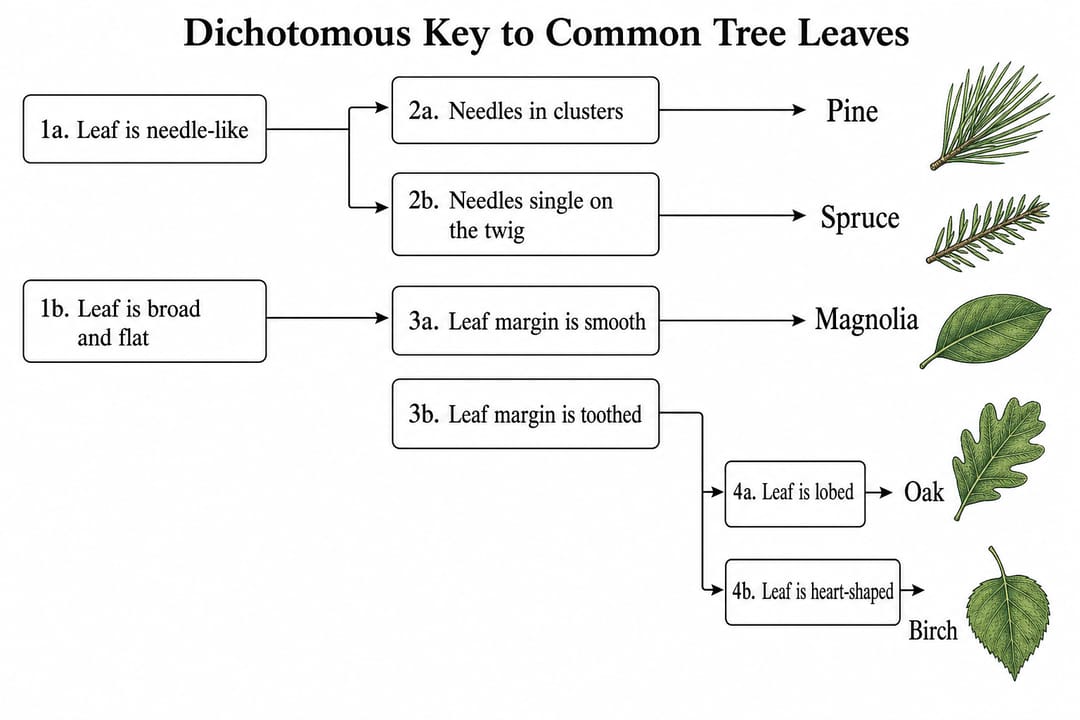
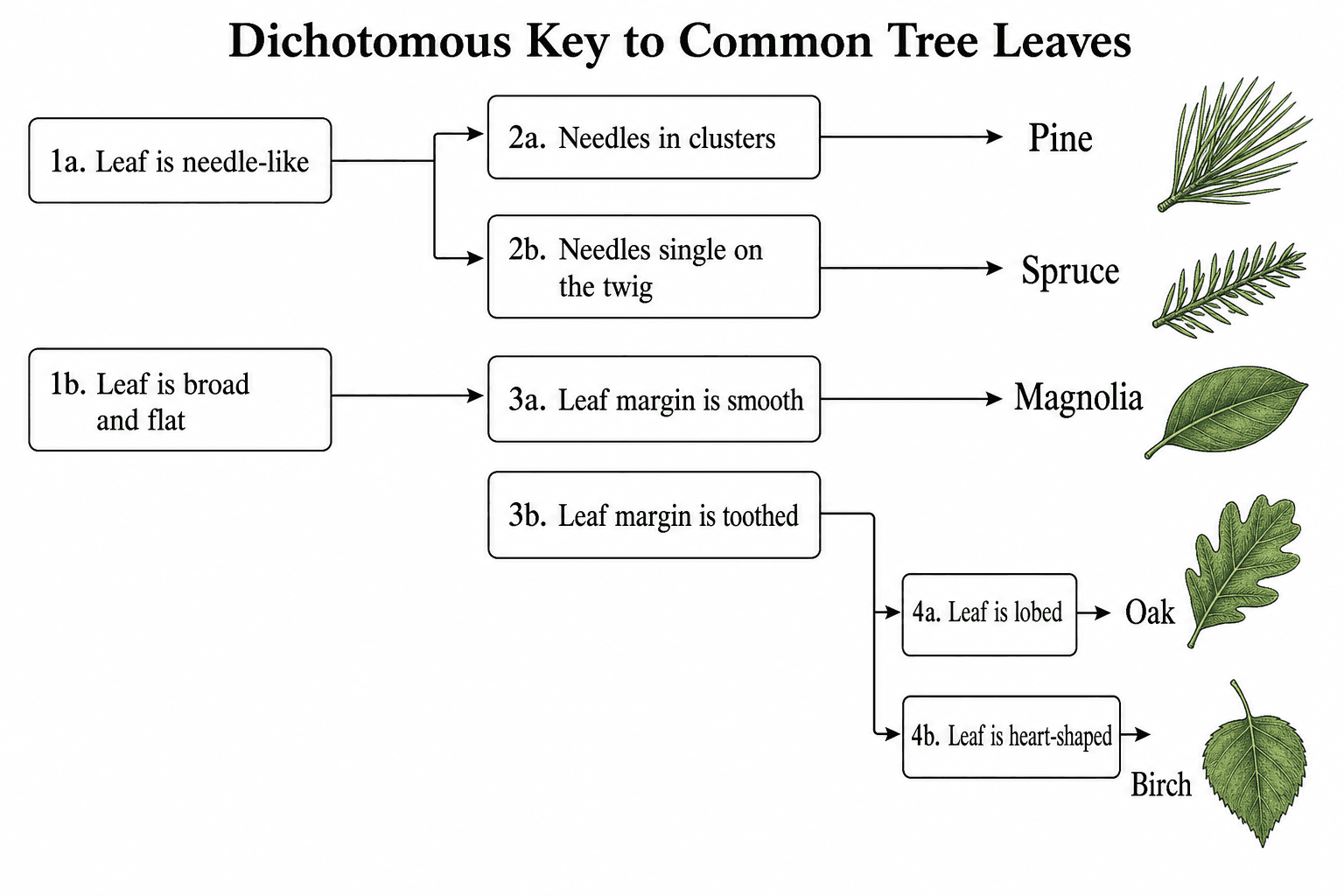
A good leaf key uses visible traits and makes every branch end at one name.
How to make a dichotomous key
1. List the organisms or objects
Start with the complete set you need to identify. Five to ten items is a manageable size for a first key. Use confirmed names and decide whether the final answers will be species, genera, families, rock types, or another consistent level.
2. Create a character table
Record observable traits before writing the couplets.
| Specimen | Needle-like | Broad leaf | Toothed margin | Lobed | Heart-shaped |
|---|---|---|---|---|---|
| Pine | Yes | No | No | No | No |
| Spruce | Yes | No | No | No | No |
| Oak | No | Yes | No | Yes | No |
| Birch | No | Yes | Yes | No | Yes |
| Magnolia | No | Yes | No | No | No |
Add more precise traits when two specimens still share the same state. Pine and spruce both have needles, for example, so the next useful distinction might be needles in clusters versus needles attached singly.
3. Choose the first split
Pick a trait that is easy to see and divides the full set into two useful groups. Broad divisions work best near the beginning:
- wings present / wings absent
- needle-like leaf / broad leaf
- backbone present / backbone absent
- visible crystals / no visible crystals
Avoid beginning with a trait that isolates one obscure specimen while leaving all others mixed together unless that is the clearest observation available.
4. Write mutually exclusive couplets
Each couplet should use the same character in parallel wording.
Weak couplet
2a. The animal has feathers
2b. The animal lives in water
Both can apply to a water bird.
Better couplet
2a. Body covering includes feathers
2b. Body covering does not include feathers
This divides the current set cleanly.
5. Continue from general to specific
Within each new group, choose the next trait that splits only that group. Repeat until each branch contains one final identification.
6. Add destinations
Every statement must end with either:
go to [couplet number], or- the name of the identified organism or object.
Keep the destinations unambiguous. Do not hide the instruction in a paragraph.
7. Test the key in both directions
Run every known specimen through the key from step 1. Then give the key and specimens to someone who did not write it. If they hesitate, record the exact couplet where the problem occurs and revise that trait or wording.
Worked example: a five-leaf dichotomous key
1a. Leaf is needle-like ........................ go to 2
1b. Leaf is broad and flat ..................... go to 3

2a. Needles grow in clusters ................... Pine
2b. Needles attach singly to the twig .......... Spruce

3a. Leaf margin is smooth ...................... Magnolia
3b. Leaf margin is toothed or lobed ............ go to 4

4a. Leaf has distinct lobes .................... Oak
4b. Leaf is unlobed and heart-shaped ........... Birch
Notice that each couplet discusses one feature. The wording is parallel, every destination is explicit, and all five names are reached exactly once.
Three useful dichotomous key formats
Numbered couplet key
The traditional scientific format is compact and easy to print. It works well in lab manuals and field guides.
Branching tree key
A tree makes the decision paths visible at a glance. It is useful for classroom slides and younger learners, but it needs more horizontal space.
Yes/no flowchart
A flowchart turns each trait into a question inside a decision diamond. It works well for digital worksheets and simple classification activities.
The logic should stay identical when you switch formats. Only the presentation changes.
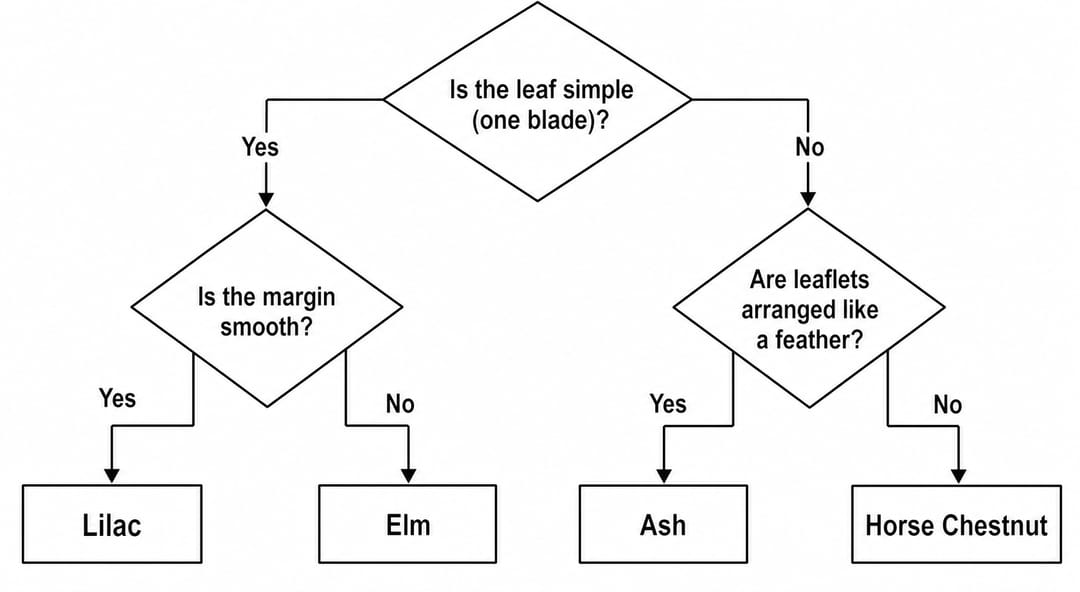
A flowchart layout can simplify the same couplets for classroom use.
Reusable dichotomous key template
1a. [Trait state A] ............................ go to 2
1b. [Opposite trait state B] ................... go to 3

2a. [Trait state A] ............................ [Identification 1]
2b. [Opposite trait state B] ................... [Identification 2]

3a. [Trait state A] ............................ go to 4
3b. [Opposite trait state B] ................... [Identification 3]

4a. [Trait state A] ............................ [Identification 4]
4b. [Opposite trait state B] ................... [Identification 5]
Replace every bracketed phrase. If one identification appears twice or one never appears, the logic needs revision.
A better prompt for a dichotomous key
Poor prompt
Make a key for trees.
Better prompt
Draw a left-to-right dichotomous key for Pine, Spruce, Oak, Birch, and Magnolia. Use these exact couplets: 1a needle-like leaf → go to 2; 1b broad flat leaf → go to 3. 2a needles in clusters → Pine; 2b needles attached singly → Spruce. 3a smooth leaf margin → Magnolia; 3b toothed or lobed margin → go to 4. 4a distinctly lobed leaf → Oak; 4b unlobed heart-shaped leaf → Birch. Show each either/or choice on a separate branch, label the couplet numbers, and end every path in one named leaf. Clean biology worksheet style, white background, 4:3.
The improved version supplies the full identification logic. The AI only has to lay it out clearly instead of inventing scientific distinctions.
Dichotomous key accuracy checklist
- Every couplet contains exactly two alternatives.
- Both alternatives describe opposite states of the same trait.
- The two choices do not overlap and cover the current group.
- Traits are observable, consistent, and suitable for the available specimen.
- Every choice leads forward to another couplet or one final name.
- Every final name appears once.
- No branch loops backward or ends without an identification.
- A second person can complete the key without extra explanation.
Build a dichotomous key online
Use the dichotomous key maker to turn your tested couplets into a branching tree, numbered key, or yes/no flowchart. For evolutionary relationships rather than identification, use the cladogram maker or phylogenetic tree maker instead.
The generator draws the structure you provide; it does not verify taxonomy. Check the finished key against reliable descriptions or specimen data before using it for a lab, field guide, or graded assignment.