Brain Diagram: Labeled and Blank Brain Anatomy
Brain lobes, sagittal sections, functional areas, and worksheets
Generate a lateral or sagittal brain diagram with the structures you need. Start from a labeled overview, a blank worksheet, or a matching answer key.

Labeled and Blank Brain Diagram Examples
Start from a ready-made example or describe your own — from fully labeled neuroanatomy to a blank brain worksheet students can fill in.
What is a brain diagram?
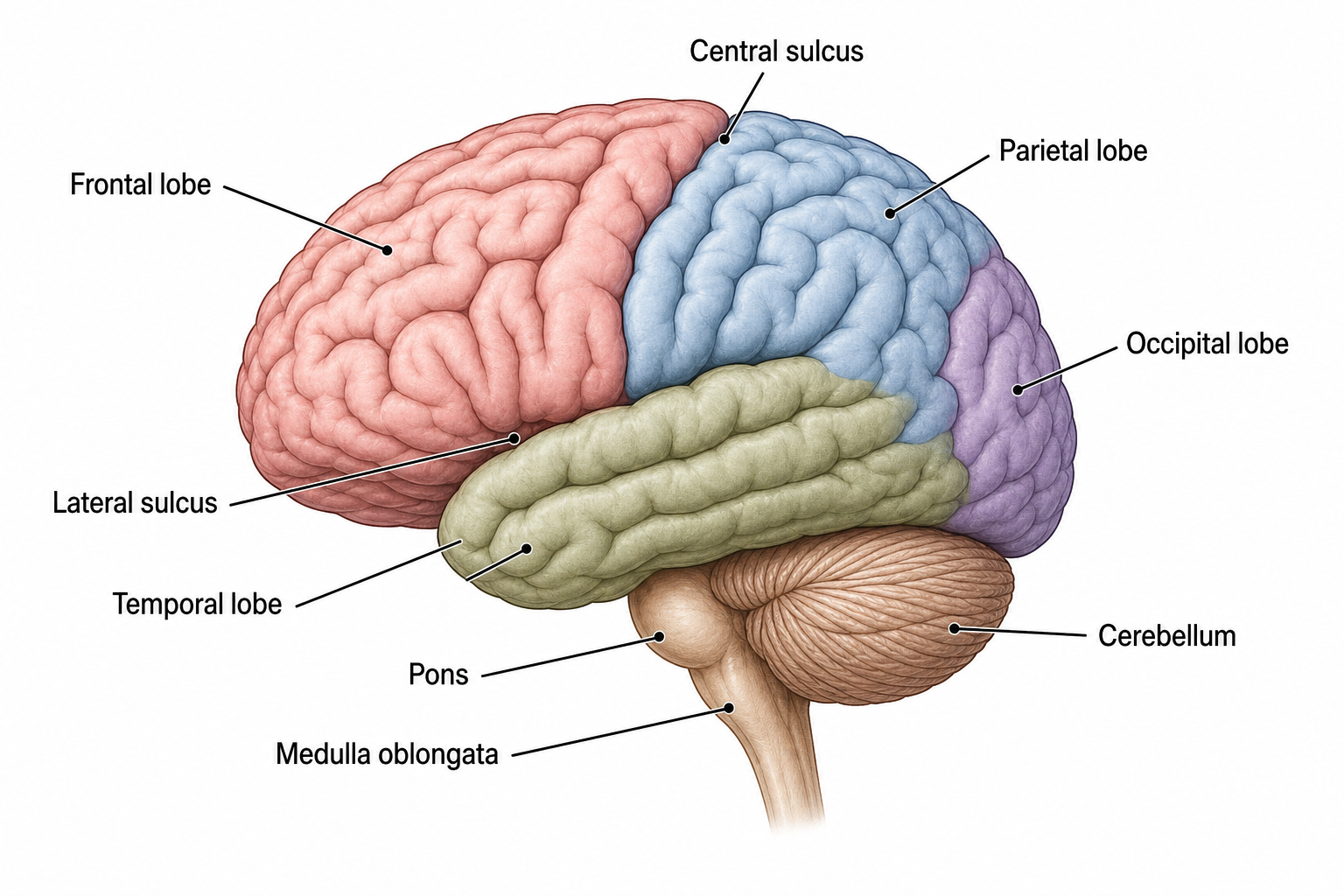
A brain diagram is a labeled illustration of the human brain that shows its major structures and where they sit relative to one another. It typically presents the cerebrum and its four lobes, the cerebellum, and the brainstem, and may add a cross section to reveal internal parts such as the corpus callosum, thalamus, and hypothalamus. By pairing each structure with a clear label, a good brain diagram turns dense anatomy into something students can read, memorize, and reproduce on an exam. SciDraw AI generates these diagrams from a short description so you get accurate, classroom-ready artwork without drawing software or stock-image licensing. The same description also gives you the classroom version: ask for an unlabeled brain with empty leader lines and you get a printable worksheet students can label themselves, then generate the labeled version to hand out as the answer key.
Why use a brain diagram generator?
- Save hours versus drawing brain anatomy by hand or hunting for a correctly labeled image.
- Get consistent, accurate labels for lobes, the brainstem, and internal structures every time.
- Tailor each diagram to your exact topic, from the limbic system to a midsagittal cross section.
- Export high-resolution images that stay crisp in slides, worksheets, and printed handouts.
- Create original artwork you can use freely in lessons without copyright worries.
How to make a labeled brain diagram
Start by choosing the view that fits your topic: a lateral (side) view is best for the lobes, while a midsagittal cross section reveals internal structures. In the prompt box, describe the view and list the parts you want labeled, for example the frontal, parietal, temporal, and occipital lobes, the cerebellum, and the brainstem. Add style notes such as color-coded lobes, a legend, or a plain white background, then select an aspect ratio and resolution. Click Generate Brain Diagram, review the labels for accuracy, and refine your wording if you need to add, remove, or reposition any structure. When you are happy, download the 2K image and drop it straight into your slides or worksheet. Say whether you want every region named or an unlabeled version with blank leader lines for students to complete, and add "clean white background, print-friendly" when the diagram is going onto a worksheet.
Parts of the brain
- Cerebrum and its four lobes: frontal (planning and voluntary movement), parietal (touch and spatial awareness), temporal (hearing, language, memory), and occipital (vision).
- Cerebellum: sits beneath the cerebrum and fine-tunes balance, posture, coordination, and motor learning.
- Brainstem: the midbrain, pons, and medulla oblongata, which relay signals and control breathing, heart rate, and blood pressure.
- Corpus callosum: the large white-matter band that connects the left and right cerebral hemispheres so they can communicate.
- Thalamus and hypothalamus: the thalamus relays sensory and motor signals to the cortex, while the hypothalamus regulates homeostasis, hormones, temperature, hunger, and thirst.
- Function labels: short captions linking each region to its role, so learners connect structure with what it actually does.
Frequently asked questions
What are the parts of the brain?
The brain has three broad regions. The cerebrum is the large, wrinkled outer part divided into the frontal, parietal, temporal, and occipital lobes, and split into left and right hemispheres joined by the corpus callosum. The cerebellum sits underneath at the back and handles balance and coordination. The brainstem, made up of the midbrain, pons, and medulla oblongata, connects the brain to the spinal cord and controls vital functions like breathing and heart rate. Deep inside lie structures such as the thalamus and hypothalamus.
How do I make a labeled brain diagram online?
Open the generator above, describe the brain view you need, and list the structures you want labeled, such as the four lobes, the cerebellum, and the brainstem. Choose your aspect ratio and resolution, then click Generate Brain Diagram. Review the labels, adjust your prompt if you want to add or move any part, and download the finished diagram as a high-resolution image ready for your slides or handout.
What are the brain lobes and their functions?
Each cerebral hemisphere has four lobes. The frontal lobe handles planning, decision-making, and voluntary movement through the motor cortex. The parietal lobe processes touch and spatial awareness via the somatosensory cortex. The temporal lobe is central to hearing, language comprehension, and memory, and houses the hippocampus. The occipital lobe is the brain's main visual processing center. The generator can color-code each lobe and add a legend so the functions are easy to study.
Can I create a brain cross section or midsagittal view?
Yes. Ask for a midsagittal cross section, which cuts the brain down the midline to reveal internal structures. The generator can label the corpus callosum, thalamus, hypothalamus, pituitary gland, cerebellum, and the brainstem segments, giving you an internal view that pairs well with a standard side view for a complete picture of brain anatomy.
Is the brain diagram generator free to use?
You can start generating brain diagrams for free with SciDraw AI. Free credits let you create and download diagrams to try the tool, and paid plans add more monthly credits plus higher-resolution exports for teachers and students who need a steady supply of figures.
Can I use these brain diagrams in class?
Yes. The diagrams are generated as original artwork, so you can use them in lecture slides, worksheets, lab handouts, study guides, and revision posters for biology, psychology, neuroscience, and nursing courses. Because you control the prompt, you can match each figure to your exact lesson and labeling conventions.
Can I generate an unlabeled or blank brain diagram?
Yes. Describe the view and the regions you want drawn, then ask SciDraw AI to leave the labels off or to use numbered leader lines pointing to empty boxes. You get the same accurate midsagittal or lateral brain with no text on it, which is what you need for a diagram students have to label themselves.
Can I use the generated brain diagram as a worksheet and answer key?
Yes. Generate the blank version first with empty numbered leader lines and print it as the labeling worksheet, then generate a fully labeled brain diagram to use as the answer key. Ask for the same view and the same numbering in both prompts so the two sheets line up for your students.
Writing a paper, thesis or grant?
SciDraw AI also makes publication-ready research figures: graphical abstracts, mechanism figures, workflows and conceptual frameworks.
Explore More Tools
Ready to map the brain?
Generate a labeled brain diagram, an unlabeled version to label, or a blank brain worksheet in seconds. Perfect for biology, psychology and neuroanatomy.