Farbe ist stille Metadaten. Bevor ein Leser eine einzige Achsenbeschriftung liest, signalisiert die Palette Ihrer Abbildung, ob Sie sorgfältig oder nachlässig gearbeitet haben – ob Ihre Grafik barrierefrei oder ausgrenzend, publikationsreif oder hastig zusammengestellt ist. Trotzdem wählen die meisten Forschenden Farben nach Bauchgefühl – oder übernehmen einfach die Standardeinstellungen von Matplotlib oder Excel.
Dieser Referenzleitfaden schafft Abhilfe. Sie lernen die drei Palettenfamilien kennen, die jede Wissenschaftlerin und jeder Wissenschaftler braucht, erhalten kopierfertige HEX-Tabellen für sieben sofort einsetzbare Paletten und nehmen konkrete Do/Don't-Regeln für Abbildungen mit, die Sie mit Überzeugung einreichen können.
Was Sie lernen werden:
- Der Unterschied zwischen qualitativen, sequenziellen und divergenten Paletten – und wann jede die richtige Wahl ist
- Welche Paletten für die ~8 % der Lesenden mit Farbsehschwäche geeignet sind
- Sieben sofort einsetzbare Paletten mit vollständigen HEX-Codes
- Praktische Regeln für die Anwendung von Farbe in wissenschaftlichen Abbildungen
- Wie Sie Ihre Abbildungen mit dem SciDraw AI Figure Checker prüfen und finalisieren
Warum die Farbwahl eine wissenschaftliche Entscheidung ist
Eine schlechte Palette ist nicht nur unschön – sie kann aktiv in die Irre führen. Regenbogen-Colormaps ("jet") erzeugen künstliche Grenzen, wo keine in den Daten existieren. Rot-Grün-Kontraste verschwinden für Lesende mit Deuteranopie (der häufigsten Form der Farbenblindheit) vollständig. Inkonsistente qualitative Farben über mehrere Abbildungsfelder hinweg zwingen Lesende dazu, die Legende bei jedem Wechsel neu zu entschlüsseln.
Zeitschriften wie Nature, Science und PNAS fordern Autorinnen und Autoren zunehmend auf sicherzustellen, dass Abbildungen für farbenblinde Lesende zugänglich sind, und einige Verlage lehnen Abbildungen ab, die einen einfachen Grauskalentest nicht bestehen. Die richtige Palette von Anfang an zu wählen spart Revisionszyklen.
Die drei Palettenfamilien
Qualitative Paletten
Verwenden wenn: Kategoriale Daten ohne inhärente Reihenfolge kodiert werden – Zelltypen, Versuchsgruppen, Spezies, Behandlungsarme.
Kernprinzip: Alle Farben sollten gleichwertig erscheinen. Keine einzelne Farbe sollte dominieren oder größere Bedeutung suggerieren.
Häufiger Fehler: Eine sequenzielle Abstufung (hell bis dunkel) für Kategorien zu verwenden impliziert eine Rangfolge, die nicht existiert.
Sequenzielle Paletten
Verwenden wenn: Eine numerische Variable von niedrig nach hoch kodiert wird – Genexpressionsrate, Temperatur, Konzentration, p-Wert-Größe.
Kernprinzip: Die Palette muss wahrnehmungsgleichmäßig sein: gleiche Schritte in den Daten sollten gleich aussehende Schritte in der Farbe ergeben. Das schließt die meisten handgemachten Verläufe aus.
Häufiger Fehler: Eine zweiseitige divergente Palette verwenden, wenn null kein sinnvoller Referenzpunkt ist.
Divergente Paletten
Verwenden wenn: Daten kodiert werden, bei denen der Mittelpunkt bedeutsam ist – Fold-Change (zentriert bei 1 oder log2-Fold = 0), Korrelationskoeffizienten (zentriert bei 0), Anomaliekarten (zentriert am historischen Mittelwert).
Kernprinzip: Beide Enden sollten gleich gesättigt sein, und der Mittelpunkt sollte eine neutrale, helle Farbe (nahe Weiß oder Hellgrau) sein – nicht eine dritte gesättigte Farbe.
Häufiger Fehler: Eine divergente Palette, bei der der neutrale Mittelpunkt eine unpassende helle Farbe ist – das erzeugt eine falsche dritte Kategorie.
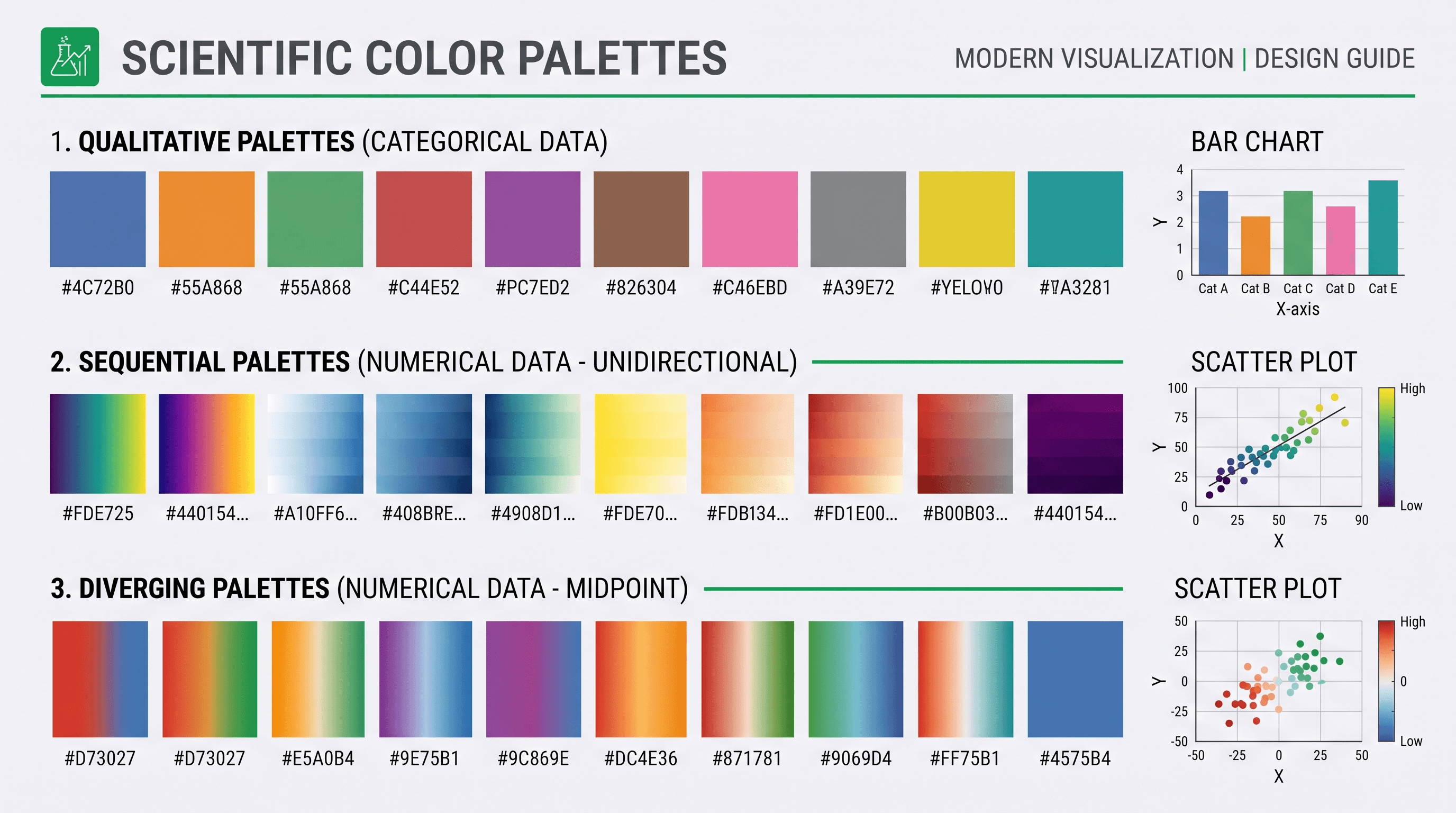
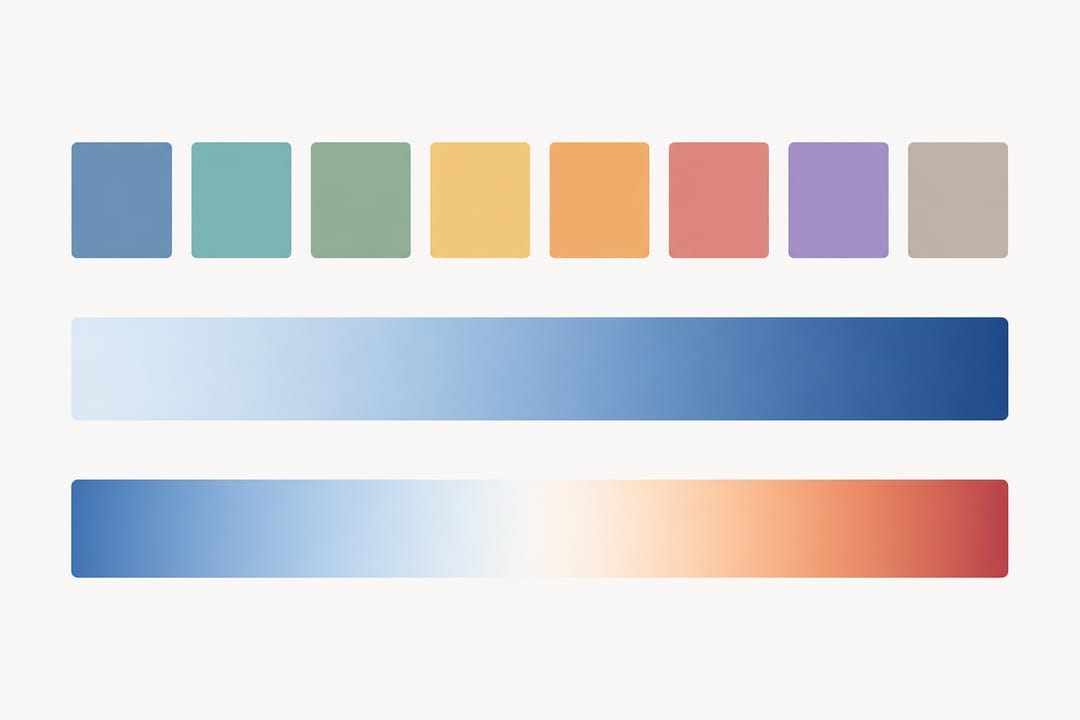 Die drei Palettenfamilien – qualitativ, sequenziell und divergent – kodieren jeweils eine andere Art wissenschaftlicher Daten.
Farbblindsicherheit: Die unverzichtbare Anforderung
Ungefähr 8 % der Männer und 0,5 % der Frauen haben irgendeine Form von Farbsehschwäche. Deuteranopie und Protanopie (Rot-Grün-Schwäche) sind am häufigsten. Tritanopie (Blau-Gelb) ist seltener, betrifft aber immer noch einen bedeutenden Anteil der Lesenden.
Der schnellste Test: Wandeln Sie Ihre Abbildung in Graustufen um. Wenn alle Kategorien noch unterscheidbar sind, besteht Ihre Abbildung die grundlegendste Barrierefreiheitsprüfung.
Der endgültige Test: Führen Sie Ihr Bild durch Coblis (Color Blindness Simulator) oder verwenden Sie das colorblind-Modul in Python, um Deuteranopie, Protanopie und Tritanopie zu simulieren. Fügen Sie Ihre Abbildung vor der Einreichung bei einer Zeitschrift in den SciDraw AI Figure Checker ein, um Barrierefreiheits- und Formatierungsprobleme automatisch zu erkennen.
Sieben sofort einsetzbare Paletten mit HEX-Codes
1. Okabe-Ito (Qualitativ, 8 Farben – der weithin empfohlene farbblindsichere Standard)
Von Masataka Okabe und Kei Ito speziell für Farbblindzugänglichkeit entwickelt (Original-CUD-Referenz). Sie wurde empirisch entwickelt statt aus einer Formel und ist die empfohlene Standardpalette für qualitative wissenschaftliche Abbildungen in den meisten modernen Stilrichtlinien.
| Muster | Name | HEX | RGB |
|---|---|---|---|
| ■ | Schwarz | #000000 | 0, 0, 0 |
| ■ | Orange | #E69F00 | 230, 159, 0 |
| ■ | Himmelblau | #56B4E9 | 86, 180, 233 |
| ■ | Blaugrün | #009E73 | 0, 158, 115 |
| ■ | Gelb | #F0E442 | 240, 228, 66 |
| ■ | Blau | #0072B2 | 0, 114, 178 |
| ■ | Zinnober | #D55E00 | 213, 94, 0 |
| ■ | Rötliches Lila | #CC79A7 | 204, 121, 167 |
Am besten für: Bis zu 8 Kategorien; jede Abbildung für ein breites Publikum oder Zeitschriften mit Barrierefreiheitsanforderungen.
2. Paul Tols Bright (Qualitativ, 7 Farben)
Vom Astronomen Paul Tol entwickelt, priorisiert dieser Satz Kontrast auf weißen und hellgrauen Hintergründen – häufig in Zeitschriftenabbildungen.
| Muster | Name | HEX |
|---|---|---|
| ■ | Blau | #4477AA |
| ■ | Cyan | #66CCEE |
| ■ | Grün | #228833 |
| ■ | Gelb | #CCBB44 |
| ■ | Rot | #EE6677 |
| ■ | Lila | #AA3377 |
| ■ | Grau | #BBBBBB |
Am besten für: Liniendiagramme und Streudiagramme mit bis zu 7 Gruppen.
3. Viridis (Sequenziell, wahrnehmungsgleichmäßig)
Die meistverwendete sequenzielle Colormap in der Wissenschaft, seit 2015 als Standard in Matplotlib. Wahrnehmungsgleichmäßig, farbblindsicher und druckt gut in Graustufen.
| Punkt | HEX | Beschreibung |
|---|---|---|
| 0 % | #440154 | Tiefes Lila (niedrig) |
| 25 % | #31688E | Blau |
| 50 % | #35B779 | Grün |
| 75 % | #90D743 | Gelbgrün |
| 100 % | #FDE725 | Helles Gelb (hoch) |
Am besten für: Heatmaps, Dichtedarstellungen, jede kontinuierliche Variable ohne bedeutsamen Nullpunkt.
4. Plasma (Sequenziell, wahrnehmungsgleichmäßig)
Eine wärmere Alternative zu Viridis. Besonders effektiv, wenn Farbdruck garantiert ist.
| Punkt | HEX |
|---|---|
| 0 % | #0D0887 |
| 25 % | #7E03A8 |
| 50 % | #CC4778 |
| 75 % | #F89540 |
| 100 % | #F0F921 |
Am besten für: Ergänzende Abbildungen mit reichem Farbdruck; Mikroskopieintensiätskarten.
5. RdBu (Divergent)
Eine klassische rot-blaue divergente Palette aus ColorBrewer, weit verbreitet für Korrelationsmatrizen, Expressionsfold-Change und Klimaanomaliekarten.
| Punkt | HEX | Beschreibung |
|---|---|---|
| −max | #B2182B | Starkes Rot |
| −mittel | #EF8A62 | Helles Rot |
| 0 | #F7F7F7 | Nahezu weißes Neutral |
| +mittel | #67A9CF | Helles Blau |
| +max | #2166AC | Starkes Blau |
Am besten für: Korrelationsmatrizen, Fold-Change-Heatmaps, jede Daten mit einem natürlichen Mittelpunkt bei null.
6. PRGn (Divergent, farbblinderfreundlicher)
Lila-Grün divergente Palette. Da sie Rot-Grün-Kontrast vermeidet, schneidet sie für Lesende mit Deuteranopie und Protanopie deutlich besser ab als RdBu.
| Punkt | HEX |
|---|---|
| −max | #762A83 |
| −mittel | #C2A5CF |
| 0 | #F7F7F7 |
| +mittel | #7FBF7B |
| +max | #1B7837 |
Am besten für: Jeden divergenten Anwendungsfall, bei dem Rot-Grün-Zugänglichkeit ein Anliegen ist.
7. Nature/Cell-inspirierte gedämpfte qualitative Palette (5 Farben)
Diese Palette orientiert sich am zurückhaltenden, publikationsqualitativen Stil, der in Abbildungen der Nature- und Cell-Journalfamilien verwendet wird. Sie vermeidet hohe Sättigung und erhält dabei klare Kategoriendifferenzierung.
| Muster | HEX | Typische Verwendung |
|---|---|---|
| ■ | #4E79A7 | Gruppe 1 / Kontrolle |
| ■ | #F28E2B | Gruppe 2 / Behandlung |
| ■ | #E15759 | Gruppe 3 / Hervorhebung |
| ■ | #76B7B2 | Gruppe 4 |
| ■ | #59A14F | Gruppe 5 |
Am besten für: Balkendiagramme, Boxplots und Mehrliniendiagramme in Manuskripten für hochkarätige Zeitschriften.
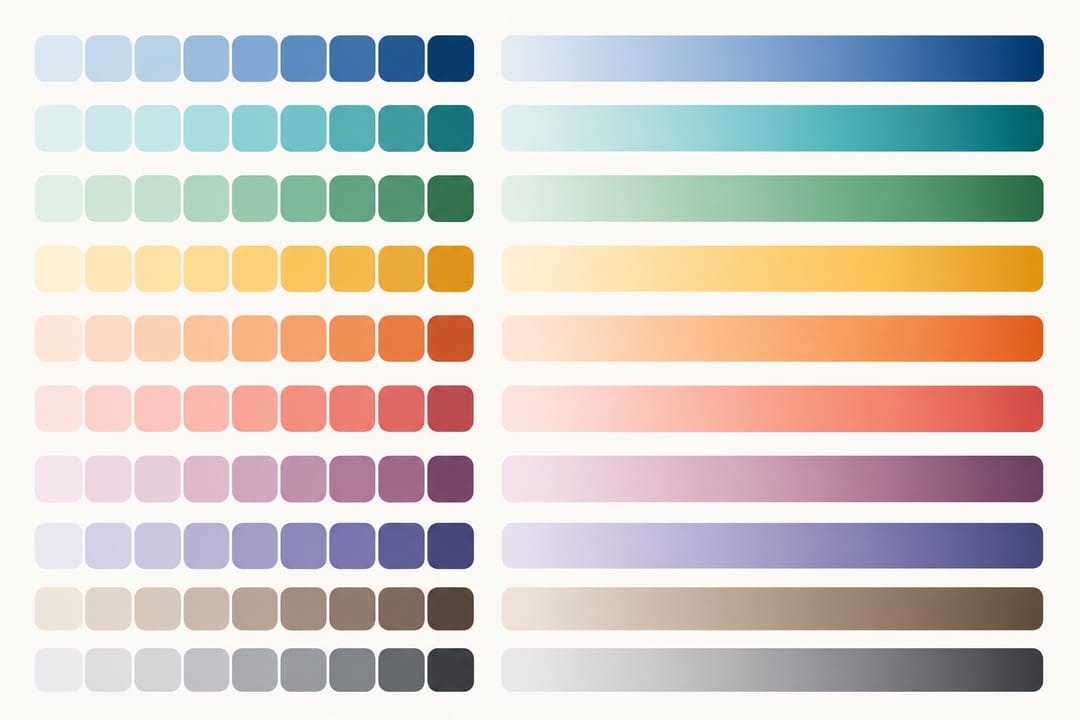 Ein aufgeräumtes Referenzblatt mit kategorialen Chips und wahrnehmungsgleichmäßigen Verläufen erleichtert die Wiederverwendung geprüfter Paletten in SciDraw AI.
Palettenvergleich: Welche Palette wann verwenden
| Palette | Typ | Farben | Farbblindsicher | Graustufen | Bester Zeitschriftenkontext |
|---|---|---|---|---|---|
| Okabe-Ito | Qualitativ | 8 | Ausgezeichnet | Gut | Alle; barrierefreiheitsorientierte Zeitschriften |
| Tol Bright | Qualitativ | 7 | Gut | Mäßig | Linien-/Streudiagramme |
| Viridis | Sequenziell | Kontinuierlich | Ausgezeichnet | Ausgezeichnet | Heatmaps, Dichte |
| Plasma | Sequenziell | Kontinuierlich | Ausgezeichnet | Gut | Farbdruck garantiert |
| RdBu | Divergent | Kontinuierlich | Mäßig | Gut | Korrelation, Fold-Change |
| PRGn | Divergent | Kontinuierlich | Gut | Gut | Barrierefreiheitskritisch divergent |
| Nature Muted | Qualitativ | 5 | Gut | Mäßig | Hochkarätige Zeitschriftenmanuskripte |
Praktische Do/Don't für wissenschaftliche Abbildungen
DO
- Verwenden Sie wahrnehmungsgleichmäßige sequenzielle Paletten (Viridis, Plasma, Cividis) für kontinuierliche Daten.
- Testen Sie jede Abbildung in Graustufen vor der Einreichung – viele Gutachtende drucken in Schwarzweiß.
- Verwenden Sie dieselbe Palette konsequent über alle Felder einer Mehrfeldabbildung hinweg. Wenn Sie mehrfeldige Layouts mit dem SciDraw AI Scientific Figure Maker erstellen, sperren Sie die Paletteneinstellungen auf Projektebene, um Konsistenz durchzusetzen.
- Wählen Sie divergente Paletten nur, wenn der Mittelpunkt wissenschaftlich bedeutsam ist.
- Beschriften Sie Ihre Farbachse (Colorbar) mit der genauen Variablen und Einheiten.
- Prüfen Sie fertige Abbildungen mit einem dedizierten Qualitätsprüfwerkzeug. Der SciDraw AI Figure Checker kennzeichnet häufige Farb- und Kontrastprobleme automatisch.
DON'T
- Verwenden Sie nicht die Jet-/Regenbogen-Colormap für wissenschaftliche Daten. Sie ist nicht wahrnehmungsgleichmäßig, erzeugt falsche Konturen und besteht keinen Farbblinddtest.
- Kodieren Sie nicht mehr als 8 qualitative Kategorien allein durch Farbe – fügen Sie Form- oder Musterredundanz hinzu.
- Verwenden Sie nicht Rot und Grün als die beiden Enden einer divergenten Palette, ohne die Zugänglichkeit zu prüfen.
- Wenden Sie keine divergente Palette auf ausschließlich positive oder ausschließlich negative Daten an.
- Ändern Sie nicht die Palette zwischen Abbildungsfeldern, die dieselbe Variable zeigen.
- Verlassen Sie sich nicht nur auf Farbe als einzigen visuellen Kanal – kombinieren Sie immer mit Form, Linienstil oder direkten Anmerkungen, wo möglich.
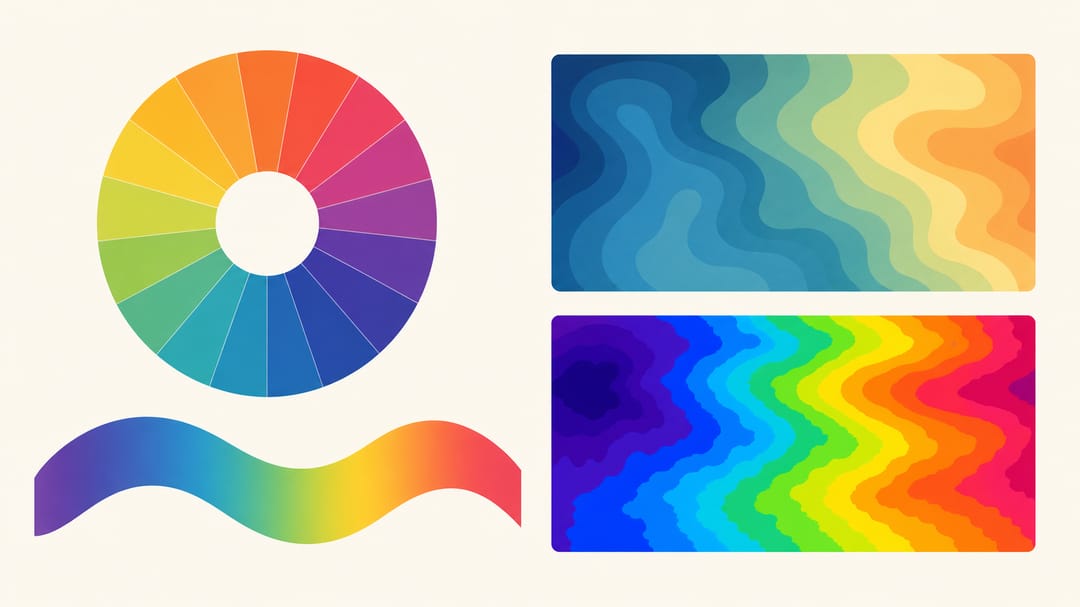 Eine wahrnehmungsgleichmäßige Colormap (links) stellt Daten getreu dar, während die Regenbogen-"jet"-Map (rechts) falsche Grenzen erfindet.
Diese Paletten in gängigen Tools anwenden
Python (Matplotlib / Seaborn)
import matplotlib.pyplot as plt
import matplotlib.colors as mcolors

# Okabe-Ito Palette
okabe_ito = ['#000000','#E69F00','#56B4E9','#009E73',
             '#F0E442','#0072B2','#D55E00','#CC79A7']

# Als Standard-Farbzyklus verwenden
plt.rcParams['axes.prop_cycle'] = plt.cycler(color=okabe_ito)

# Viridis ist bereits die Standard-Matplotlib-Colormap
plt.imshow(data, cmap='viridis')
R (ggplot2)
library(ggplot2)

# Okabe-Ito über das colorblind-freundliche Paket
library(ggthemes)
scale_colour_colorblind()

# Oder manuell angeben
okabe <- c("#E69F00","#56B4E9","#009E73","#F0E442","#0072B2","#D55E00","#CC79A7")
scale_colour_manual(values = okabe)
Adobe Illustrator / Inkscape
HEX-Codes direkt in Farbfelder importieren. Für jedes Projekt eine benannte Farbfeldgruppe erstellen, um Palettenkonsistenz über alle Felder hinweg durchzusetzen. Exportieren Sie dann Ihre Abbildungsdateien und nutzen Sie den SciDraw AI Graphical Abstract Maker, um sie in polierte, publikationsfertige Layouts zu integrieren.
Von der Palette zur publikationsreifen Abbildung
Die richtigen Farben zu wählen ist Schritt eins. Publikationsreife erfordert außerdem:
- Korrekte Schriftgrößen (mindestens 6 pt für Beschriftungen in den meisten Zeitschriften; 8–10 pt empfohlen)
- Linienstärken, die die Verkleinerung überstehen (mind. 0,5 pt)
- Abbildungsabmessungen, die den Zeitschriftenvorgaben entsprechen
- Auflösung von mindestens 300 DPI für Rasterelemente
Der SciDraw AI Scientific Figure Maker verarbeitet die Dimensions- und Auflösungsanforderungen automatisch, und der SciDraw AI Graphical Abstract Maker hilft Ihnen, Ihre Datenabbildungen in eine visuell kohärente einseitige Zusammenfassung zu integrieren. Führen Sie die fertige Datei durch den Figure Checker, um nichts zu verpassen.
FAQ
F: Sollte ich für Heatmaps immer Viridis verwenden?
Viridis ist ein ausgezeichneter Standard, aber nicht die einzige Option. Inferno und Cividis sind ebenfalls wahrnehmungsgleichmäßig und farbblindsicher. Wählen Sie nach dem visuellen Kontext: Viridis wirkt für viele Zielgruppen wie "kalt zu warm", was möglicherweise zur Erzählung Ihrer Daten passt oder nicht. Wenn Ihre Daten Intensität oder Anzahl ohne gerichtete Aussage darstellen, sind alle drei angemessen.
F: Kann ich mehr als 8 Farben in einer qualitativen Palette verwenden?
Sie können, aber Sie sollten sich nicht allein auf Farbe verlassen, wenn Sie mehr als 8 Kategorien haben. Über 8 Farbtöne hinaus verschlechtert sich die menschliche Wahrnehmung der kategorialen Unterscheidung erheblich. Fügen Sie Formmarkierungen (Kreise, Quadrate, Dreiecke), Linienstile (Durchgezogen, Gestrichelt, Gepunktet) oder direkte Beschriftungen hinzu, um die Farbkodierung zu ergänzen.
F: Welche Mindestauflösung sollte die Colorbar haben?
Eine Colorbar sollte mindestens 5 beschriftete Markierungen in gleichmäßigen Abständen über den gesamten Datenbereich haben. Geben Sie in der Colorbar-Beschriftung die genauen Einheiten an. Bei divergenten Paletten immer den Mittelpunktwert ausdrücklich beschriften.
F: Meine Zeitschrift fordert CMYK-Abbildungen. Gelten diese HEX-Codes noch?
HEX-Codes sind RGB. Vor der endgültigen Einreichung konvertieren Sie Ihre Abbildung mit dem ICC-Profil der Zeitschrift in CMYK (üblicherweise Adobe RGB 1998 oder sRGB IEC61966-2.1 als Quellprofil). Farben werden leicht verschoben – prüfen Sie den CMYK-Proof sorgfältig, besonders bei gesättigten Gelbtönen (wie dem hellen Ende von Viridis), die schlammig werden können. Fordern Sie bei Unklarheiten einen Farbproof vom Produktionsbüro an.
F: Gibt es eine einzelne Palette, die für alle Arten von Farbenblindheit sicher genug ist?
Keine einzelne Palette ist perfekt für alle drei Haupttypen (Protanopie, Deuteranopie, Tritanopie) gleichzeitig, aber Okabe-Ito kommt für qualitative Daten am nächsten. Für sequenzielle und divergente Paletten ist Cividis speziell für alle Formen von Farbsehschwäche optimiert. Verwenden Sie den Coblis-Simulator, um Ihre spezifische Palette gegen alle drei Bedingungen zu verifizieren.
F: Wie stelle ich sicher, dass meine Farben auf verschiedenen Monitoren und Projektoren korrekt aussehen?
Kalibrieren Sie Ihren Monitor auf den sRGB-Farbraum, der die Standardannahme für bildschirmbestimmte Akademikerdarstellungen ist. Bei Präsentationen, die in einem großen Raum projiziert werden, erhöhen Sie den Kontrast und vermeiden Sie sehr helle Farben (alles über ~85 % Helligkeit wird auf den meisten Projektoren auswaschen). Testen Sie Ihre Folien nach Möglichkeit in der tatsächlichen Projektionsumgebung.