Gerador de Diagrama de Neurônio
Diagramas de célula nervosa rotulados, sem rótulos ou em branco em segundos
Descreva o neurônio que você precisa e gere um diagrama rotulado de referência, um diagrama sem rótulos para os alunos completarem ou uma atividade de célula nervosa em branco para as aulas de biologia, psicologia e neurociência.
Exemplos de diagramas de neurônio rotulados e em branco
Comece com um exemplo pronto ou descreva o seu: da célula nervosa totalmente rotulada à atividade em branco que os alunos completam.
O que faz este gerador de diagramas de neurônio?
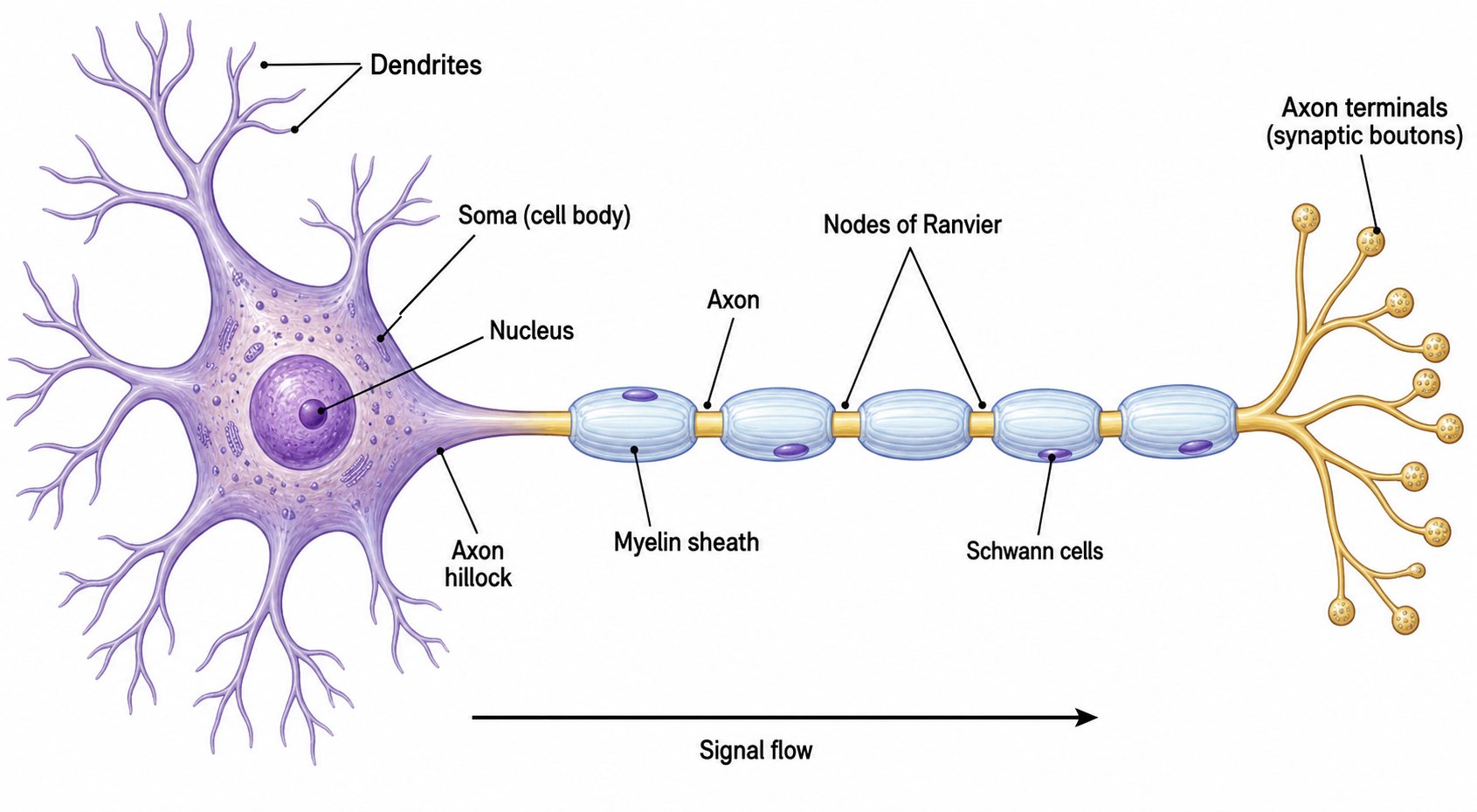
Ele transforma a descrição de um neurônio em um diagrama de célula nervosa limpo e legendado. Você informa qual neurônio deseja — um neurônio legendado geral, um neurônio motor ou sensorial, uma sinapse em detalhe ou uma comparação de tipos de neurônio — e a IA desenha os dendritos, o corpo celular e o núcleo, o cone de implantação, o axônio mielinizado com nós de Ranvier e células de Schwann, e os terminais axônicos, e então adiciona linhas-guia e legendas para cada parte. Você obtém uma figura organizada e precisa sem ter de desenhar cada dendrito ou posicionar legendas à mão. A mesma descrição também gera a versão para a aula: peça um neurônio sem rótulos, com linhas de chamada vazias, e você tem uma folha de exercícios pronta para imprimir que os próprios alunos completam; depois gere a versão rotulada para entregar como gabarito.
Por que usar um gerador de diagramas de neurônio
- Um diagrama de neurônio legendado é uma das figuras mais usadas no ensino de biologia e neurociência.
- Desenhar à mão uma célula nervosa limpa, com estrutura correta e legendas organizadas, leva bastante tempo.
- Legendas claras para os dendritos, o corpo celular, o axônio, a bainha de mielina e a sinapse tornam a figura autoexplicativa.
- Professores, estudantes e pesquisadores precisam de diagramas apresentáveis para atividades, slides e artigos com rapidez.
- Regenerar a partir de uma descrição é mais rápido do que redesenhar sempre que você precisa de um tipo de neurônio ou conjunto de legendas diferente.
Como fazer um diagrama de neurônio
Descreva o neurônio de que precisa — por exemplo, um neurônio multipolar legendado, um neurônio motor em uma junção neuromuscular ou um neurônio sensorial com seu corpo celular em um gânglio da raiz dorsal. Liste as partes a legendar (dendritos, corpo celular, núcleo, cone de implantação, axônio, bainha de mielina, nós de Ranvier, células de Schwann, terminais axônicos, sinapse) e informe em que direção o impulso deve viajar. Gere o diagrama, depois confira se cada parte está corretamente posicionada e legendada, e refine até que corresponda ao que você está ensinando. Diga se quer todas as partes nomeadas ou uma versão sem rótulos, com linhas de chamada vazias para os alunos completarem, e acrescente "fundo branco, pronto para impressão" quando o diagrama for para uma folha de exercícios.
Partes de um neurônio
- Dendritos — fibras ramificadas que recebem sinais de outros neurônios.
- Corpo celular — contém o núcleo e integra os sinais recebidos.
- Cone de implantação — onde o axônio sai do corpo celular e o potencial de ação começa.
- Axônio — a longa fibra que conduz o impulso para longe do corpo celular.
- Bainha de mielina e nós de Ranvier — envoltórios isolantes de células de Schwann com lacunas que aceleram a condução.
- Terminais axônicos e sinapse — botões sinápticos que passam o sinal para a próxima célula através da sinapse.
Perguntas Frequentes sobre o Gerador de Diagrama de Neurônio
O que é um diagrama de neurônio?
Um diagrama de neurônio é um desenho legendado de uma célula nervosa que mostra suas principais partes — os dendritos, o corpo celular com o núcleo, o axônio e o cone de implantação, a bainha de mielina e os nós de Ranvier, e os terminais axônicos que formam sinapses. Ele mostra como um neurônio é constituído e como um sinal viaja por ele.
Quais são as principais partes de um neurônio?
As partes principais são os dendritos (que recebem sinais), o corpo celular (que abriga o núcleo), o cone de implantação e o axônio (que conduzem o impulso), a bainha de mielina com nós de Ranvier (que aceleram a condução) e os terminais axônicos ou botões sinápticos (que repassam o sinal em uma sinapse).
Posso legendar partes específicas do neurônio?
Sim. Nomeie as partes que deseja legendar — como dendritos, corpo celular, núcleo, axônio, bainha de mielina, nós de Ranvier, células de Schwann e terminais axônicos — e o gerador desenha linhas-guia e legendas para cada uma. Você também pode pedir uma versão limpa, sem legendas, para legendar você mesmo.
Ele pode desenhar diferentes tipos de neurônio?
Sim. Você pode pedir um neurônio motor, um neurônio sensorial, um interneurônio ou uma comparação de neurônios multipolares, bipolares e unipolares (pseudounipolares). Basta descrever o tipo e o gerador ajusta a estrutura e as legendas de acordo.
Ele é adequado para aulas e provas?
Sim. Os diagramas são feitos para serem claros e precisos para atividades, slides, livros didáticos e resumos de revisão, com legendas legíveis para cada parte. Sempre revise a figura com seu programa de estudos ou fonte antes de usá-la.
Posso exportar um diagrama editável?
O SciDraw AI pode exportar para formatos vetoriais, para que você possa ajustar legendas, cores e disposição depois. Sempre confira a precisão científica do diagrama antes de compartilhá-lo ou entregá-lo.
Posso gerar um diagrama de neurônio sem rótulos ou em branco?
Sim. Descreva o tipo de neurônio e as partes que quer desenhar e peça ao SciDraw AI que deixe os rótulos de fora ou que use linhas de chamada numeradas apontando para campos vazios. Você recebe a mesma célula nervosa, com a mesma precisão, mas sem nenhum texto sobre ela — pronta para os alunos nomearem os dendritos, o axônio, a bainha de mielina e os terminais.
Posso usar o diagrama de neurônio gerado como atividade e como gabarito?
Sim. Gere primeiro o neurônio em branco, com linhas de chamada numeradas e vazias, e imprima como atividade de rotulagem; depois gere a versão totalmente rotulada para servir de gabarito. Peça o mesmo tipo de neurônio e a mesma numeração nos dois prompts para que as duas folhas se correspondam.
Escrevendo um artigo, TCC, tese ou projeto de pesquisa?
O SciDraw AI também cria figuras de pesquisa prontas para publicar: resumos gráficos, figuras de mecanismo, fluxogramas e modelos conceituais.
Explore mais ferramentas
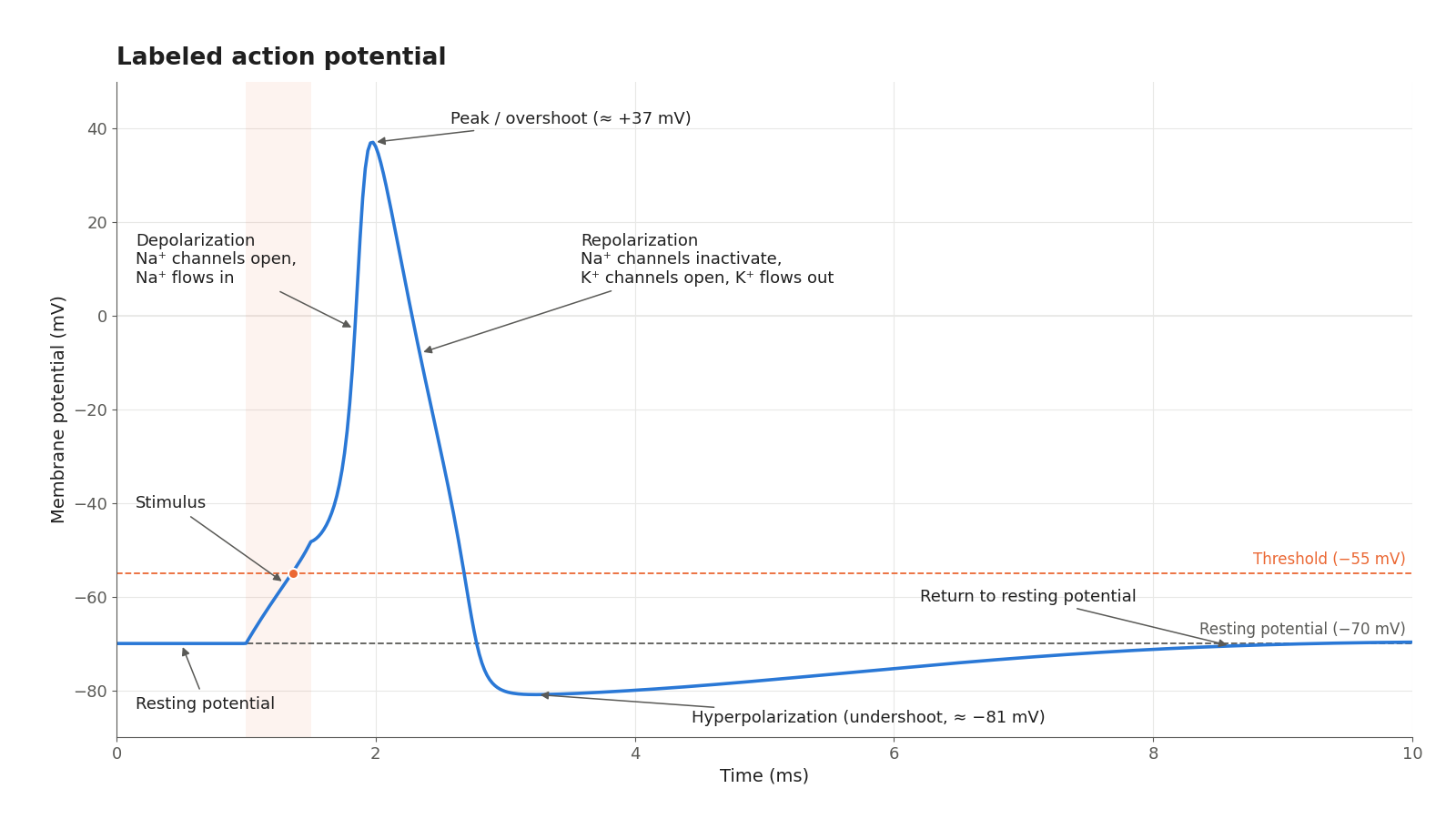
Gráfico de Potencial de Ação
Desenhe um potencial de ação legendado: repouso, limiar, despolarização, repolarização e períodos refratários.
Experimente grátis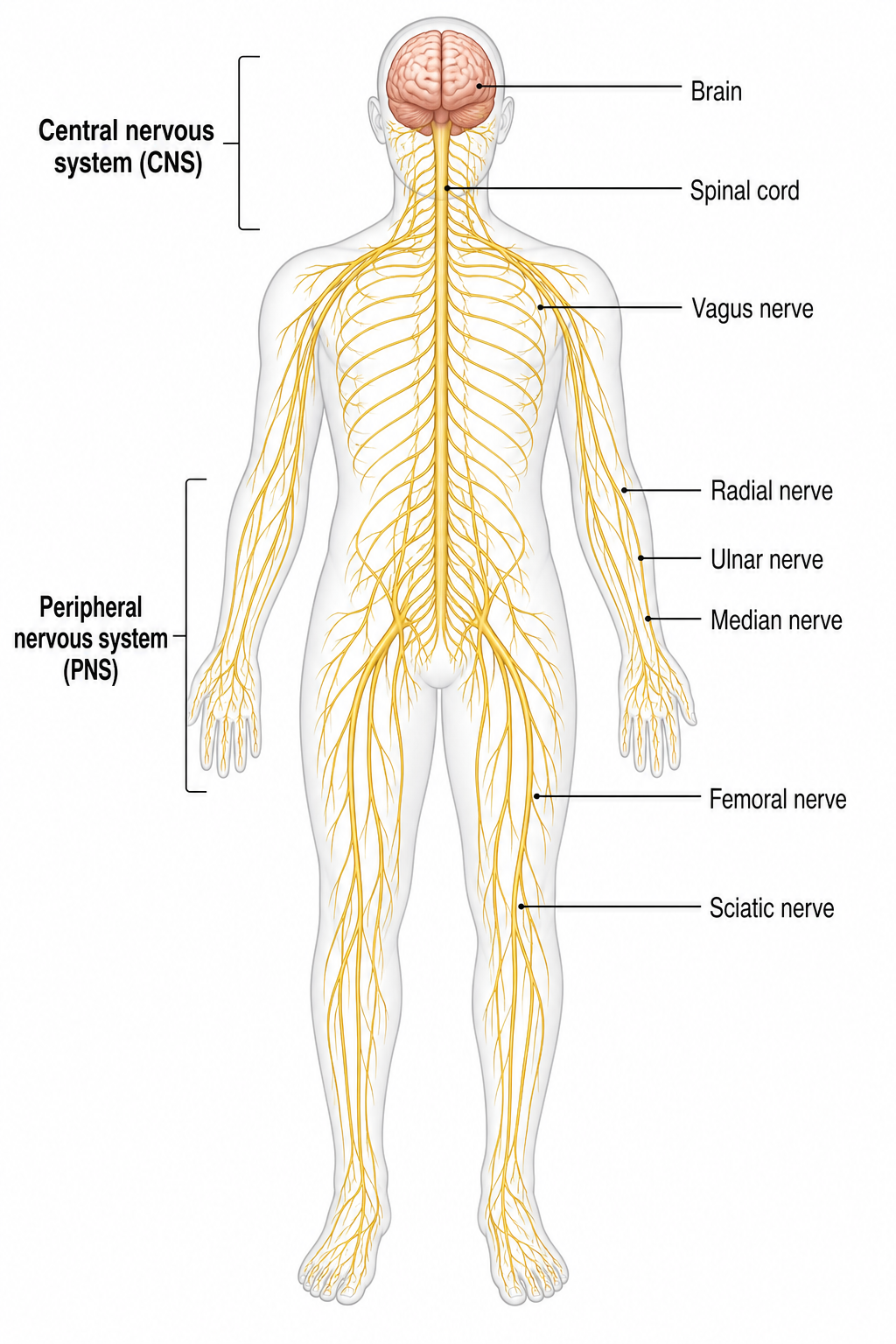
Gerador de Diagrama do Sistema Nervoso
Desenhe um sistema nervoso humano rotulado, as divisões central e periférica e os nervos com IA
Experimente grátis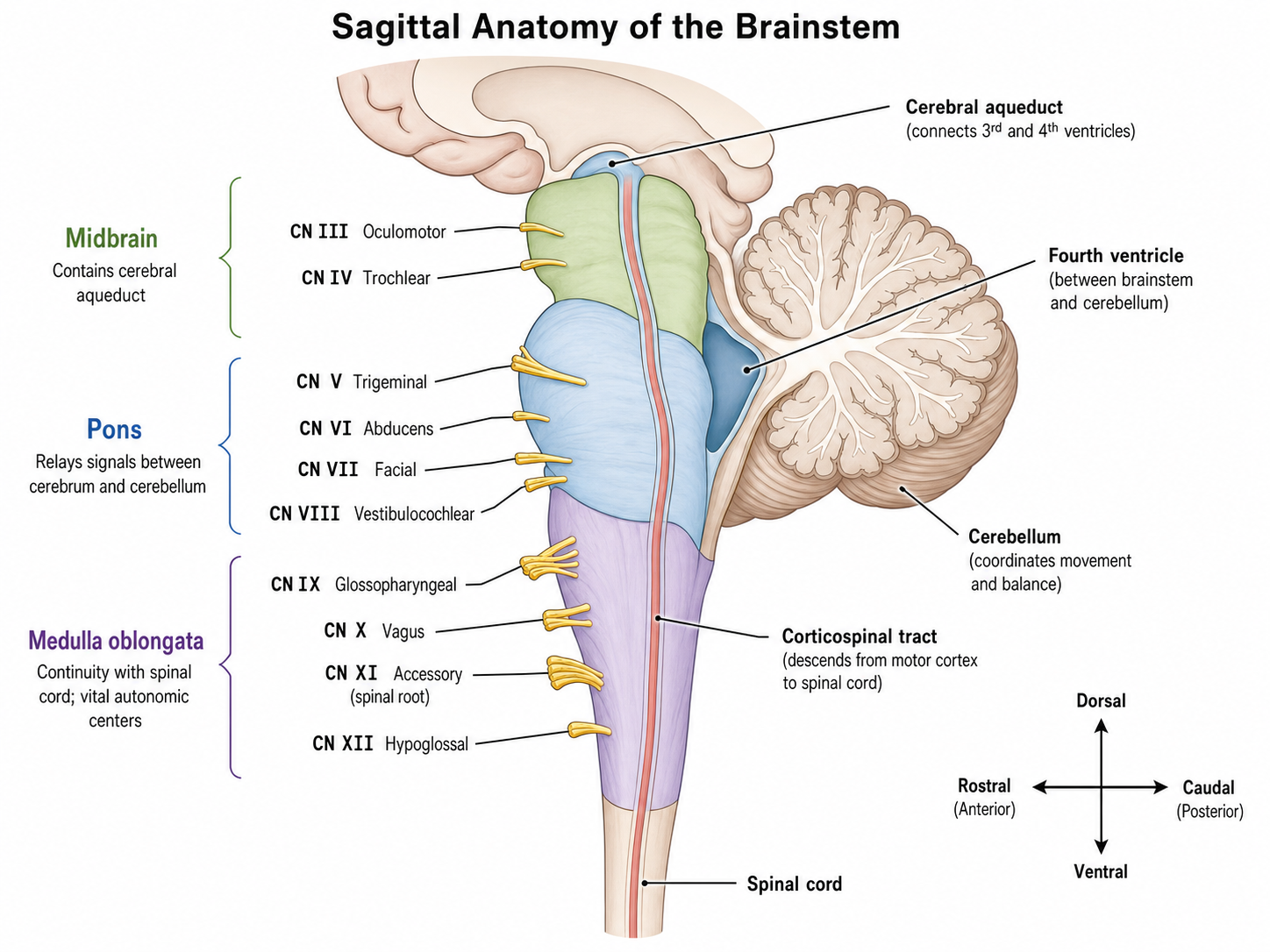
Gerador de diagramas do tronco encefálico
Ferramenta com IA para Gerador de diagramas do tronco encefálico, com estrutura clara, rótulos e layout exportável.
Experimente grátisPrecisa de outros diagramas científicos?
Gere em segundos um diagrama de neurônio rotulado, uma versão sem rótulos para completar ou uma atividade de célula nervosa em branco. Perfeito para biologia, psicologia e neurociência.