💡 SciDraw AI advantage: template-driven → SVG vector export → editable in PowerPoint and Illustrator, no watermarks. Try it free →
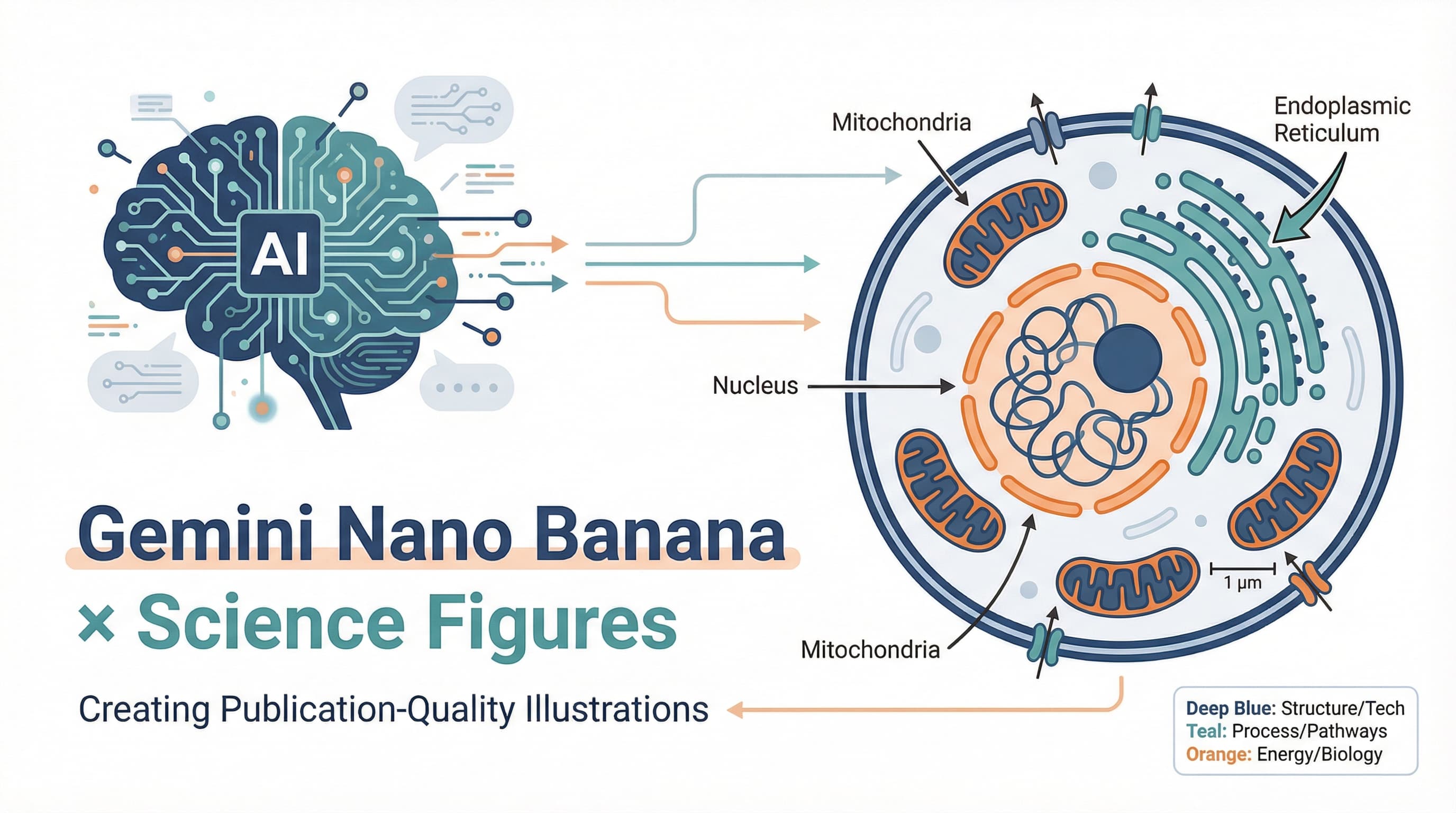
You've spent the last hour rewriting the same Gemini prompt twenty times. The cell diagram looks great — except the label still reads "Mitochodria" instead of "Mitochondria". You tweak the prompt, the spelling fixes itself, and now the colors look like a children's cereal box. One more try, and a small "AI generated" watermark appears in the corner.
This isn't a you problem. Gemini 2.5 Flash Image (the model the community calls Nano Banana) is a general-purpose image model. It has no built-in concept of "scientific figure", and its text rendering on long technical terms is fragile. It gives you back exactly what you describe — and not much more.
This article does two things:
- Walks through 5 prompt rules that lifted our reproducibility from "lucky" to over 85% across 200+ test prompts run in the last three months
- Tells you, honestly, where Nano Banana still can't go — and what to do when you hit those walls
❌ Three pitfalls to dodge first
Before we get to the rules, let's clear three errors that account for roughly 60% of the failures we've seen.
1. No aspect ratio specified Gemini's default output is roughly square. But Nature, Science, Cell, and most journals want landscape figure panels (16:9 or 4:3) or portrait covers (3:4). A square image dropped into a journal template either gets cropped or floats in dead space. Always set the aspect ratio explicitly, in the first sentence of the prompt.
2. Labels written in non-English text Even Chinese journals require English labels for figure text. Gemini's text rendering is far less reliable in non-Latin scripts than in English, and you'll have to redo it for submission anyway. Write your label content in English from the start — it saves a round trip.
3. No explicit ban on watermarks and signatures
Gemini's training set is full of stock-image watermarks and artist signatures. If you don't say no watermark, no signature, no text overlay, there's roughly a 30% chance you'll get a corner stamp — and that's a one-line rejection at submission.
With those out of the way, here's how to actually write the prompt.
✅ 5 prompt rules for Gemini Nano Banana scientific figures
Each rule has the same structure: why it matters, ❌ a bad prompt, ✅ a good prompt, an example output, and the takeaway.
Rule 1: Put aspect ratio and dimensions at the very front
Why it matters Aspect ratio is the constraint Gemini understands worst when buried in the middle of a paragraph. Putting it in the first sentence gives the model a stronger anchor and dramatically reduces "almost square" outputs.
❌ Bad prompt:
A diagram showing the structure of a eukaryotic cell with labels.✅ Good prompt:
16:9 landscape scientific illustration, eukaryotic cell cross-section,
journal figure layout, fills entire frame, no empty borders.
[... rest of the description ...]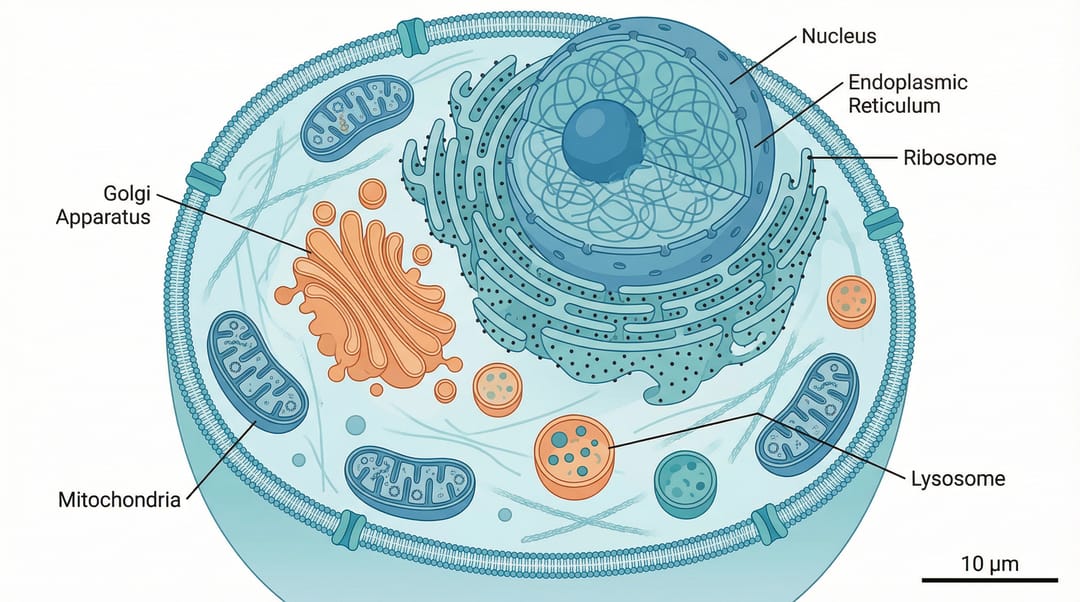
Takeaway: Use 4:3 or 16:9 for figure panels, 3:4 or 9:16 for covers, 1:1 for table-of-contents (TOC) graphics. Lead with it.
Rule 2: Quote-lock every label to defeat typos
Why it matters This is the root cause of the typo nightmare in the opening paragraph. Long technical words (Mitochondria, Endoplasmic Reticulum, Phosphofructokinase) trip Gemini's text renderer regularly — letters get dropped, doubled, or swapped. In our tests, the same prompt produced the correct spelling only 40-60% of the time on words longer than 12 characters.
The fix: wrap every label in quotes and tell the model the quoted strings must appear exactly. This single trick pushed our spelling accuracy above 85%.
❌ Bad prompt:
Cell diagram with labels for mitochondria, endoplasmic reticulum and golgi apparatus.✅ Good prompt:
Cell diagram with labels: "Mitochondria", "Endoplasmic Reticulum",
"Golgi Apparatus", "Nucleus", "Ribosome". Each label in quotes
must appear exactly as written, sans-serif font, 12pt.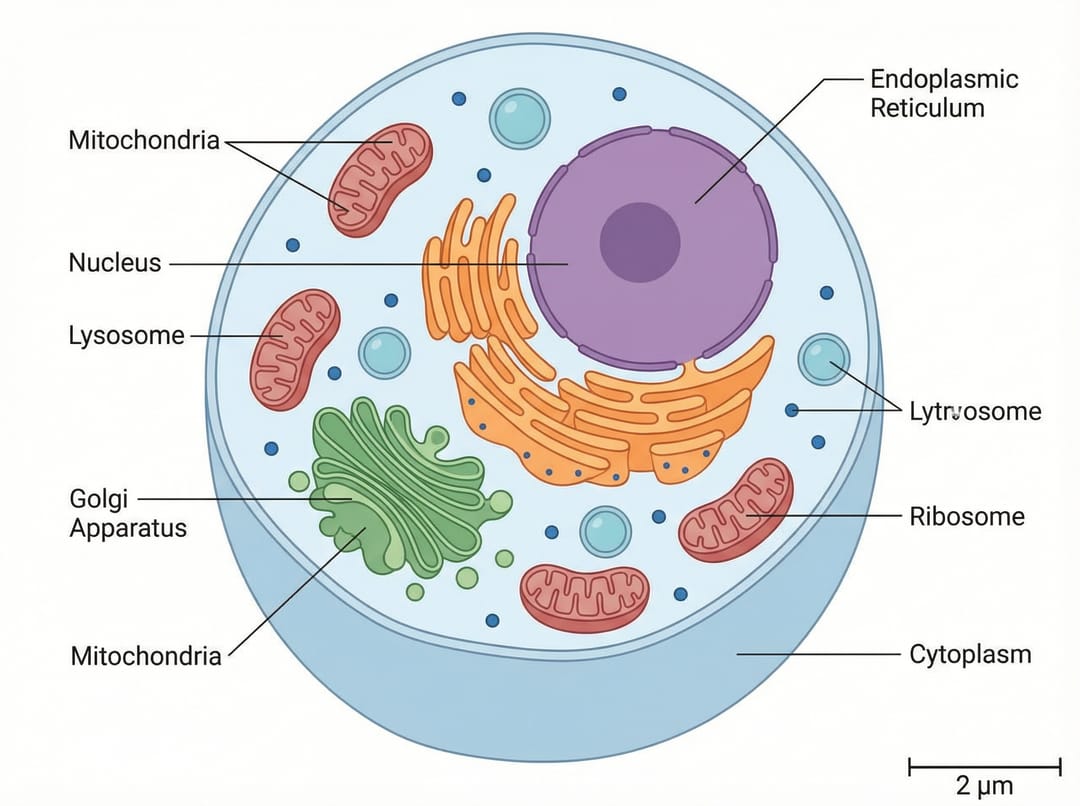
Takeaway: Quotes plus the phrase "must appear exactly as written" is the most reliable way we've found to fight Gemini's text-rendering drift. The same trick works for Greek letters (α, β, γ) and chemical formulas (H₂O, CO₂).
Rule 3: Use real scientific terminology and standard units
Why it matters Generic phrases like "a protein", "some molecules", or "a few cells" get interpreted as cartoon shapes. You have to tell Gemini what specifically — using the names a researcher in the field would actually use, with the units and conventions a journal expects. This is what separates "science-themed clipart" from a figure that looks publishable.
❌ Bad prompt:
Show a protein binding to DNA with some chemicals around.✅ Good prompt:
Cryo-EM style illustration of "p53 transcription factor" (53 kDa)
binding to "DNA double helix" at consensus site "5'-RRRCWWGYYY-3'",
zinc ions "Zn²⁺" coordinated, scale bar "5 nm", temperature "4°C".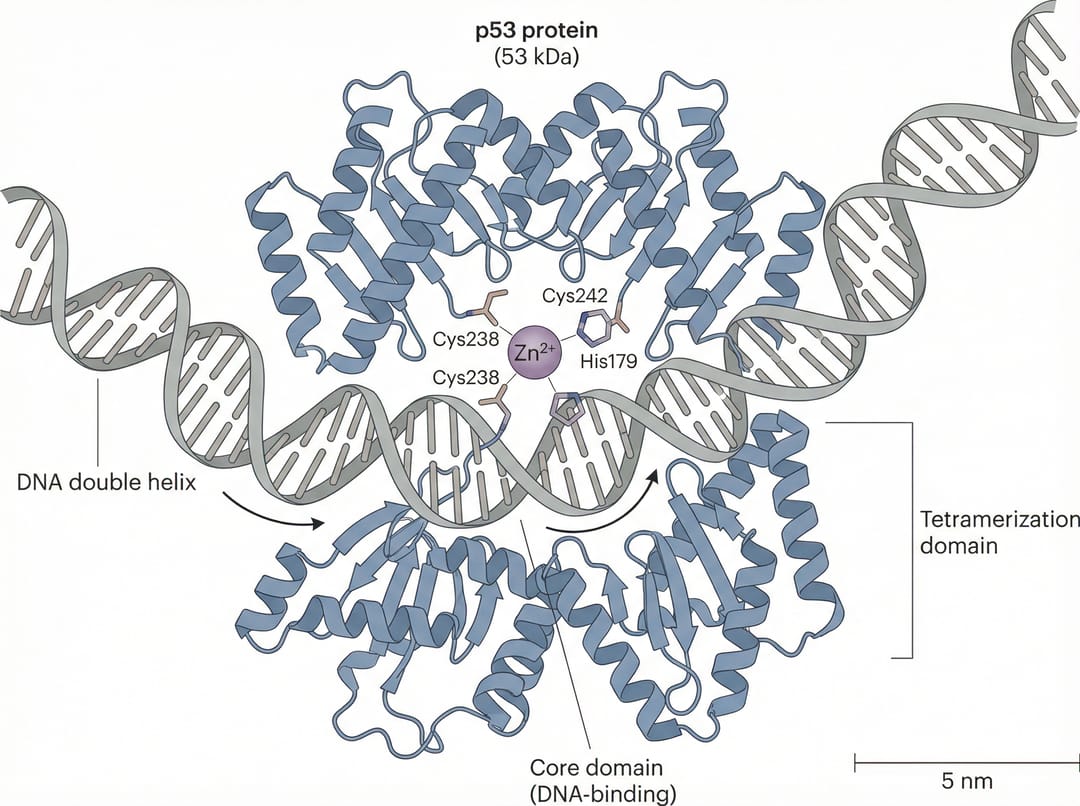
Takeaway: Whenever there's a real name, use it. Whenever there's a standard unit, write it (kDa, μm, mM, °C, nm). This is the prompt-side switch that turns Gemini from a general illustrator into a scientific tool.
Rule 4: Anchor the visual style explicitly
Why it matters Without a style anchor, Gemini reaches into its training data and pulls out something different every time — sometimes a textbook diagram, sometimes a children's book, sometimes 3D rendered, sometimes cyberpunk. Run the same prompt five times and you'll get five different aesthetics. For a single image, that's fine. For a series — Figure 1 through Figure 6 of a paper — it's a disaster.
Some style anchors that consistently produce publishable results:
Nature journal figure style— top-tier journal aestheticbiology textbook illustration, flat color— clean educational lookscientific schematic, isometric view— engineering-style diagramsBioRender style, clean vector look— life sciences standard
❌ Bad prompt:
Show the process of CRISPR gene editing in a cell.✅ Good prompt:
Nature journal figure style, flat vector illustration of "CRISPR-Cas9"
gene editing mechanism, clean white background, professional sans-serif labels,
4-step horizontal flow, muted scientific color palette (blue, gray, orange).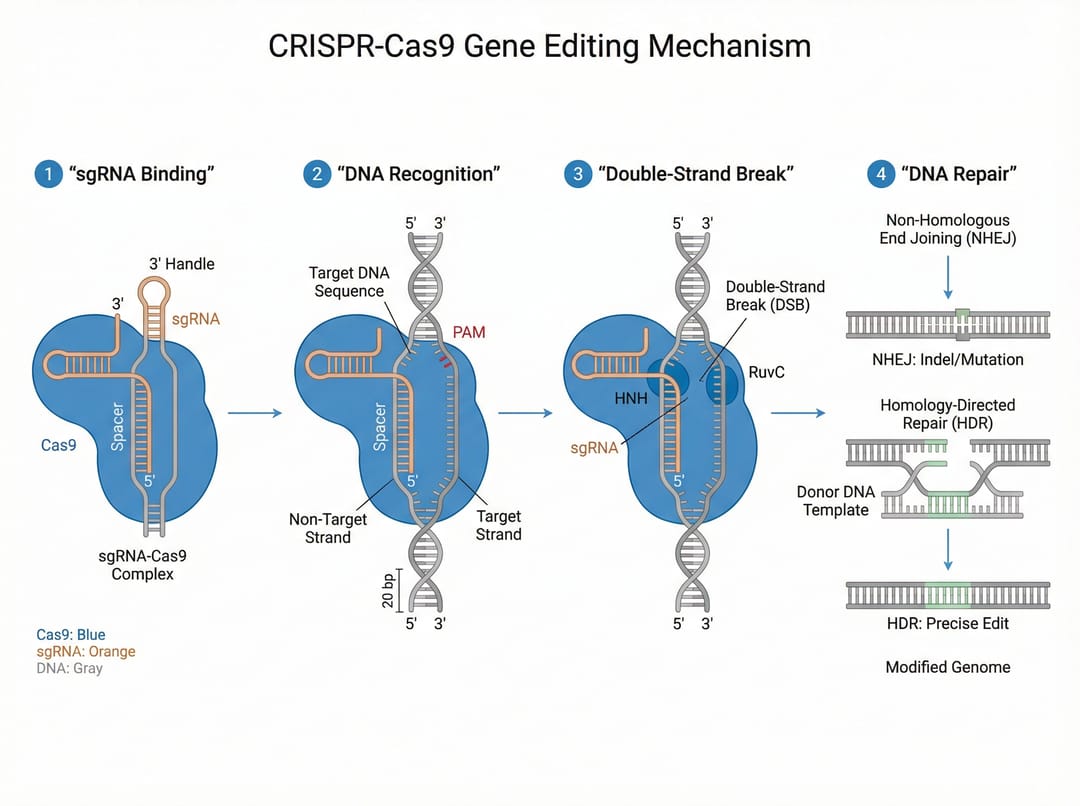
Takeaway: Style anchor + color palette + background color, all stated in the front portion of the prompt. This is the foundation for keeping a series of figures visually consistent.
Rule 5: Explicitly ban watermarks, signatures, and cartoon elements
Why it matters Gemini's training data is contaminated with watermarked stock images, signed artist works, and stylized cartoons. Without an explicit "do not include these" instruction, you'll get any of: corner watermarks, artist signatures, chibi characters, candy-colored backgrounds, emoji, decorative borders.
Any of those, in a reviewer's eyes, mean "this isn't a serious scientific figure".
❌ Bad prompt:
[normal scientific figure description]✅ Good prompt:
[normal scientific figure description]

Strict requirements: no watermark, no signature, no text overlay,
no cartoon characters, no emoji, no decorative elements,
white background only, professional scientific publication quality.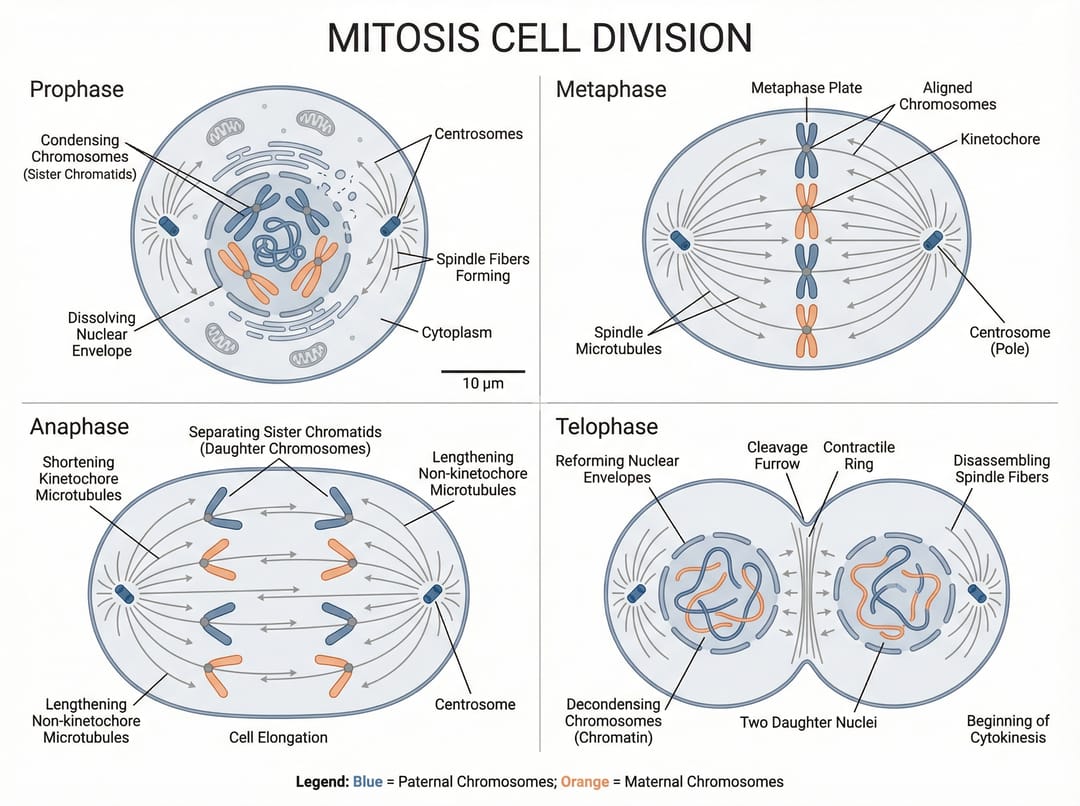
Takeaway: Make this exclusion list a permanent tail on every prompt template you use. It costs you nothing to paste and prevents 100% of the contamination cases we've measured.
The two walls Nano Banana can't climb
Apply all five rules and you'll get figures with correct spelling, consistent style, no watermarks, and the right aspect ratio. But two limitations remain — these aren't prompt problems, they're model boundaries.
Wall 1: Re-running the same prompt gives wildly different results
We ran one well-crafted mechanism-figure prompt through Nano Banana 10 times. The result: 10 different layouts, color schemes, label positions, and viewpoints.
For a single image, this is a feature — pick the best one. For a multi-figure paper, it's a wall. When Figure 1 to Figure 6 don't share a color palette, viewpoint, or font weight, reviewers see "this set of figures looks messy" before they read a single caption. Gemini's randomness means you can't lock consistency through prompts alone — you can only re-roll, and re-rolling on a deadline is expensive.
Wall 2: The output is a PNG, not an SVG
Gemini hands you a raster image. That means:
- Want to fix one mislabeled word? Regenerate the whole figure.
- Want to swap blue for red? Regenerate the whole figure.
- Want to drop it into a poster and resize? Edges go fuzzy.
- Want to do final layout in Illustrator? You can place the bitmap, but you can't edit any element inside it.
- Journal asks for a different color scheme on resubmission? Regenerate the whole figure.
This wall is harder than the first one because it isn't a probability — it's a format. As long as Nano Banana outputs PNG, your final deliverable is permanently uneditable.
What if you don't want to write prompts at all? Meet SciDraw AI
Here's where we'll talk about what we're building, as straightforwardly as we can. SciDraw AI takes a different approach to the same problem — and it's worth knowing about specifically because of the two walls above.
Against Wall 1 (inconsistency): SciDraw AI is template-driven, not prompt-driven.
You don't write Nature journal style, 16:9, no watermark.... You pick a template like "Cell Mechanism Diagram", fill in fields (cell type, key proteins, reaction steps), and the system generates the figure. Run the same template five times and the color palette, font sizes, and visual style stay locked. Figure 1 through Figure 6 actually look like they came from the same lab.
Against Wall 2 (uneditable output): SciDraw AI exports SVG vector graphics. Drop it into PowerPoint and edit the labels directly. Open it in Illustrator and reassign every color. When the journal asks you to change the palette on resubmission, you don't regenerate — you edit. One source file flows from manuscript submission to lab meeting deck to thesis defense slides.
On top of that:
- No watermarks, no "AI generated" tags
- Pre-built templates for common figure types (cell mechanisms, molecular structures, flowcharts, system architectures, technical roadmaps)
- No prompt syntax to learn — if you can fill in a form, you can use it
One way to think about the two tools:
Gemini Nano Banana is a paintbrush. SciDraw AI is a mold.
Side-by-side comparison
| Dimension | Gemini Nano Banana | SciDraw AI |
|---|---|---|
| Learning curve | Need to learn prompt syntax | Pick template, fill fields |
| Creative range | ⭐⭐⭐⭐⭐ Nearly unlimited | ⭐⭐⭐ Within template scope |
| Series consistency | ⭐⭐ Same prompt drifts each run | ⭐⭐⭐⭐⭐ Templates lock style |
| Output format | PNG (raster) | SVG (vector, fully editable) |
| Long-term spelling | ⚠ Needs quote-locking, still imperfect | ✅ Direct field input, 100% accurate |
| Watermarks | Must explicitly ban in prompt | None by default |
| Best for | Exploration, single hero images, concept sketches | Series figures, paper submissions, technical proposals |
How to use this guide depending on who you are
- You're a PhD student who enjoys crafting prompts and wants creative freedom → Use Nano Banana, build a personal prompt template from the 5 rules above
- You're a PI on a deadline who needs standardized batch output → Use SciDraw AI templates and skip the re-rolling game
- You're an engineer producing technical proposal diagrams that have to look uniform → SciDraw AI; the SVG output drops straight into Word documents
- You're a medical or biological illustrator who needs final edit-ability → SciDraw AI for the base figure, Illustrator for the polish pass
- You want both → Nano Banana for early exploration and concept variations, SciDraw AI for the final deliverable that has to ship
A good prompt teaches the AI to listen to you. A good tool means you don't have to learn its language at all.