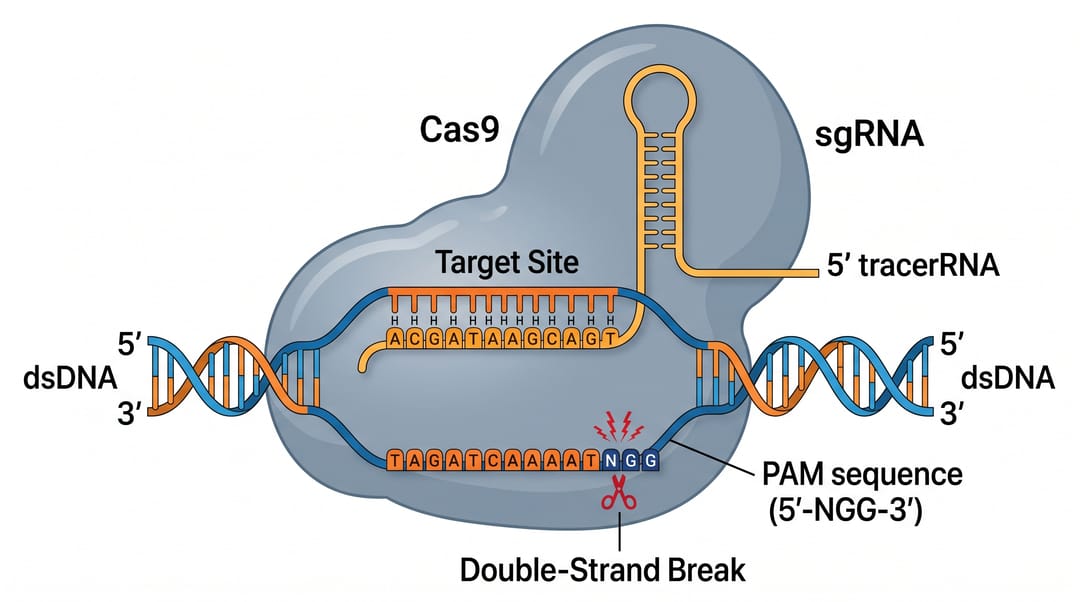
The CRISPR-Cas9 mechanism is deceptively simple to describe and surprisingly hard to draw: a guide RNA, a Cas9 nuclease, a PAM sequence, base-pairing at the target site, a blunt double-strand break, and then two competing repair pathways. Get one element wrong — the PAM on the wrong strand, the cut in the wrong place — and the figure misleads. This guide shows you how to generate a clean, accurate, publication-ready CRISPR-Cas9 mechanism diagram with AI from a single sentence, then refine it by talking to the editor.
By the end of this guide you'll be able to:
- Generate a complete CRISPR-Cas9 mechanism diagram from one prompt.
- Label every key element correctly: sgRNA (crRNA + tracrRNA), Cas9, the PAM, the target/protospacer, and the blunt double-strand break (DSB).
- Show the two DNA repair pathways — error-prone NHEJ (knockout) vs. precise HDR (knock-in) — side by side.
- Adapt the prompt to base editing, prime editing, or a full editing workflow.
- Export an editable figure for your manuscript, slides, or poster.
Paste any prompt below into the Signaling Pathway Diagram Generator or the Biological Pathway Diagram Generator, then refine the result in the SciDraw AI editor.
A reusable prompt template for CRISPR figures
Strong CRISPR-Cas9 diagram prompts have four parts:
- Subject — the step or variant: targeting, cleavage, repair, base editing, or full workflow.
- Components and interactions — what binds what, where the cut happens.
- Labels — name every molecule and site you want labeled.
- Style & layout — "flat vector, publication-ready, left-to-right flow, clear DNA helix."
Template: "Draw the CRISPR-Cas9 [step] showing [components and interactions]. Label [sgRNA, Cas9, PAM, target site, DSB, repair pathways]. Use a clean flat-vector style with a clear DNA double helix, left-to-right layout."
Copy-paste CRISPR-Cas9 mechanism prompts
Targeting and cleavage
- Draw the CRISPR-Cas9 mechanism: a Cas9 protein loaded with a single guide RNA (sgRNA) scanning double-stranded DNA, recognizing the PAM sequence, the sgRNA spacer base-pairing with the complementary target strand to form an R-loop, and the two nuclease domains (RuvC and HNH) making a blunt double-strand break three base pairs upstream of the PAM. Label Cas9, sgRNA, PAM, protospacer/target, RuvC, HNH, and the cut site.
- Show the sgRNA structure: the crRNA (spacer + scaffold) fused to the tracrRNA into a single guide RNA, with the 20-nucleotide spacer that defines the target highlighted and labeled.
DNA repair: NHEJ vs. HDR
- Draw the two DNA repair outcomes after a Cas9 double-strand break, side by side: non-homologous end joining (NHEJ) producing small insertions/deletions and gene knockout on the left, and homology-directed repair (HDR) using a donor template to introduce a precise edit (knock-in) on the right. Label NHEJ, indels, knockout, HDR, donor template, and precise edit.
Variants and workflows
- Illustrate base editing: a catalytically impaired Cas9 (nickase) fused to a deaminase converting a single base (C→T or A→G) without a double-strand break. Label nCas9, deaminase, sgRNA, target base, and the edited base.
- Draw a CRISPR-Cas9 gene-editing workflow as a left-to-right flowchart: guide RNA design, vector cloning, cell transfection/delivery, selection of edited clones, genotyping validation, and phenotype analysis.
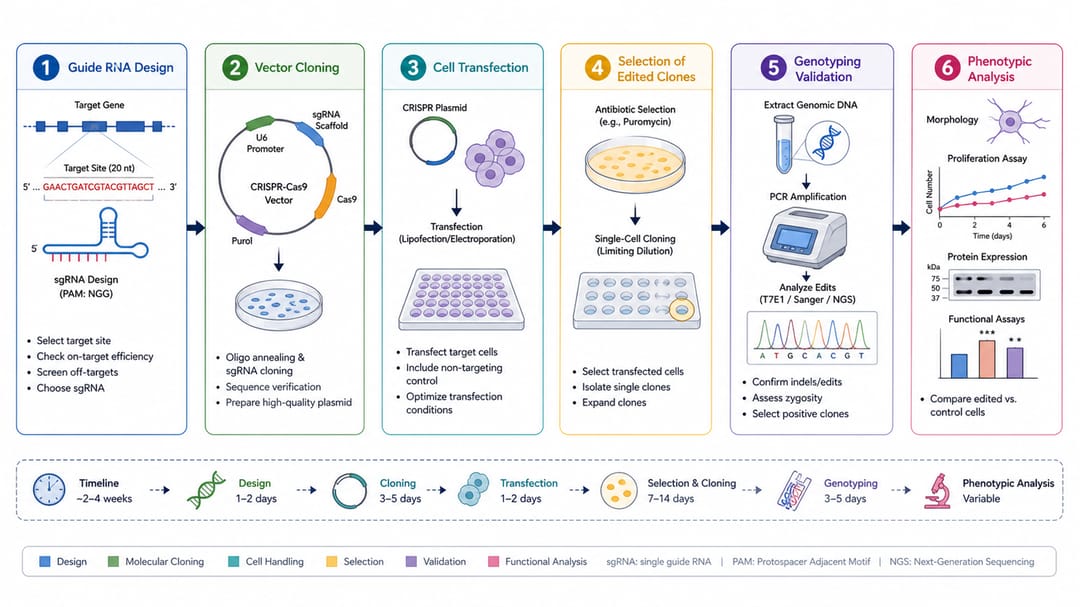
For a graphical-abstract-style figure that combines the editing mechanism with its downstream biological effect, the mechanism figure generator is a good starting point.
How to get clean, accurate CRISPR diagrams
- Name every element you want labeled. List "sgRNA, Cas9, PAM, protospacer, RuvC, HNH, DSB."
- Place the PAM correctly. Tell the AI the PAM (NGG for SpCas9) sits on the non-target strand immediately 3′ of the protospacer, and the cut is ~3 bp upstream.
- Distinguish the two repair pathways. Ask for "NHEJ on the left (indels, knockout) and HDR on the right (donor template, precise knock-in)" so they read as alternatives.
- Keep the DNA legible. Request "a clear, evenly spaced double helix" so base-pairing and the cut site are visible.
- Iterate, don't restart. Refine with "make the cut site clearer" or "recolor the guide RNA" instead of rewriting the prompt.
Common mistakes (and how to fix them)
- PAM on the wrong strand or wrong place. Fix: specify "PAM (NGG) immediately 3′ of the protospacer on the non-target strand, cut 3 bp upstream."
- Cut shown as a single strand. Cas9 makes a double-strand break. Fix: add "blunt double-strand break cutting both strands."
- NHEJ and HDR merged into one path. Fix: ask for two clearly separated branches with distinct outcomes.
- Guide RNA drawn as DNA. Fix: label it "single guide RNA (sgRNA)" and ask for it to be visually distinct from the DNA helix.
- Garbled text (typical of generic image AI). Fix: SciDraw AI renders clean sans-serif labels — re-prompt the exact wording if needed.
Export and use your CRISPR figure
Once the mechanism looks right, export it to editable SVG or PowerPoint (PPTX), or download a high-resolution image for your manuscript, slides, or poster. Want more mechanism prompts to adapt? See our signaling pathway diagram prompts. Need to fix a label or translate it? See how to edit text and labels in an AI figure.
Frequently asked questions
What is the best AI tool to draw a CRISPR-Cas9 diagram? SciDraw AI's Signaling Pathway Diagram Generator and Biological Pathway Diagram Generator produce publication-ready CRISPR figures — guide RNA targeting, PAM recognition, the double-strand break, and NHEJ vs. HDR repair — with clean labels and editable export.
How do I show the PAM and cut site correctly? Tell the AI the PAM (NGG for SpCas9) is immediately 3′ of the protospacer on the non-target strand and that the blunt cut falls about 3 bp upstream. Use prompt #1 above as a starting point.
How do I draw NHEJ vs. HDR repair? Ask for two side-by-side branches: NHEJ producing indels and gene knockout, and HDR using a donor template for a precise knock-in. Prompt #3 above does exactly this.
Can I make a CRISPR diagram for free? Yes — you can start generating CRISPR-Cas9 mechanism diagrams for free, then upgrade for more credits and editable SVG/PPTX export.
Is the CRISPR figure accurate enough for publication? It is designed for publication-ready output, but always review the biology for your construct — PAM placement, cut site, and repair outcomes — and correct any labels before submitting.
Start creating
Pick any prompt above, paste it into the Signaling Pathway Diagram Generator, and refine it in the SciDraw AI editor until it matches your experiment. From guide RNA targeting to precise knock-in, your next CRISPR-Cas9 figure is one sentence away.