Particle Diagram Generator
Draw clear solid, liquid, and gas particle diagrams in seconds
Describe a state of matter and AI draws a clean, labeled particle diagram with the correct particle arrangement and spacing — tightly packed for solids, close but irregular for liquids, and spread out for gases. Built for chemistry and physics classrooms, with the particle model, changes of state, and elements, compounds, and mixtures ready for worksheets and slides.
Particle diagram examples
Click any example to load its prompt, or use it as a starting point for your own particle diagram.
What is a particle diagram?
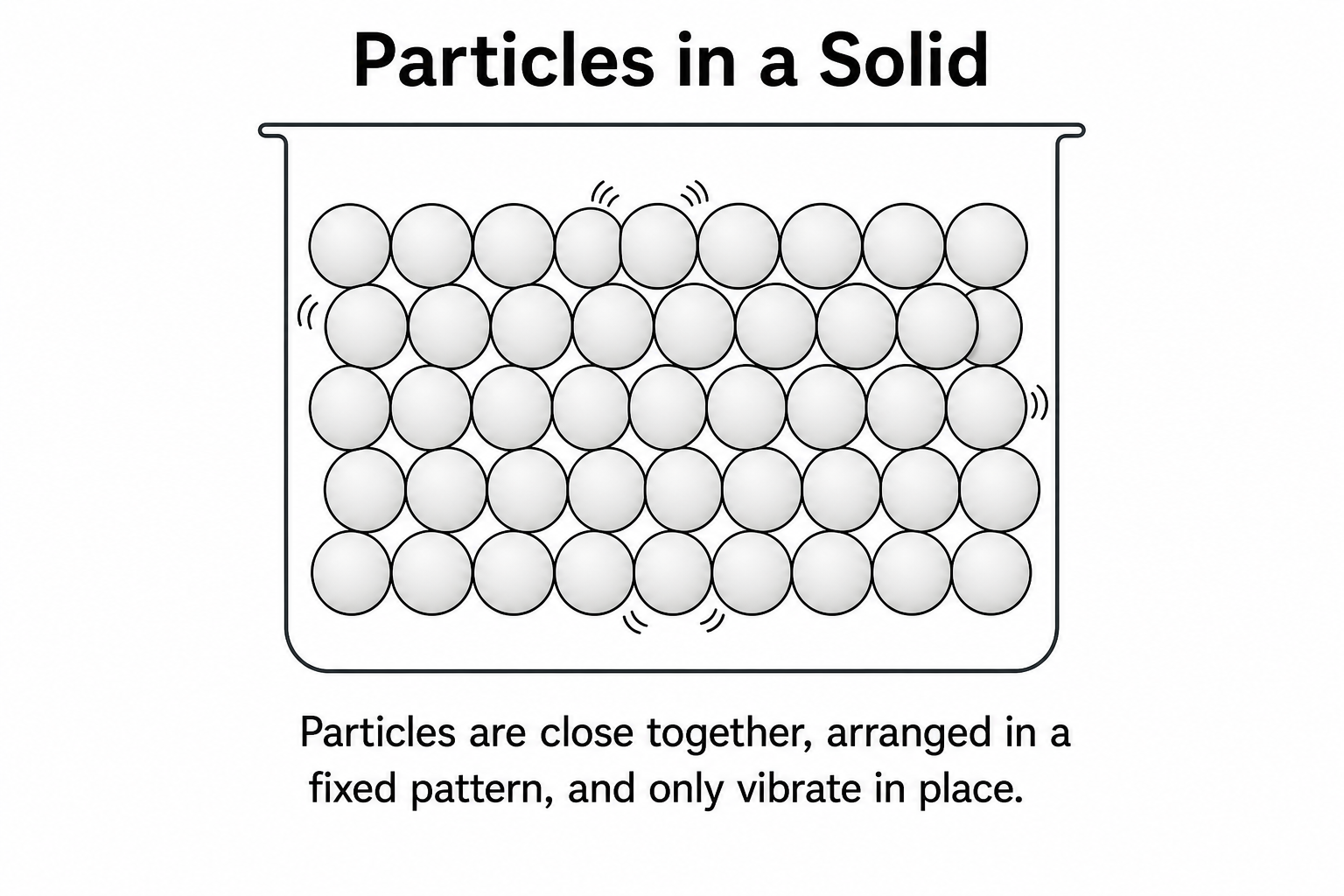
A particle diagram is a simple drawing that uses circles to represent the particles (atoms or molecules) in a substance, showing how they are arranged, how close together they are, and how they move. It is the core picture behind the particle model of matter: in a solid the particles are packed tightly in a fixed, regular pattern and only vibrate; in a liquid they are still close together but arranged irregularly and able to slide past one another; in a gas they are far apart, randomly arranged, and moving quickly in all directions. Particle diagrams are also used to show the difference between elements, compounds, and mixtures, and to explain changes of state. This generator turns your description into a clean, labeled particle diagram with the correct arrangement and spacing — no drawing tools or manual placement needed.
Why use a particle diagram generator
- The particle diagram is the standard way to show the arrangement, spacing, and movement of particles in solids, liquids, and gases.
- Drawing dozens of evenly spaced circles by hand — packed for a solid, scattered for a gas — is slow and fiddly to get right.
- Clear labels and consistent particle spacing help students grasp the particle model far better than a paragraph of text.
- Teachers need quick, presentable particle diagrams of states of matter, changes of state, and mixtures for worksheets and slides.
- Adjusting the spacing, adding motion arrows, or switching from one state to another and regenerating is faster than redrawing.
How to draw a particle diagram
Say which state of matter you want — solid, liquid, or gas — or ask for all three side by side. Describe the particle arrangement and spacing: tightly packed and ordered for a solid, close but irregular for a liquid, far apart and random for a gas. Add any extras such as motion arrows, a container outline, labels, or a key, and mention whether you want changes of state with arrows or an elements, compounds, and mixtures comparison. Generate the diagram, then check that the arrangement, spacing, and labels match the particle model and refine the prompt until it fits your lesson. As this is a drawing tool, verify the diagram against your curriculum before relying on it.
What a particle diagram shows
- Particles as circles — each atom or molecule drawn as a simple, identical circle, sometimes color-coded for different atoms.
- Solid — particles close together in a regular, ordered pattern with no gaps, vibrating in fixed positions.
- Liquid — particles still close together but in an irregular arrangement with small gaps, able to slide past one another.
- Gas — particles far apart in a random arrangement, moving quickly and filling the whole container.
- Elements, compounds & mixtures — single atoms, bonded atoms in a fixed ratio, or different particles mixed together.
- Labels & key — names for each state, motion arrows, and a key explaining what each colored circle represents.
Particle Diagram FAQ
What is a particle diagram?
A particle diagram is a drawing that uses circles to represent the particles in a substance, showing how they are arranged, how far apart they are, and how they move. It is the central image of the particle model of matter and is used in chemistry and physics to compare solids, liquids, and gases, as well as elements, compounds, and mixtures.
How do I make a particle diagram online?
Describe the state of matter you want and how the particles should be arranged — tightly packed for a solid, close but irregular for a liquid, or spread out for a gas. SciDraw AI then draws a clean particle diagram with the correct arrangement, spacing, and labels for you. You can adjust the wording and regenerate until it matches what you need, with no drawing skills required.
How do solid, liquid, and gas particle diagrams differ?
In a solid, the particles are packed closely in a fixed, regular pattern and only vibrate in place. In a liquid, they are still close together but arranged irregularly with small gaps, so they can slide past one another. In a gas, the particles are far apart in a random arrangement and move quickly in all directions to fill their container. A particle diagram shows these differences in arrangement, spacing, and movement at a glance.
Can it show changes of state and mixtures?
Yes. You can ask for a changes-of-state diagram with solid, liquid, and gas connected by labeled arrows for melting, freezing, boiling, condensing, sublimation, and deposition. You can also generate particle diagrams that compare elements, compounds, and mixtures using different colored circles for different atoms. Just name what you want shown and the tool draws it with the correct particles and labels.
Is the particle diagram generator free?
Yes, you can generate particle diagrams for free. SciDraw AI gives new users starter credits, and each diagram uses a small number of credits, so you can draw a solid, liquid, or gas particle diagram without any subscription to start.
Can I use it for a chemistry or physics class?
Yes. The particle diagram generator produces clean, labeled figures of the particle model, states of matter, changes of state, and mixtures that suit chemistry and physics homework, worksheets, and lecture slides. Because it draws rather than checks the science, confirm that the arrangement and labels match your curriculum before handing it out.
Explore More Tools

Chemistry Diagram Generator
Create chemistry figures, TOC graphics, and molecular visuals
Try it free
Lewis Dot Structure Generator
Draw electron dot diagrams for any molecule or ion instantly.
Try it free
Bohr Model Maker
Draw clean, labeled Bohr diagrams with a nucleus and electron shells from a text prompt.
Try it freeDraw your particle diagram now
Describe the state of matter and arrangement you need and get a clean, labeled particle diagram in seconds. Start free with SciDraw AI.