뉴럴 네트워크 다이어그램은 아키텍처를 한눈에 전달해야 합니다. 순서대로 놓인 모든 레이어, 그 사이를 흐르는 텐서 형상(shape), 입력에서 출력까지의 경로를 말이죠. 이 글은 그 단계별 실전 가이드입니다 — 단순한 프롬프트 모음이 아니라, 빈 캔버스에서 내보내기 가능한 그림까지 따라가는 워크플로입니다. 복붙용 프롬프트를 원한다면 함께 보면 좋은 글 뉴럴 네트워크 다이어그램 프롬프트를 참고하세요. 여기서는 어떤 아키텍처 그림이든 깔끔하게 나오게 하는 방법론을 배웁니다.
이 가이드를 끝까지 읽으면 다음을 할 수 있습니다:
- AI로 뉴럴 네트워크 다이어그램 만들기를 네 단계로 반복 — 기획, 생성, 다듬기, 내보내기.
- 컴퓨터 비전이든, NLP든, 정형 데이터 딥러닝이든 본인 분야에 맞게 워크플로를 적용하기.
- 라벨링된 레이어, 텐서 형상, 깔끔한 좌→우 데이터 흐름을 갖춘 학위논문·논문급 아키텍처 그림 제작하기.
- AI 아키텍처 다이어그램을 지저분하거나 틀리게 만드는 실수 피하기.
모든 작업은 SciDraw AI 에디터에서 이뤄집니다. 그림이 곧 캔버스이고 일상 언어가 도구인 AI 네이티브 작업 공간입니다.
모든 아키텍처 다이어그램에 통하는 4단계 워크플로
CNN, Transformer, RNN/LSTM, 오토인코더 — 모든 아키텍처 그림은 같은 네 단계에서 나옵니다.
- 아키텍처를 기획한다. 입력, 순서대로 쌓인 레이어/블록, 중요한 형상, 출력 헤드를 정합니다.
- 첫 초안을 생성한다. 기획을 입력, 순서대로의 각 레이어, 텐서 형상, 출력을 명시하고 좌→우 흐름을 갖춘 한 문장으로 바꿉니다.
- 대화로 다듬는다. 블록을 다시 칠하고, 레이어 라벨을 바꾸고, 형상을 추가하거나 단순화하세요 — 다시 시작하지 마세요.
- 내보내고 배치한다. 논문·슬라이드·포스터용 고해상도 이미지나 편집 가능 SVG/PPTX를 다운로드합니다.
2단계 템플릿: "[입력]에서 [레이어1, 레이어2, 레이어3]을 거쳐 [출력 헤드]까지 이어지는 [아키텍처]를 그려줘. 각 레이어에 라벨을 달고, 텐서/특징맵 형상을 보여주고, 흰 배경에 좌→우 데이터 흐름 화살표를 써줘."
1단계: 프롬프트 전에 아키텍처를 기획하라
아키텍처 그림은 레이어 스택이 모호할 때 실패합니다. 프롬프트 전에 답하세요:
- 무엇이 들어가는가? 입력과 그 형상을 적습니다(예: 224×224×3 이미지, 토큰 시퀀스).
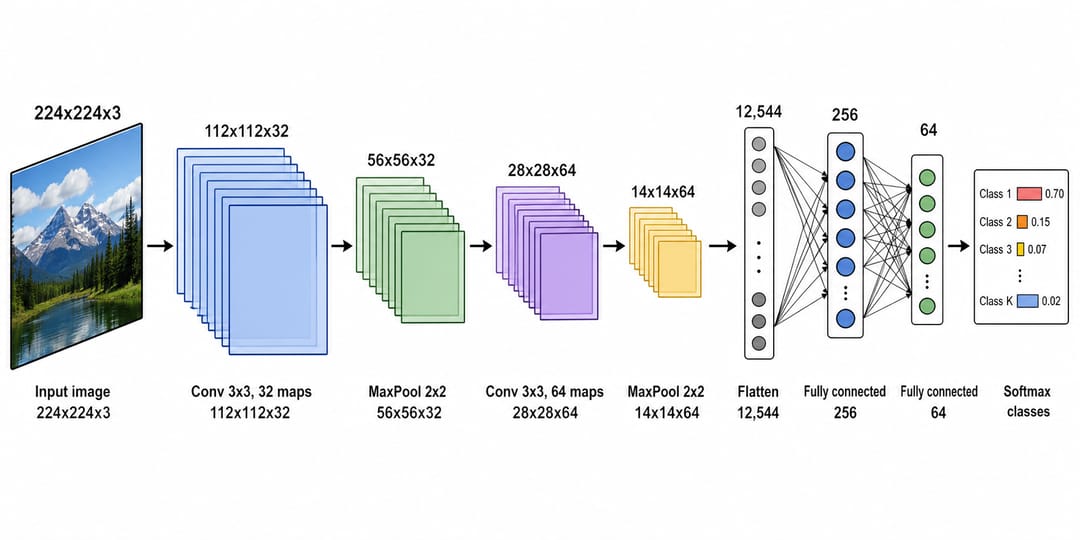
- 스택은 순서대로 어떻게 되는가? 모든 레이어나 블록을 나열합니다: conv → pool → conv → pool → flatten → dense → softmax. 순서가 곧 그림입니다.
- 어떤 형상이 중요한가? 특징맵이 작아지거나 채널이 늘어나는 지점을 표시하세요 — 그 숫자들이 이야기를 담습니다.
- 무엇이 나오는가? 소프트맥스 분류기, 회귀 헤드, 복원된 이미지, 시퀀스.
이 순서가 잡힌 기획이 프롬프트의 골격이고, 레이어가 올바른 순서와 올바른 형상으로 나오는 이유입니다.
2단계: 첫 초안을 생성하라
기획을 한 문장으로 바꾸세요. CNN이라면, 기획("입력 이미지 → conv/pool 블록 → flatten → 완전연결 → softmax, 특징맵이 작아지면서")이 한 줄의 프롬프트와 위의 깔끔한 아키텍처가 됩니다.
첫 초안을 제대로 뽑는 팁:
- 라벨을 달고 싶은 모든 레이어의 이름을 적어라. AI는 이름 붙인 것만 정확히 라벨링합니다.
- 순서를 명시적으로 진술하라. "입력에서 X를 거쳐, 그다음 Y, 그다음 Z로, 출력에서 끝나도록."
- 형상을 요청하라. "진행하면서 특징맵 크기가 줄어드는 것을 보여줘"가 평범한 스택을 정보가 담긴 그림으로 바꿔줍니다.
- 스타일을 정하라. "좌→우 데이터 흐름 화살표, 플랫한 기술 스타일, 흰 배경"이 출판에 적합한 깔끔함을 유지해줍니다.
3단계: 대화로 다듬어라 — 다시 시작하지 마라
AI 네이티브의 강점은 말로 설명해 편집하는 것입니다. 아키텍처 그림의 전형적인 다듬기:
- "합성곱 블록은 파란색, dense 레이어는 초록색으로 칠해줘."
- "각 블록 아래에 출력 형상을 추가해줘."
- "'FC' 라벨을 'Fully Connected'로 고쳐줘."
- "인코더 블록에서 대응하는 디코더 블록으로 스킵 연결을 추가해줘."
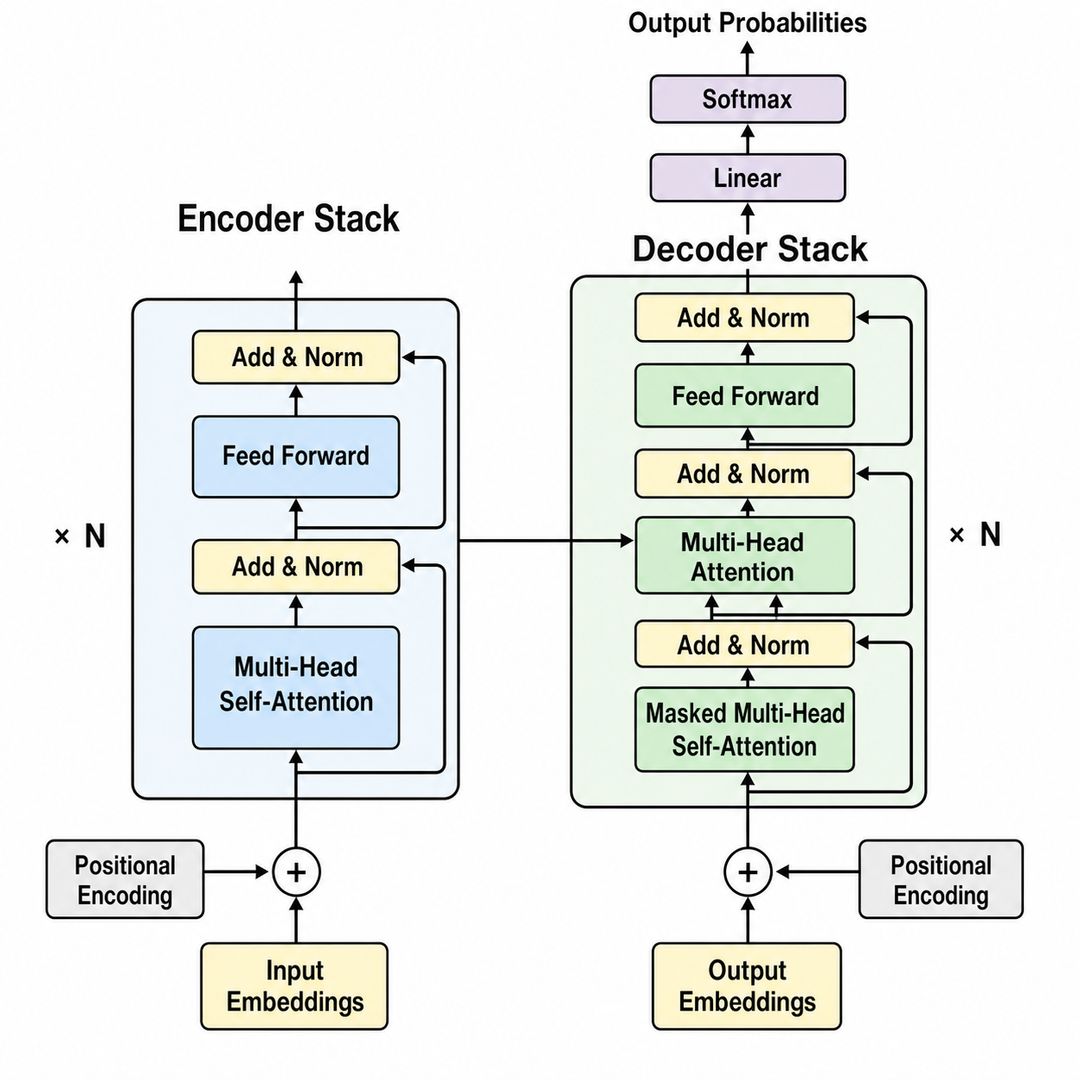
각 지시는 기존 이미지를 그 자리에서 편집합니다 — 그래서 마음에 든 인코더/디코더 레이아웃은 그대로 두고 라벨과 형상만 조정할 수 있습니다. 라벨만 변경하려면 AI 그림에서 텍스트와 라벨 편집하는 법을 참고하세요.
분야별 실전 예제
네 단계는 무엇을 만들든 적용됩니다. 기획만 달라집니다.
컴퓨터 비전
메시지: 이미지가 어떻게 클래스가 되는가. 입력 이미지에서 합성곱과 풀링을 거쳐 flatten과 dense 레이어로, softmax에서 끝나는 CNN을 특징맵이 작아지도록 기획하세요. 이것이 위의 그림입니다. 분할(segmentation)이라면 스킵 연결을 가진 인코더-디코더(U-Net)로 다시 기획하고, 다듬어서 스킵 연결을 추가하세요.
자연어 처리
메시지: 시퀀스 모델이 어떻게 어텐션하고 생성하는가. 인코더와 디코더 스택을 가진 Transformer를 기획하세요 — 입력 임베딩과 위치 인코딩, 멀티헤드 셀프어텐션, 피드포워드 블록, add-and-norm, 출력 softmax. 멀티헤드 어텐션 블록이 당신의 기여라면 그 블록을 강조하도록 다듬으세요.
정형·순차 딥러닝
메시지: 남들이 재현할 수 있는 간결한 모델. 다층 퍼셉트론(입력 특징 → 은닉층 → 출력)이나 타임스텝에 걸친 순환 셀을 보여주는 펼쳐진 RNN/LSTM을 기획하세요. 작게 유지하고 레이어당 유닛 수에 라벨을 달아 심사자가 다시 만들 수 있게 하세요.
학위논문이나 논문용 아키텍처 그림 만들기
학위논문 챕터와 저널 투고에는 다음 제약을 처음부터 반영하세요:
- 단에 맞춰라. 깊은 스택은 2단용으로 넓은 1행 좌→우 그림으로 잘 읽히고, 간결한 모델은 1단에 맞습니다. 고해상도로 생성하세요.
- 전문 용어가 아니라 형상을 보여줘라. 각 블록 아래의 텐서 형상이 독자가 모델을 재현하게 해줍니다. 긴 설명은 방법론에 속합니다.
- 패널 문자를 추가하라. 복합 그림용으로: "왼쪽 위에 패널 문자 'A'를 추가해줘".
- 일관성을 유지하라. 모든 그림에 레이어 유형당 색상 하나(conv, pool, dense, attention)를 재사용해 학위논문이 하나의 디자인 시스템으로 읽히게 하세요.
흔한 실수 (그리고 해결법)
- 레이어 순서가 모호하다. 해결: 모든 레이어를 순서대로 나열해 AI가 스택을 올바로 그리게 하세요.
- 텐서 형상이 빠졌다. 해결: 각 블록 아래에 특징맵이나 출력 형상을 요청하세요.
- 화살표가 어수선하다. 해결: 깔끔한 "좌→우 데이터 흐름 화살표"를 요청하고, 메인 경로가 깔끔해진 후에만 스킵 연결을 추가하세요.
- 색상이 일관되지 않다. 해결: 레이어 유형당 색상을 정하고 모든 그림에 재사용하세요.
- 다듬는 대신 다시 시작한다. 해결: 기존 그림을 편집해("dense 레이어를 초록색으로 다시 칠해줘") 마음에 든 레이아웃을 유지하세요.
- 일반 이미지 AI의 깨진 라벨. 해결: SciDraw AI는 깔끔한 산세리프 텍스트를 렌더링합니다. 라벨이 이상해 보이면 정확한 용어를 다시 프롬프트하세요.
뉴럴 네트워크 다이어그램 내보내기와 활용
맞춰졌다면 편집 가능한 SVG나 **PowerPoint(PPTX)**로 내보내거나, 논문·슬라이드·포스터용 고해상도 이미지를 다운로드하세요. 출판 전 색맹 안전 팔레트가 필요한가요? 과학 다이어그램 색상 변경하는 법을 보세요. 미리 작성된 시작점을 원한다면, 뉴럴 네트워크 다이어그램 프롬프트를 둘러보고 아무거나 에디터에 넣어보세요.
자주 묻는 질문
AI로 뉴럴 네트워크 다이어그램은 어떻게 만드나요? 아키텍처를 기획하고(입력, 순서대로의 레이어, 형상, 출력), 뉴럴 네트워크 다이어그램 생성기에서 한 문장으로 설명한 뒤, 대화로 다듬고 내보내세요. 4단계 워크플로가 디자인 소프트웨어 없이 논문급 그림을 줍니다.
아키텍처 다이어그램에서 텐서 형상은 어떻게 보여주나요? 프롬프트에 이름 붙이세요 — "진행하면서 특징맵 크기가 줄어드는 것을 보여줘" 또는 "각 블록 아래에 출력 형상을 추가해줘" — 그러면 AI가 각 단계의 차원을 라벨링해 독자가 모델을 재현할 수 있게 합니다.
논문용 딥러닝 아키텍처 그림을 무료로 만들 수 있나요? 네 — SciDraw AI 에디터에서 아키텍처 다이어그램을 무료로 생성하기 시작한 뒤, 더 많은 크레딧과 논문용 편집 가능 SVG/PPTX 내보내기를 위해 업그레이드할 수 있습니다.
Transformer나 CNN 다이어그램은 어떻게 그리나요? 레이어를 순서대로 나열하고(CNN이라면: conv, pool, flatten, dense, softmax; Transformer라면: 임베딩, 멀티헤드 어텐션, 피드포워드, add-and-norm, softmax), 좌→우 흐름을 요청한 뒤, 라벨과 형상을 대화로 다듬으세요.
AI 아키텍처 생성기는 작도 도구의 좋은 대안인가요? 모든 블록을 손으로 배치하기보다 모델을 말로 설명하는 게 낫다면, AI 생성기는 CNN, Transformer, RNN/LSTM, MLP 그림을 만드는 빠르고 저렴한 방법이며, 협업자용 편집 가능 내보내기까지 지원합니다.
지금 시작하기
뉴럴 네트워크 다이어그램 생성기를 열고, 순서가 잡힌 기획을 적어, SciDraw AI 에디터에서 그림으로 바꿔보세요. CNN 분류기부터 Transformer 스택까지, 다음 논문·학위논문 그림은 워크플로 하나 거리에 있습니다.