Network Topology Diagram Generator
Network diagrams with standard device icons, from a plain description
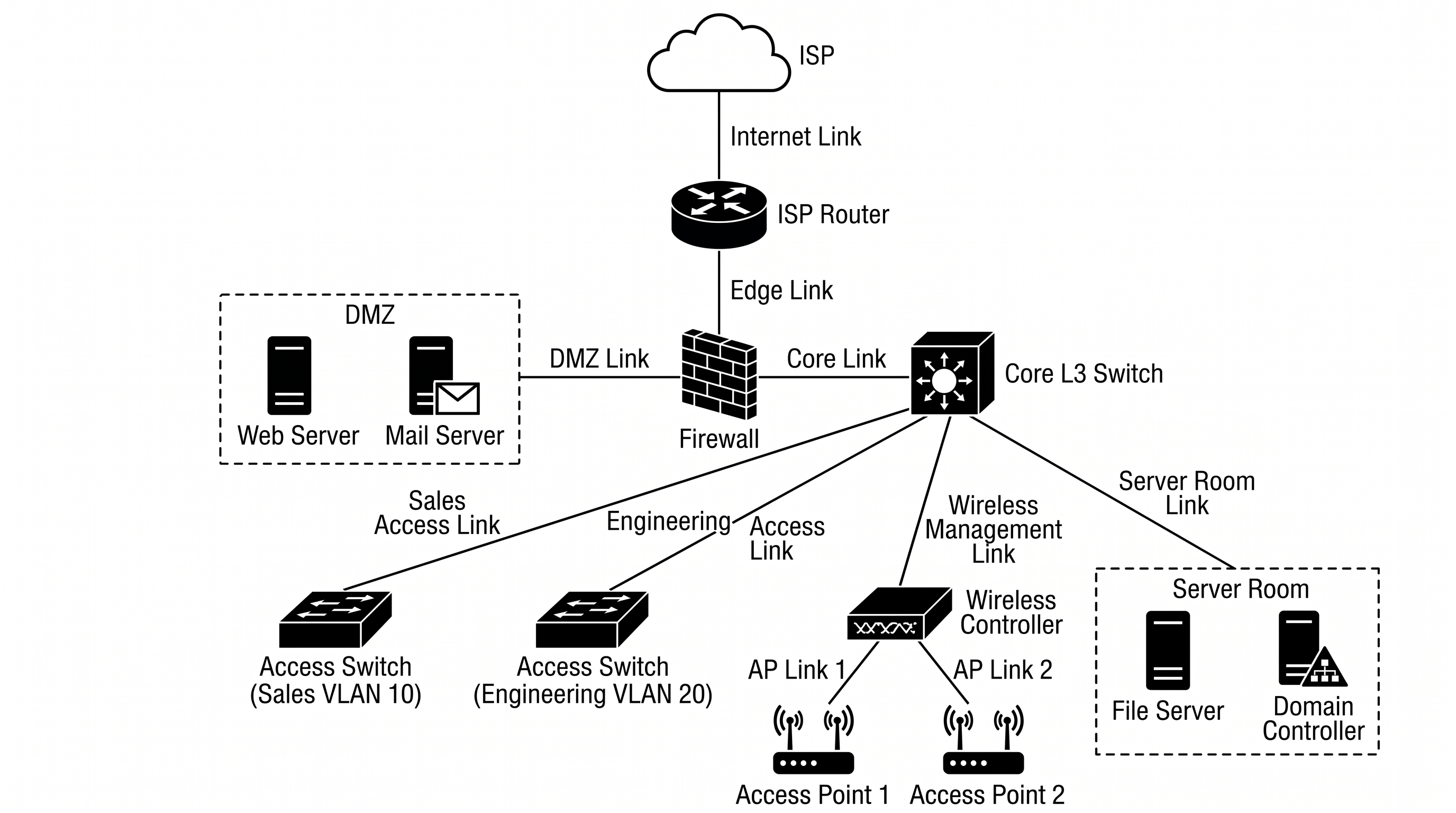
Describe how your network is connected, from the Internet link through the firewall and core switch down to access switches, servers, PCs and access points. SciDraw AI draws a layered topology with standard icons, labeled devices and VLAN or DMZ zones.
Network Topology Examples
Click an example to load its description.
What does this network topology generator do?
It draws a network topology diagram from a written description of your devices and links. Devices get standard icons (cloud, router, firewall, Layer 3 and Layer 2 switches, servers, PCs, access points), the layout runs from the Internet at the top to end devices at the bottom, links are plain lines, and VLANs, DMZs or server rooms are shown as labeled dashed zones. Use it for network course projects, lab reports, campus or office network designs and documentation.
Why a topology diagram matters
- It shows how traffic reaches every device and where the security boundaries are.
- A clear diagram makes it faster to reason about failures, single points of failure and capacity.
- Network design reports, coursework and tender documents nearly always include one.
How to draw a network topology diagram
Work from the outside in. Start with the Internet or campus uplink, then the edge router and firewall, then the core switch. Below the core, list the distribution or building switches, then the access switches, and finally the end devices: PCs, access points, printers and servers. For each device, say what it connects to. Put servers that sit together in a named zone ("server room", "DMZ") and say which devices belong to each VLAN. Keep one diagram to one site; for several sites, draw an overview plus one diagram per site.
Elements of a network topology diagram
- Edge: the Internet cloud, the ISP or edge router and the firewall.
- Core and distribution: Layer 3 switches that connect buildings, floors or departments.
- Access: Layer 2 switches and wireless access points that end devices plug into.
- Servers: web, database, DNS, DHCP or authentication servers, often grouped in a zone.
- Zones: dashed regions for VLANs, a DMZ or a server room, each with a label.
Frequently Asked Questions
What should I put in the description?
Every device and what it connects to, from the uplink down: "the firewall connects to the core switch", "the core switch connects to three building switches". Add VLAN names and which devices belong to them, and group servers into a named zone. The generator draws only the devices and links you describe.
Does it use standard network icons?
Yes. It uses flat, standard-style icons for clouds, routers, firewalls, Layer 3 and Layer 2 switches, servers, PCs, laptops and access points, similar to the icon sets used in network textbooks and vendor diagrams.
Can it show VLANs, a DMZ or redundancy?
VLANs, DMZs and server rooms are drawn as labeled dashed zones. Redundant links work if you describe each one, for example "each access switch connects to both core switches". Very large networks are clearer split into an overview and per-building diagrams.
Is the generated diagram always correct?
Check that every link you described is present and that no extra links were added; also check device labels for typos. If something is off, regenerate or refine it in the editor with a short instruction.
Can I edit it in Visio or PowerPoint?
Download it as a high-resolution PNG, or open it in the editor and convert it to a Visio file (20 credits), a PowerPoint PPTX file (10 credits) or an SVG vector file (10–15 credits).
How many credits does it cost?
Each diagram uses 5 credits at 2K. A free account gets 10 credits at sign-up and 5 more every day; paid plans and credit packs add more. See the pricing page for current plans.
Draw your network topology now
Describe your devices and links and get a clean topology diagram with standard icons.