신경망 다이어그램 생성기
한 문장을 라벨이 달린 아키텍처 그림으로
CNN, 트랜스포머, RNN/LSTM, MLP, U-Net, 전체 ML 파이프라인 등 어떤 모델 아키텍처든 설명해 보세요. SciDraw AI가 레이어, 텐서 형상, 좌에서 우로 흐르는 데이터 흐름을 갖춘 깔끔하고 라벨이 달린 다이어그램을 그려 편집하고 내보낼 수 있게 해 드립니다.
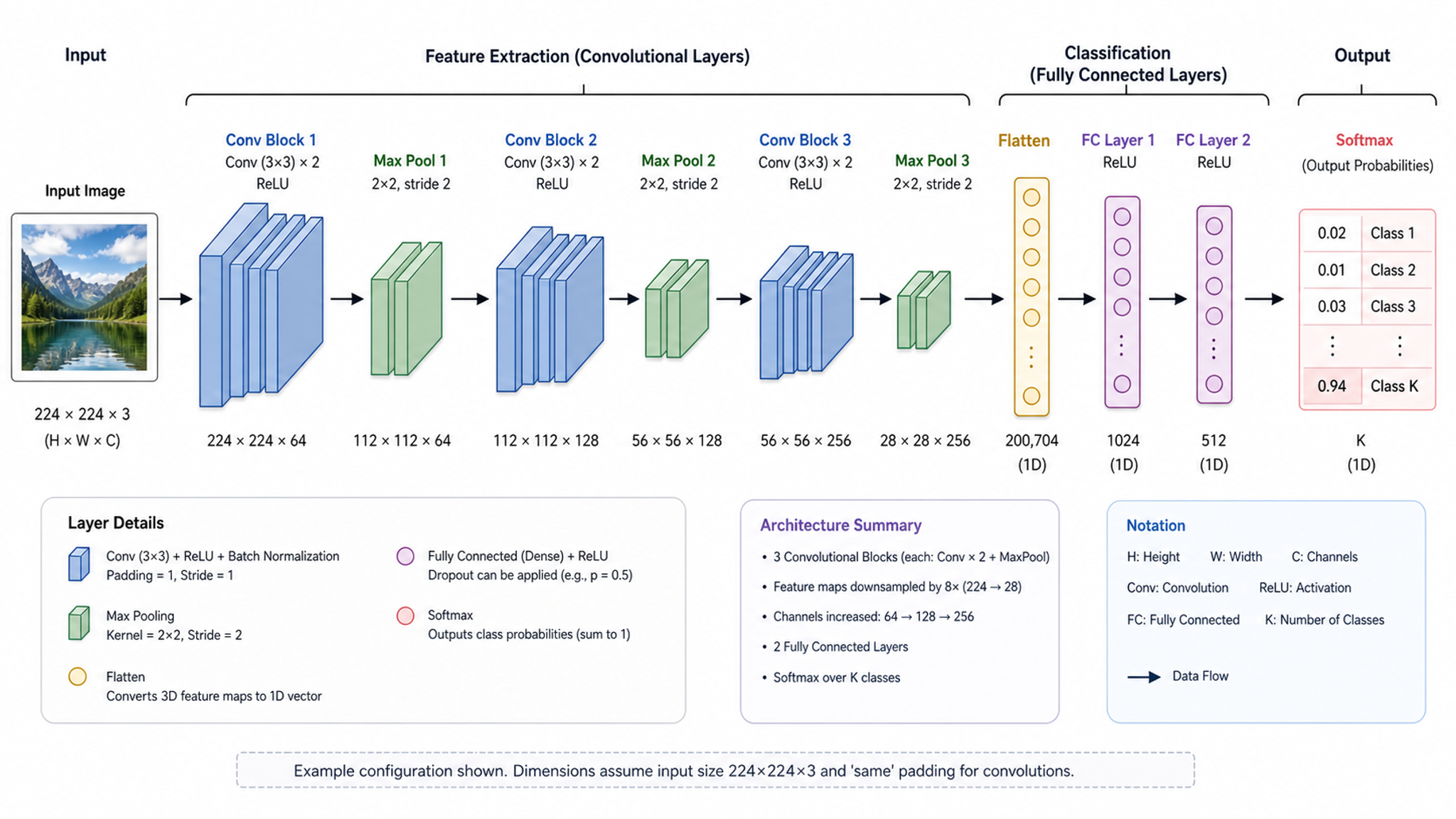
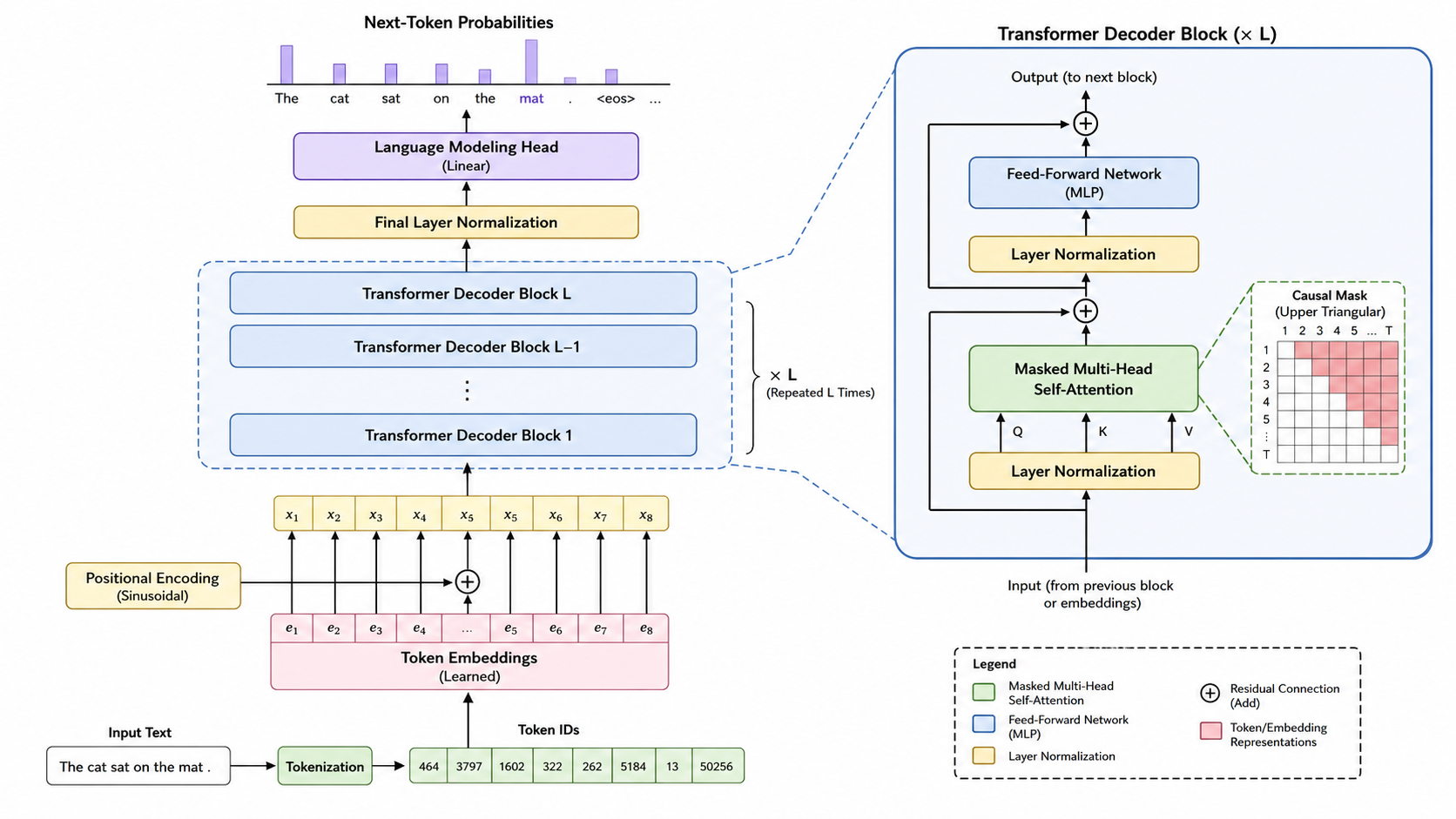
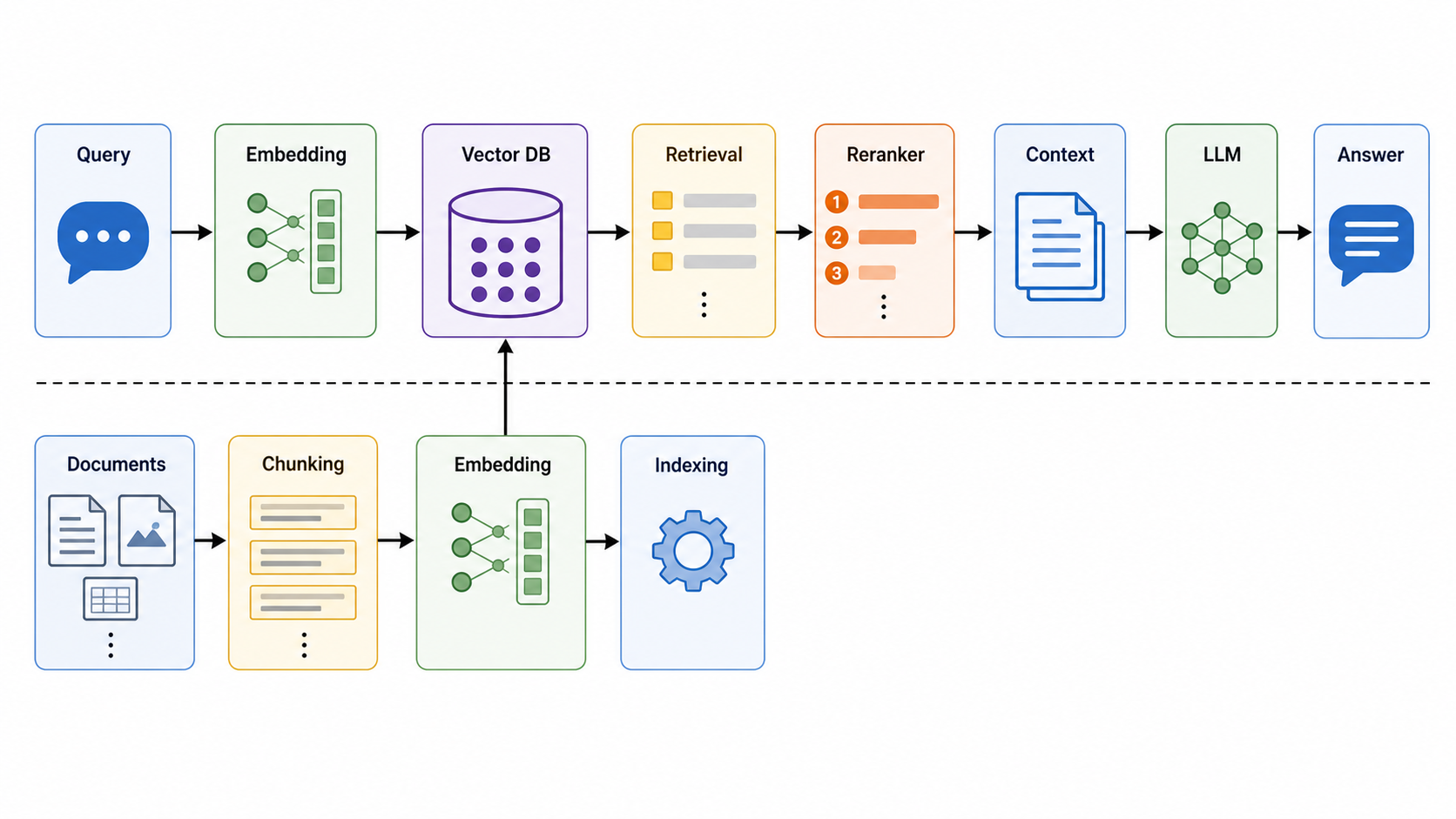
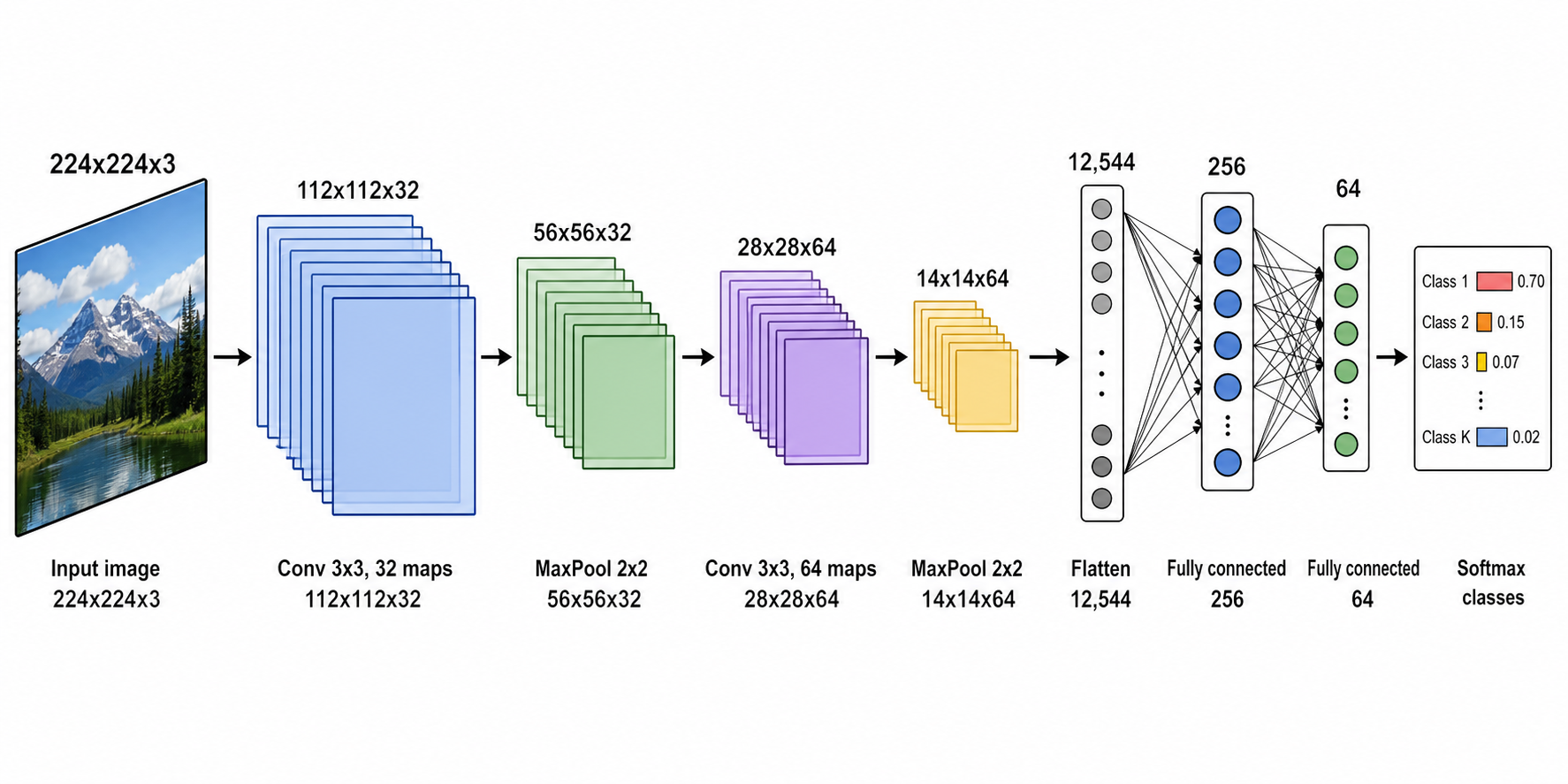
신경망 다이어그램 예시
검증된 프롬프트에서 시작해 여러분의 모델에 맞게 변형하세요.
이 도구가 하는 일
신경망 다이어그램 생성기는 평범한 문장 설명을 깔끔하고 라벨이 달린 아키텍처 그림으로 바꿔 줍니다. 원하는 레이어, 블록, 데이터 흐름 — 합성곱, 어텐션, 순환 셀, 스킵 연결, 파이프라인 단계 — 를 설명하면 SciDraw AI가 라벨이 달린 텐서 형상과 화살표로 이들을 좌에서 우로 배치합니다. 명확하고 논문에 바로 쓸 수 있는 아키텍처 그림을 빠르게 필요로 하는 ML 연구자, 학생, 엔지니어를 위해 만들어졌습니다.
AI 신경망 다이어그램 생성기를 쓰는 이유
- 슬라이드 도구에서 아키텍처를 손으로 그리는 일은 느리고 일관성을 유지하기 어렵습니다.
- 레이어 이름과 텐서 형상이 또렷하고 읽기 쉽게 유지됩니다 — 일반 이미지 AI와 다릅니다.
- 좌에서 우로 흐르는 데이터 흐름과 블록 경계 덕분에 복잡한 모델도 따라가기 쉽습니다.
- 모든 다이어그램은 편집 가능하며 논문과 발표용으로 SVG나 PowerPoint로 내보낼 수 있습니다.
- 프롬프트 하나로 CNN, 트랜스포머, RNN/LSTM, MLP, U-Net, 파이프라인 등 다양한 아키텍처를 다룹니다.
신경망 다이어그램 만드는 방법
1) 아키텍처를 설명하세요 — 순서대로 레이어나 블록, 그리고 입력/출력을 나열합니다. 2) 생성을 클릭해 라벨이 달린 초안을 받습니다. 3) 레이어를 추가하거나 형상을 표기하고, 색이나 라벨을 변경하도록 요청해 다듬습니다. 4) SVG나 PPTX로 내보내거나, 논문, 슬라이드, 포스터용 고해상도 이미지를 다운로드합니다.
그릴 수 있는 것들
- 합성곱, 풀링, 완전연결 레이어
- 어텐션 블록, 인코더, 디코더
- 순환 셀(RNN, LSTM, GRU)과 펼쳐진 시퀀스
- 스킵 연결, 잔차 블록, 연결(concatenation)
- 텐서 형상, 채널 수, 데이터 흐름 화살표
- 엔드투엔드 학습 및 추론 파이프라인
신경망 다이어그램 생성기 — 자주 묻는 질문
어떤 아키텍처를 만들 수 있나요?
CNN, 트랜스포머, RNN/LSTM/GRU, MLP, 오토인코더, U-Net, GAN, 엔드투엔드 ML 파이프라인 등을 만들 수 있습니다. 순서대로 레이어나 블록, 그리고 입력/출력을 설명하면 됩니다.
텐서 형상과 레이어 이름을 표시할 수 있나요?
네. 라벨이 달린 레이어, 채널 수, 텐서 형상을 요청할 수 있으며, 일반 이미지 생성기 특유의 깨진 라벨이 아니라 또렷하고 읽기 쉬운 텍스트로 렌더링됩니다.
생성한 후에 다이어그램을 편집할 수 있나요?
물론입니다. 전체 그림을 다시 그리지 않고도 레이어를 추가·삭제하거나, 형상을 표기하고, 색을 바꾸고, 단순화하고, 이름을 변경하도록 요청해 어떤 다이어그램이든 다듬을 수 있습니다.
PowerPoint나 SVG로 내보낼 수 있나요?
네. 다이어그램은 편집 가능한 SVG나 PowerPoint(PPTX)로 내보내거나 고해상도 이미지로 다운로드할 수 있어 논문, 슬라이드, 포스터에 바로 쓸 수 있습니다.
학술 논문에 적합한가요?
논문에 바로 쓸 수 있는 출력을 위해 설계되었습니다: 깔끔한 기술적 스타일, 라벨이 달린 레이어와 흐름, 정확한 블록 경계를 갖췄습니다. 제출 전에 본인 모델에 맞는 형상을 검토하세요.
디자인 실력이 필요한가요?
아니요. 아키텍처를 한 문장으로 설명할 수 있다면 전문가급 그림을 만들 수 있습니다. 레이아웃, 스타일링, 라벨링은 AI가 처리합니다.