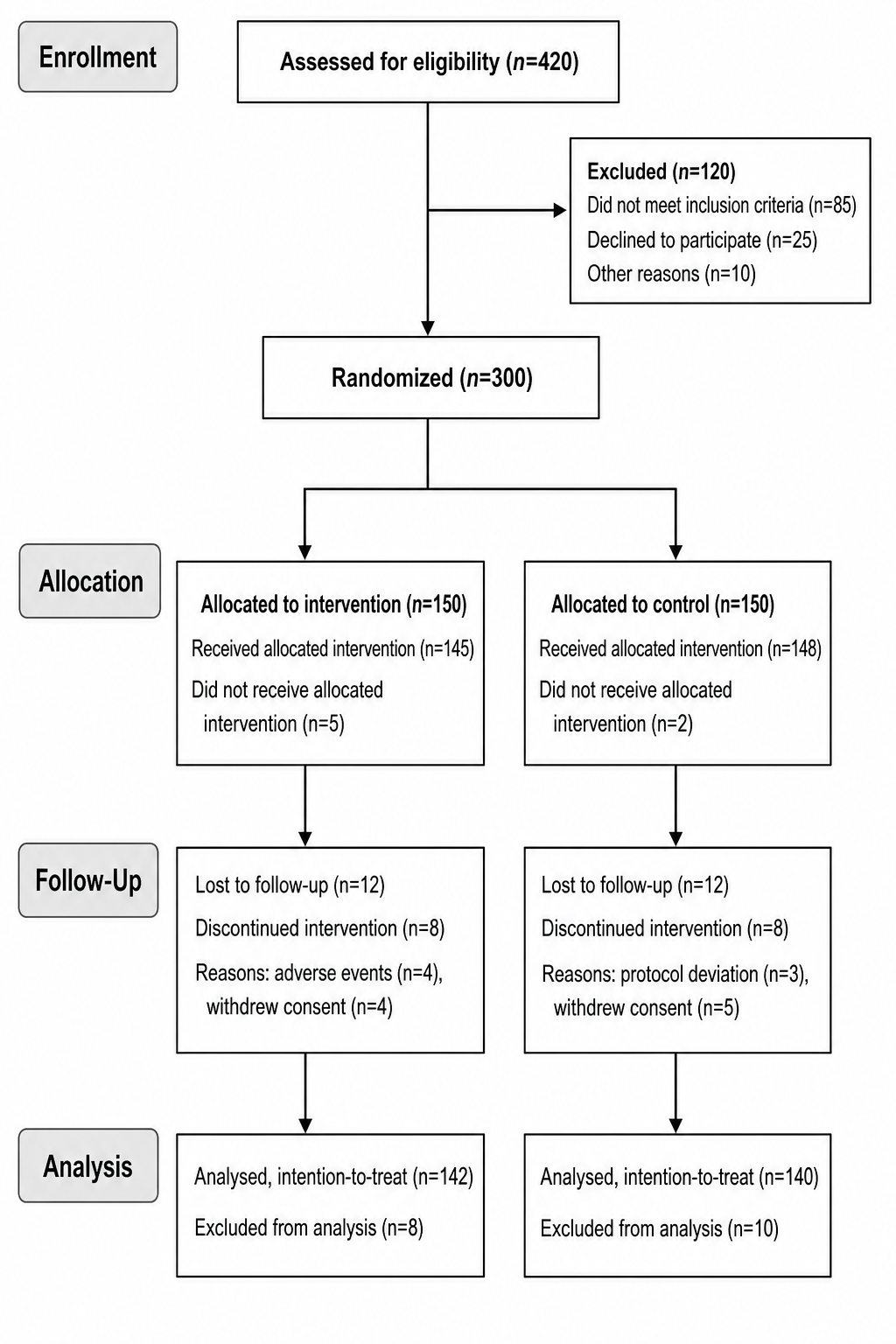
Gerador de Diagrama de Fluxo CONSORT
Transforme os números de recrutamento do seu ensaio em uma figura pronta para publicação
Descreva o fluxo de participantes do seu ensaio clínico — a IA desenha um diagrama CONSORT 2025 por padrão (rótulos CONSORT 2010 se pedir), com caixas rotuladas e contagens n=.
Exemplos de diagrama CONSORT
Clique em qualquer exemplo para carregar seu prompt ou use-o como ponto de partida para o seu próprio diagrama de fluxo CONSORT.
O que faz este gerador de diagrama de fluxo CONSORT?
Ele transforma a descrição do fluxo de participantes do seu ensaio clínico em um diagrama de fluxo CONSORT 2010 limpo — o fluxograma padrão de cima para baixo que acompanha os participantes ao longo do recrutamento, da alocação, do seguimento e da análise. Você descreve quantos foram avaliados quanto à elegibilidade, excluídos e por quê, randomizados, alocados a cada braço de intervenção, perdidos no seguimento e analisados, e a IA desenha as caixas rotuladas, as setas verticais e os ramos de exclusão com a contagem de participantes (n=) em cada caixa — sem software de diagramação nem alinhamento manual.
Por que usar um gerador de diagrama de fluxo CONSORT
- O diagrama de fluxo CONSORT é exigido pela maioria dos periódicos que publicam ensaios clínicos randomizados.
- Alinhar caixas, setas e braços paralelos à mão em ferramentas de desenho é lento e trabalhoso.
- Mostrar exclusões, perdas no seguimento e contagens de análise torna o fluxo de participantes transparente para os revisores.
- Pesquisadores precisam de uma figura limpa e consistente para manuscritos, pôsteres e palestras com rapidez.
- Gerar de novo a partir de uma descrição é mais rápido do que redesenhar o diagrama sempre que os números mudam.
Como fazer um diagrama de fluxo CONSORT
Liste seus números para cada fase: quantos foram avaliados quanto à elegibilidade, quantos foram excluídos e por quais motivos, e quantos foram randomizados; quantos foram alocados a cada intervenção e quantos a receberam; quantos foram perdidos no seguimento ou descontinuaram a intervenção; e quantos foram analisados ou excluídos da análise por intenção de tratar. Gere o diagrama e, em seguida, verifique se cada caixa traz a contagem n= correta e se os braços estão equilibrados, refinando até corresponder ao seu ensaio.
Partes de um diagrama de fluxo CONSORT
- Recrutamento — avaliados quanto à elegibilidade, excluídos com os motivos e randomizados.
- Alocação — participantes alocados a cada braço de intervenção e quantos a receberam.
- Seguimento — perdas no seguimento e descontinuação da intervenção, com contagens e motivos.
- Análise — analisados e excluídos da análise, em geral por intenção de tratar.
- Contagem de participantes — um número n= em cada caixa.
- Setas de fluxo — setas verticais para o fluxo principal e ramos laterais para as exclusões.
Diagrama de fluxo CONSORT 2025 vs 2010: o que mudou
- O diagrama de fluxo do participante ainda tem quatro fases — recrutamento, alocação, seguimento e análise. O CONSORT 2025 não adiciona uma quinta fase.
- Na caixa de seguimento de cada braço, o CONSORT 2025 lista primeiro a descontinuação da intervenção e depois perda de seguimento do desfecho primário; em 2010 a ordem era inversa.
- Na caixa de análise, o CONSORT 2025 usa "Analysed for primary outcome"; "Excluded from analysis (give reasons)" permanece. O CONSORT 2010 usava "Analysed".
- Itens de checklist do diagrama passaram de 13a/13b (2010) para 22a/22b (2025); a checklist tem 30 itens numerados em vez de 25.
Perguntas frequentes sobre o Gerador de Diagrama de Fluxo CONSORT
O que é um diagrama de fluxo CONSORT?
Um diagrama de fluxo CONSORT acompanha participantes de um ensaio controlado randomizado em quatro fases — recrutamento, alocação, seguimento e análise. O CONSORT 2025 substitui a declaração de 2010 e mostra as contagens em cada caixa.
De quais informações preciso para fazer um?
Você precisa das contagens de participantes de cada fase: número de avaliados quanto à elegibilidade e de excluídos (com motivos), o número randomizado, quantos foram alocados a cada intervenção e a receberam, quantos foram perdidos no seguimento ou descontinuaram, e quantos foram analisados. Descreva isso e o gerador coloca cada n= na caixa certa.
Qual a diferença entre um diagrama CONSORT e um diagrama PRISMA?
São padrões diferentes para estudos diferentes. O diagrama CONSORT mostra o fluxo de participantes em um ensaio clínico randomizado (recrutamento, alocação, seguimento, análise), enquanto o diagrama PRISMA mostra a seleção de estudos em uma revisão sistemática ou metanálise (registros identificados, triados e incluídos). Use CONSORT para ensaios e PRISMA para revisões.
Ele dá conta de mais de dois braços ou de um desenho cruzado?
Sim. Descreva o número de braços — dois braços paralelos, três braços multicêntricos ou um desenho cruzado com sequências randomizadas e washout — junto com as contagens de cada um, e o gerador organiza colunas paralelas equilibradas ou caminhos de sequência conforme o caso.
Posso mostrar motivos de exclusão e perdas no seguimento?
Sim. Liste os motivos de exclusão com as contagens e os participantes perdidos no seguimento ou que descontinuaram a intervenção em cada braço, e o diagrama adiciona os ramos laterais e as caixas de seguimento, para que os revisores vejam exatamente onde os participantes saíram do ensaio.
Posso exportar uma figura editável?
O SciDraw AI exporta para formatos vetoriais, para que você possa ajustar caixas, contagens e rótulos depois. Sempre confira cada n= com os registros do seu ensaio antes de submeter.
Devo usar o diagrama de fluxo CONSORT 2010 ou 2025?
O CONSORT 2025 substitui o CONSORT 2010. Siga as diretrizes da revista-alvo — algumas ainda exigem o diagrama de 2010 ou aceitam ambas as versões. Extensões para cluster e não inferioridade ainda referenciam o CONSORT 2010; combine o diagrama genérico 2025 com a extensão adequada.
Explore mais ferramentas
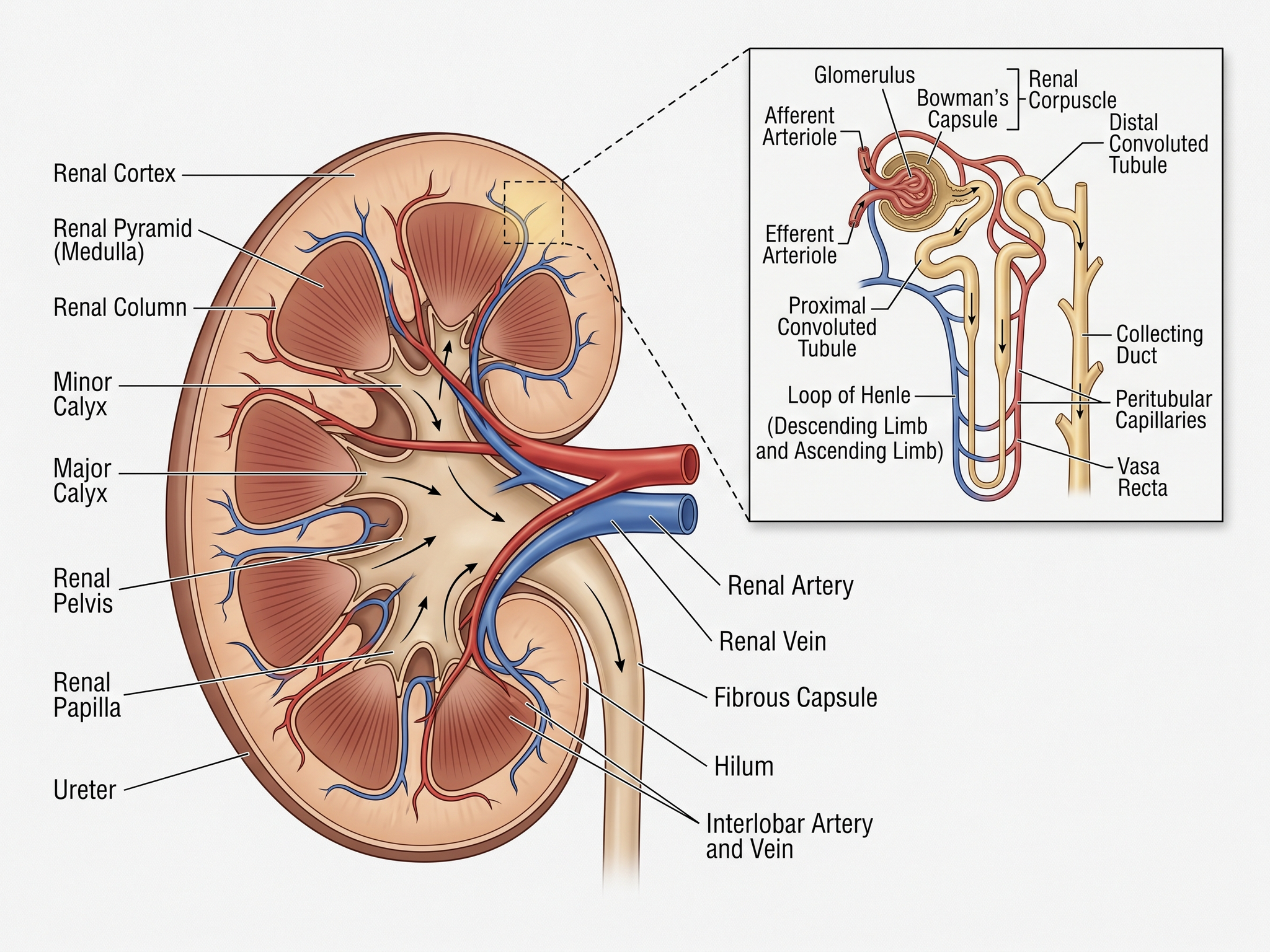
Gerador de ilustrações médicas
Crie diagramas anatômicos, esquemas clínicos e visuais didáticos
Experimente grátis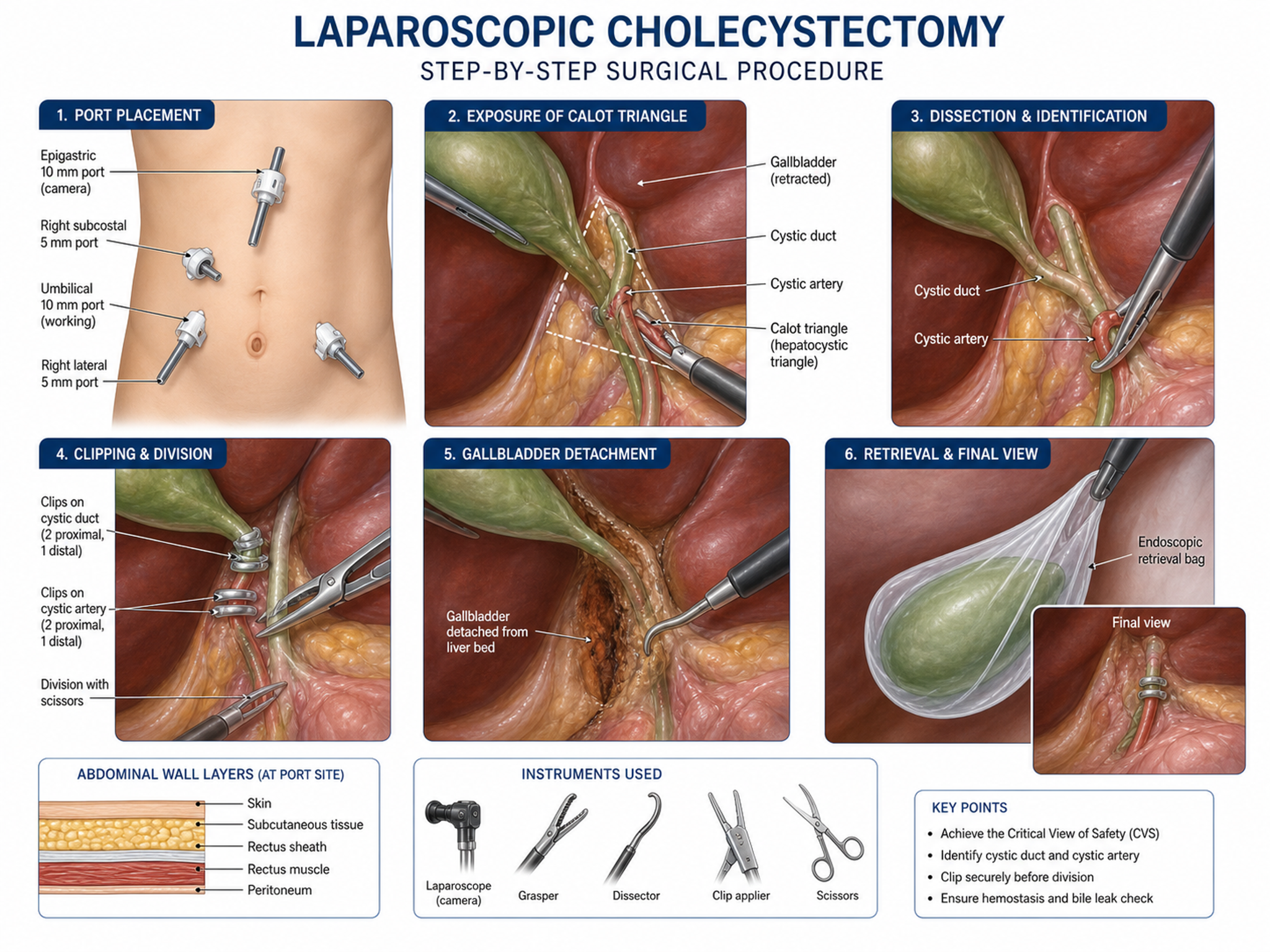
Gerador de Ilustrações Clínicas
Crie diagramas anatômicos e figuras de procedimentos cirúrgicos
Experimente grátis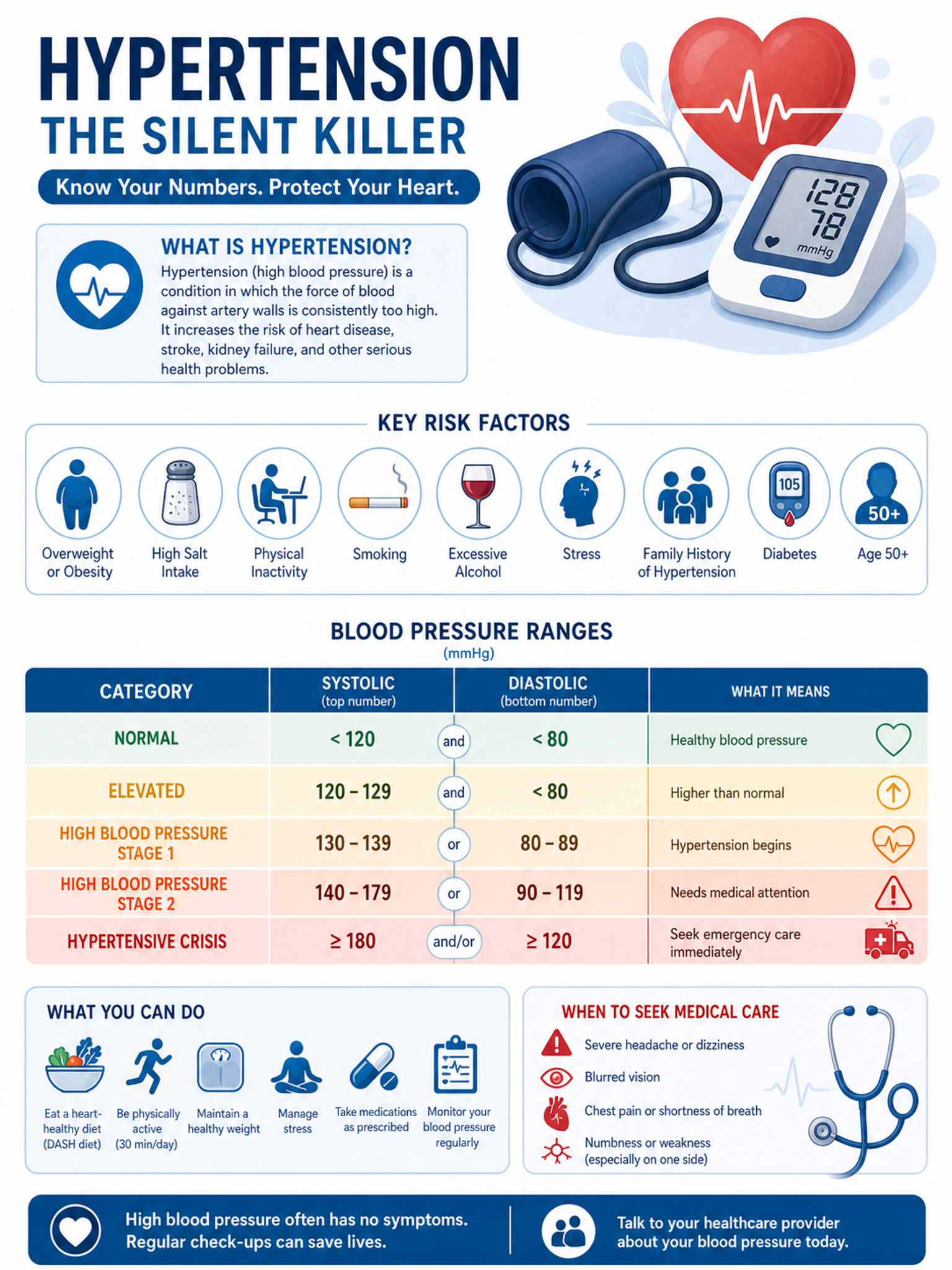
Criador de Infográficos Médicos
Crie infográficos médicos e visuais de educação ao paciente
Experimente grátisPrecisa de outras figuras científicas?
Gere fluxogramas PRISMA, gráficos de floresta, curvas de sobrevida e outras figuras de pesquisa com o SciDraw AI.