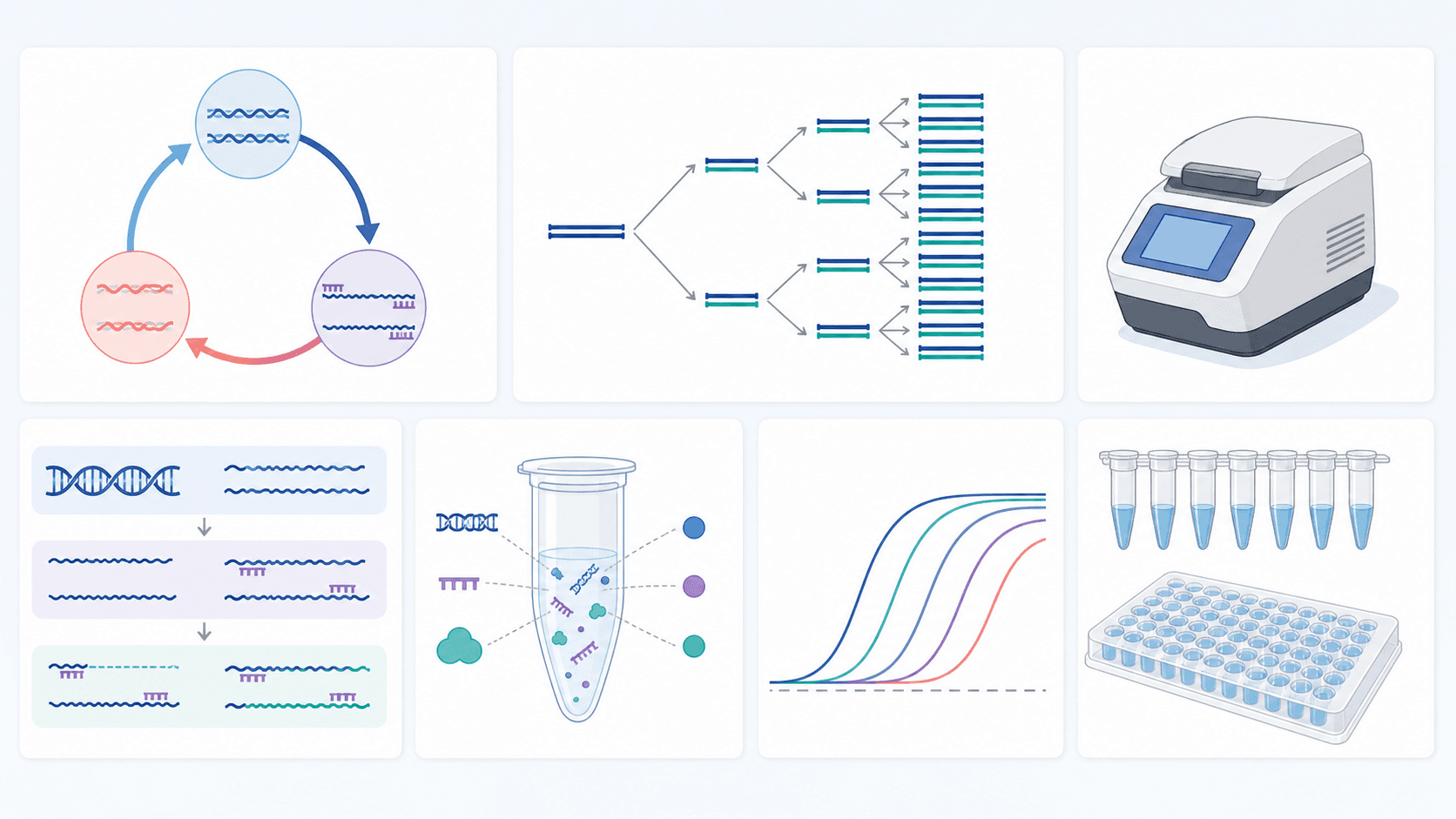
I diagrammi della PCR sono ingannevolmente difficili da disegnare: rendono concreto un processo astratto e ciclico — filamenti che si separano, primer che si legano, polimerasi che estende, copie che raddoppiano a ogni ciclo — mantenendo correttamente etichettate temperature, direzioni e componenti. Questa guida ti offre 24 prompt pronti all'uso per diagrammi della PCR, un modello di prompt riutilizzabile ed esempi reali generati, così puoi creare figure della PCR pronte per la pubblicazione, pulite ed etichettate, con l'AI in pochi minuti — senza software di grafica e senza saper disegnare.
Al termine di questa guida saprai:
- Generare un diagramma del ciclo della PCR, un diagramma qPCR, un diagramma RT-PCR, un diagramma del legame dei primer e un diagramma del workflow della PCR da una singola frase.
- Adattare qualsiasi prompt al tuo protocollo con un semplice modello in quattro parti.
- Evitare gli errori comuni che rendono sbagliati i diagrammi della reazione a catena della polimerasi generati dall'AI.
Incolla qualsiasi prompt nel Generatore di diagrammi della PCR, poi perfeziona il risultato chiedendo di aggiungere un passaggio, regolare le temperature, ricolorare o rietichettare — oppure aprilo nell'editor di SciDraw AI per continuare a iterare.
L'anatomia di un buon prompt per la PCR
I risultati deboli nascono quasi sempre da prompt vaghi. Un buon prompt per il generatore di diagrammi della PCR ha quattro parti:
- Soggetto — quale processo o struttura (es. "un ciclo di PCR" o "una curva di amplificazione qPCR").
- Passaggi e temperature — nomina i passaggi e indica la temperatura di ciascuno (denaturazione ~95 °C, annealing ~55 °C, estensione ~72 °C).
- Etichette — nomina ogni componente che vuoi etichettare (DNA stampo, primer forward/reverse, dNTP, Taq polimerasi).
- Stile e layout — "vettoriale piatto, pronto per la pubblicazione, flusso da sinistra a destra, direzioni 5′→3′ mostrate."
Modello: "Disegna [soggetto] mostrando [passaggi e temperature]. Etichetta [componenti]. Usa uno stile vettoriale piatto e pulito con direzioni 5′→3′ e un layout da sinistra a destra (o ciclico)."
Tieni questo modello a portata di mano — ogni prompt qui sotto lo segue, e puoi sostituire il soggetto con il tuo.
Come ottenere figure della PCR pulite e accurate
- Indica le temperature di ogni passaggio (es. 95 °C, 55 °C, 72 °C) così compaiono nella figura.
- Nomina i componenti — stampo, primer, dNTP, polimerasi — che vuoi etichettati.
- Mostra la direzione. Chiedi 5′→3′ su ogni filamento e primer così il legame dei primer si legge correttamente.
- Scegli l'ambito. Un ciclo, l'intero workflow della PCR o una lettura dei risultati — deciditi prima di prompare.
- Itera, non ricominciare. Perfeziona con "aggiungi un quarto pannello che mostra l'amplificazione esponenziale" o "ricolora il primer forward di blu" invece di riscrivere tutto il prompt.
Il ciclo della PCR
Il diagramma del ciclo della PCR è la figura della reazione a catena della polimerasi più richiesta — e la più facile da sbagliare, perché i tre passaggi e le loro temperature devono allinearsi esattamente. Parti da un ciclo completo, poi diramati verso i singoli passaggi.
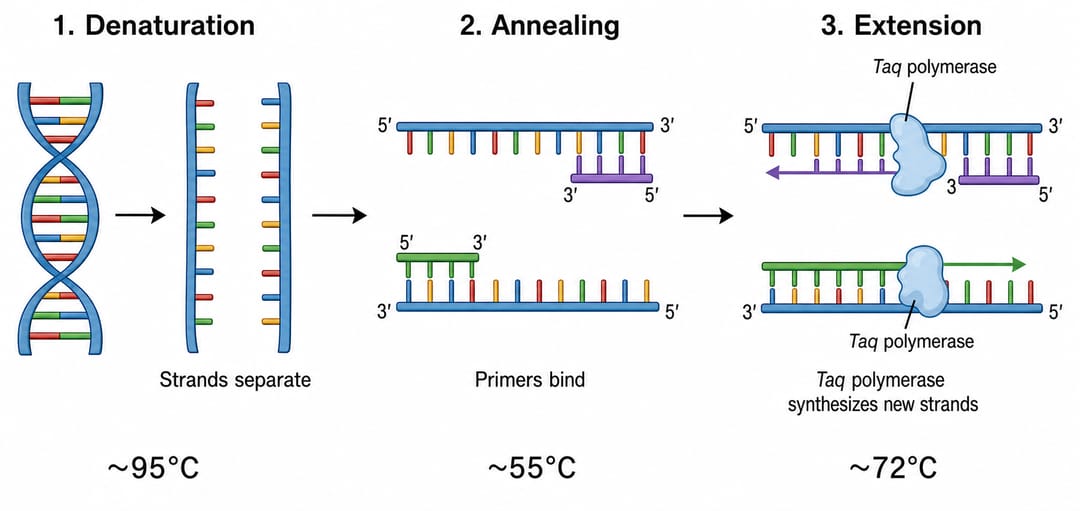
- Disegna un ciclo di PCR come tre passaggi etichettati — denaturazione (~95 °C), annealing (~55 °C) ed estensione (~72 °C) — mostrando il DNA a doppio filamento, i primer forward e reverse e la Taq polimerasi, con la temperatura sotto ogni passaggio e le direzioni 5′→3′ marcate.
- Disegna l'amplificazione esponenziale della PCR lungo i primi quattro cicli, mostrando come il numero di copie raddoppia a ogni ciclo (1 → 2 → 4 → 8), con lo stampo originale evidenziato.
- Disegna nel dettaglio il passaggio di denaturazione: DNA a doppio filamento che si separa in due singoli filamenti a ~95 °C mentre si rompono i legami a idrogeno, con i due filamenti antiparalleli etichettati 5′→3′ e 3′→5′.
- Disegna nel dettaglio il passaggio di annealing: i primer forward e reverse che si legano ai filamenti singoli complementari a ~55 °C, con le direzioni 5′→3′ etichettate e l'appaiamento delle basi primer–stampo mostrato.
- Disegna nel dettaglio il passaggio di estensione: la Taq polimerasi che aggiunge dNTP all'estremità 3′ di ciascun primer a ~72 °C, sintetizzando nuovi filamenti complementari in direzione 5′→3′.
- Disegna un profilo di temperatura del termociclatore per un programma di PCR: un grafico lineare temperatura in funzione del tempo che mostra la denaturazione iniziale, poi i cicli ripetuti denaturazione–annealing–estensione e un'estensione finale, con ogni fase etichettata.
qPCR e rilevamento in tempo reale
I diagrammi qPCR (diagrammi della PCR in tempo reale) aggiungono una lettura in fluorescenza alla reazione, quindi la chiave è mostrare chiaramente la curva di amplificazione e la chimica di rilevamento. Questi prompt coprono il grafico di amplificazione della PCR in tempo reale, le chimiche comuni e la quantificazione.
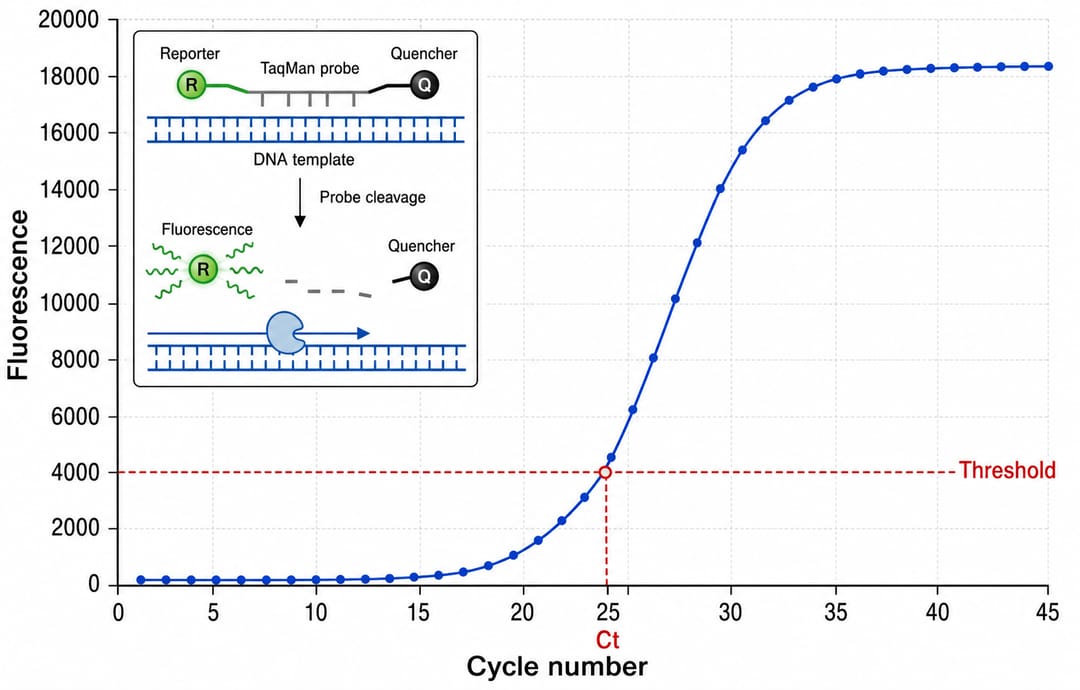
- Disegna un grafico di amplificazione qPCR (PCR in tempo reale): fluorescenza in funzione del numero di ciclo con una curva sigmoidale che mostra le fasi di baseline, esponenziale, lineare e plateau, più una linea di soglia e il valore Ct marcato, con gli assi etichettati.
- Disegna il meccanismo della sonda TaqMan: la sonda che si appaia tra i primer, poi viene tagliata dall'attività esonucleasica 5′ della Taq polimerasi per separare il fluoroforo reporter dal quencher ed emettere fluorescenza, con reporter e quencher etichettati.
- Disegna un meccanismo qPCR con SYBR Green che mostra il colorante che fluoresce solo quando legato al DNA a doppio filamento, con il segnale che aumenta man mano che il prodotto si accumula a ogni ciclo.
- Disegna una curva standard qPCR per la quantificazione assoluta: valore Ct in funzione del logaritmo della quantità iniziale come retta, con la pendenza, l'R² e l'efficienza di amplificazione etichettati.
- Disegna un'analisi della curva di melting: fluorescenza (o −dF/dT) in funzione della temperatura che mostra un singolo picco per un prodotto specifico contro un picco di dimero di primer, etichettato.
RT-PCR e varianti
I diagrammi RT-PCR aggiungono un passaggio di trascrizione inversa prima dell'amplificazione, quindi il flusso da RNA a cDNA a prodotto deve essere inequivocabile. Questi prompt coprono il workflow della RT-PCR e le varianti comuni della PCR.
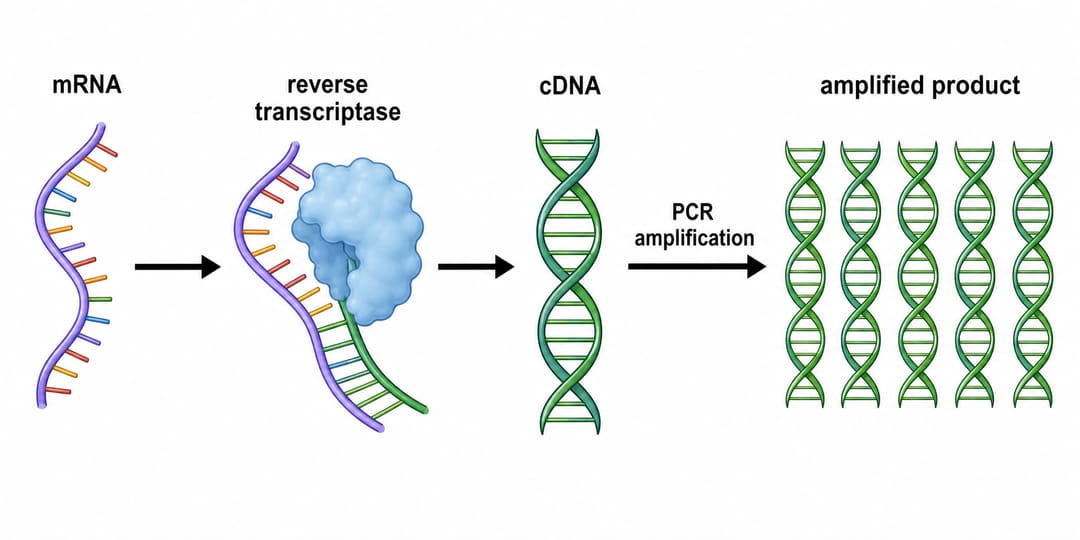
- Disegna il workflow della RT-PCR come flusso da sinistra a destra: mRNA, trascrizione inversa in cDNA da parte della trascrittasi inversa, poi amplificazione PCR del cDNA, etichettando ogni componente ed enzima.
- Disegna la differenza tra RT-PCR one-step e two-step in due corsie parallele, mostrando la provetta unica contro le reazioni RT e PCR separate.
- Disegna la RT-qPCR: combina la trascrizione inversa dell'mRNA in cDNA con un grafico di amplificazione in tempo reale, mostrando la quantificazione dell'espressione genica dall'inizio alla fine.
- Disegna una PCR multiplex che amplifica diversi bersagli con coppie di primer differenti in un'unica reazione, ogni amplicone di un colore diverso, terminando in bande distinte su gel.
- Disegna una nested PCR: una coppia di primer esterni che amplifica una regione lunga, poi una coppia di primer interni che amplifica una regione interna più corta per maggiore specificità.
Primer, workflow e confronto
I diagrammi del legame dei primer e i diagrammi del workflow della PCR legano la chimica al protocollo di banco. Questi prompt coprono il design dei primer, il workflow end-to-end, la lettura su gel e i confronti affiancati.
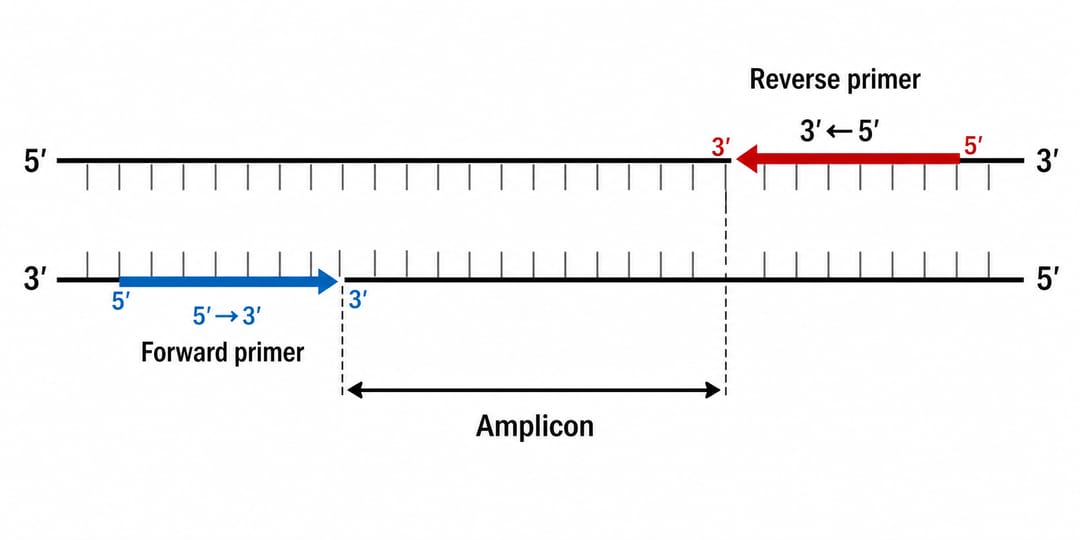
- Disegna uno schema del legame dei primer della PCR: una regione bersaglio su DNA a doppio filamento con i primer forward e reverse che si appaiano ai filamenti opposti in orientamento 5′→3′, e l'estensione dell'amplicone tra di essi etichettata.
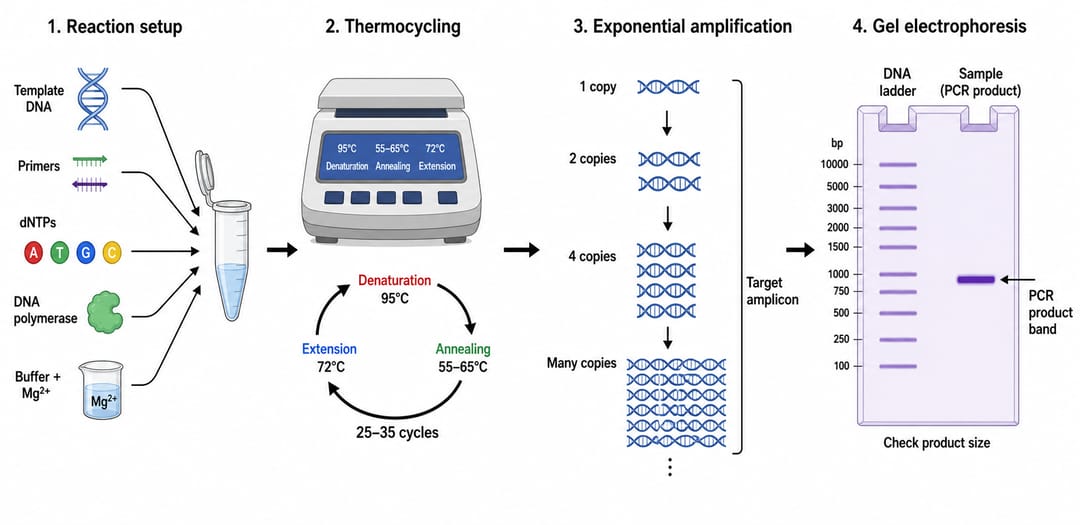
- Disegna il workflow completo della PCR: allestimento della reazione (stampo, primer forward e reverse, dNTP, Taq polimerasi, tampone, Mg²⁺), il termociclatore, l'amplificazione esponenziale e l'elettroforesi su gel per verificare il prodotto, come flusso da sinistra a destra.
- Disegna un risultato di elettroforesi su gel per un prodotto di PCR: una corsia con marcatore di peso molecolare con le dimensioni delle bande etichettate accanto alle corsie dei campioni che mostrano un'unica banda specifica, con i pozzetti e la direzione di migrazione etichettati.
- Disegna un diagramma etichettato di design dei primer che mostra il posizionamento dei primer forward e reverse, le estremità 3′ rivolte l'una verso l'altra, il contenuto in GC e le annotazioni della temperatura di melting (Tm).
- Disegna un workflow di colony PCR usato per screenare colonie batteriche alla ricerca di un inserto: prelievo delle colonie, lisi, amplificazione e verifica su gel che distingue i cloni positivi da quelli negativi.
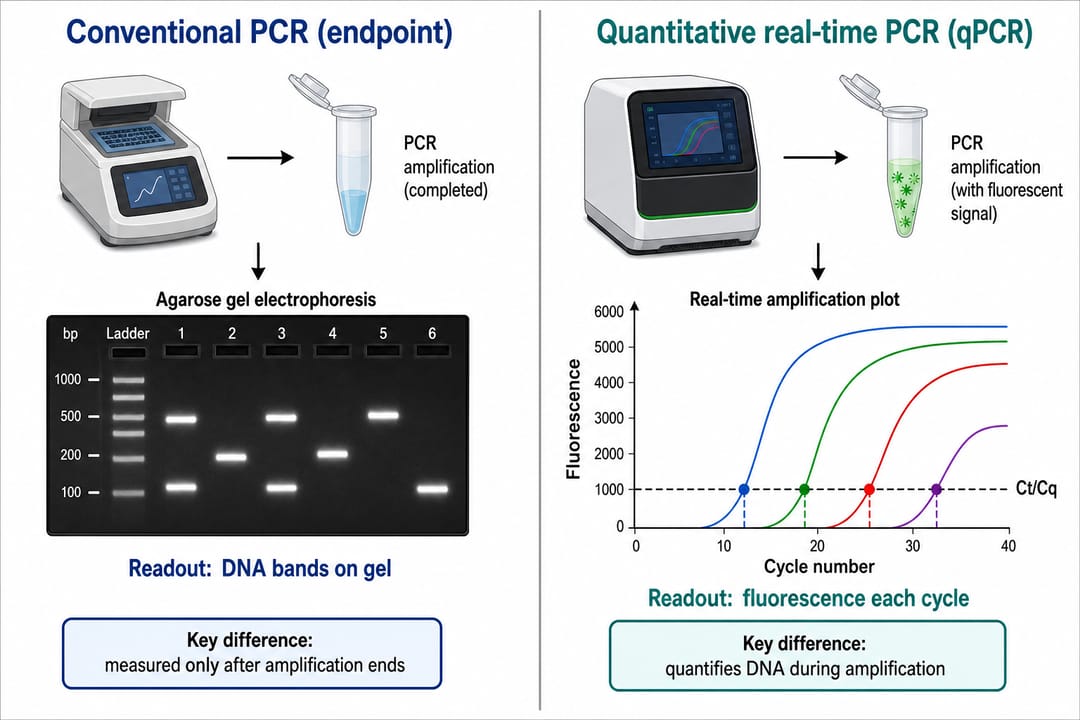
- Disegna un confronto a due colonne tra PCR convenzionale (a endpoint) e qPCR (PCR in tempo reale), etichettando la lettura della banda su gel per la PCR a endpoint e la curva di fluorescenza in tempo reale per la qPCR.
- Disegna un confronto tra PCR e RT-PCR affiancate, mostrando lo stampo di DNA per la PCR e lo stampo di RNA (con un passaggio di trascrizione inversa) per la RT-PCR.
- Disegna un diagramma di hot-start PCR che contrappone una reazione standard a una polimerasi hot-start che resta inattiva fino al primo passaggio ad alta temperatura, riducendo l'amplificazione non specifica.
Errori comuni (e come correggerli)
- Temperature sbagliate o mancanti. Soluzione: indica esplicitamente ogni valore nel prompt ("denaturazione 95 °C, annealing 55 °C, estensione 72 °C"). Ri-prompta con "correggi la temperatura di annealing a 55 °C."
- Direzioni dei filamenti invertite o assenti. Soluzione: chiedi "etichette 5′→3′ e 3′→5′ sui filamenti antiparalleli" così i primer puntano nella direzione giusta.
- Figura del ciclo sovraffollata. Soluzione: chiedi di "semplificare ai tre passaggi principali" o di separare il ciclo e l'amplificazione in pannelli distinti.
- Testo confuso (tipico delle AI di immagini generiche). Soluzione: SciDraw AI produce etichette sans-serif pulite; ri-prompta la formulazione esatta (es. "Taq polimerasi", "dNTP") se necessario.
- Primer disegnati dello stesso colore dello stampo. Soluzione: nomina un codice colore ("primer forward blu, primer reverse rosso, stampo grigio") così il legame dei primer risalta.
Esporta e usa le tue figure della PCR
Quando una figura è corretta, esportala in SVG modificabile o PowerPoint (PPTX), oppure scarica un'immagine ad alta risoluzione per il tuo manoscritto, le diapositive o il poster. Devi correggere un'etichetta, cambiare una temperatura o tradurre il testo? Vedi come modificare testo ed etichette in una figura AI. Ti serve uno schema di colori diverso per l'accessibilità? Vedi come ricolorare un diagramma (incluse palette adatte ai daltonici).
Domande frequenti
Qual è il miglior strumento AI per disegnare diagrammi della PCR? Il Generatore di diagrammi della PCR di SciDraw AI è pensato per figure della PCR pronte per la pubblicazione — il ciclo della PCR, le curve di amplificazione qPCR, i workflow RT-PCR, il legame dei primer e i gel — con etichette pulite e accurate, temperature corrette ed esportazione modificabile.
Come disegno un diagramma della PCR con l'AI? Descrivi il soggetto, i passaggi e le temperature e i componenti che vuoi etichettati (stampo, primer, dNTP, polimerasi), poi genera. Usa il prompt n. 1 qui sopra come punto di partenza per un diagramma completo del ciclo della PCR.
Posso creare un diagramma della PCR gratis? Sì — puoi iniziare a generare diagrammi della PCR gratuitamente, poi passare a un piano superiore per più crediti ed esportazione modificabile SVG/PPTX per i tuoi articoli, le diapositive e le dispense per gli studenti.
Qual è la differenza tra un diagramma della PCR e un diagramma qPCR? Un diagramma del ciclo della PCR mostra i passaggi denaturazione–annealing–estensione e l'amplificazione esponenziale; un diagramma qPCR (PCR in tempo reale) aggiunge un grafico di amplificazione fluorescenza-in-funzione-del-ciclo con linea di soglia e valore Ct. Puoi generare entrambi con i prompt qui sopra.
Le figure sono abbastanza accurate per articoli e studenti? Sono progettate per un output pronto per la pubblicazione, ma verifica sempre le temperature, le direzioni dei filamenti e le etichette per il tuo protocollo specifico prima di inviare o di insegnare da una figura.
Inizia a creare
Scegli uno dei prompt qui sopra, incollalo nel Generatore di diagrammi della PCR e perfezionalo nell'editor di SciDraw AI finché non corrisponde al tuo protocollo. Da un singolo ciclo di PCR a un workflow qPCR completo, la tua prossima figura di biologia molecolare è a una frase di distanza.