Creatore gratuito di diagrammi del sistema solare
Crea un modello del sistema solare etichettato da semplice testo
Descrivi il Sole, gli otto pianeti, il loro ordine e le orbite o la fascia degli asteroidi che vuoi mostrare, e l'IA disegna un diagramma del sistema solare pulito e professionale — pronto per la lezione di scienze, le lezioni di astronomia e le schede di studio.
Esempi di diagrammi del sistema solare
Clicca un esempio per caricarne il prompt, oppure usalo come punto di partenza per il tuo diagramma del sistema solare.
Che cos'è un diagramma del sistema solare?
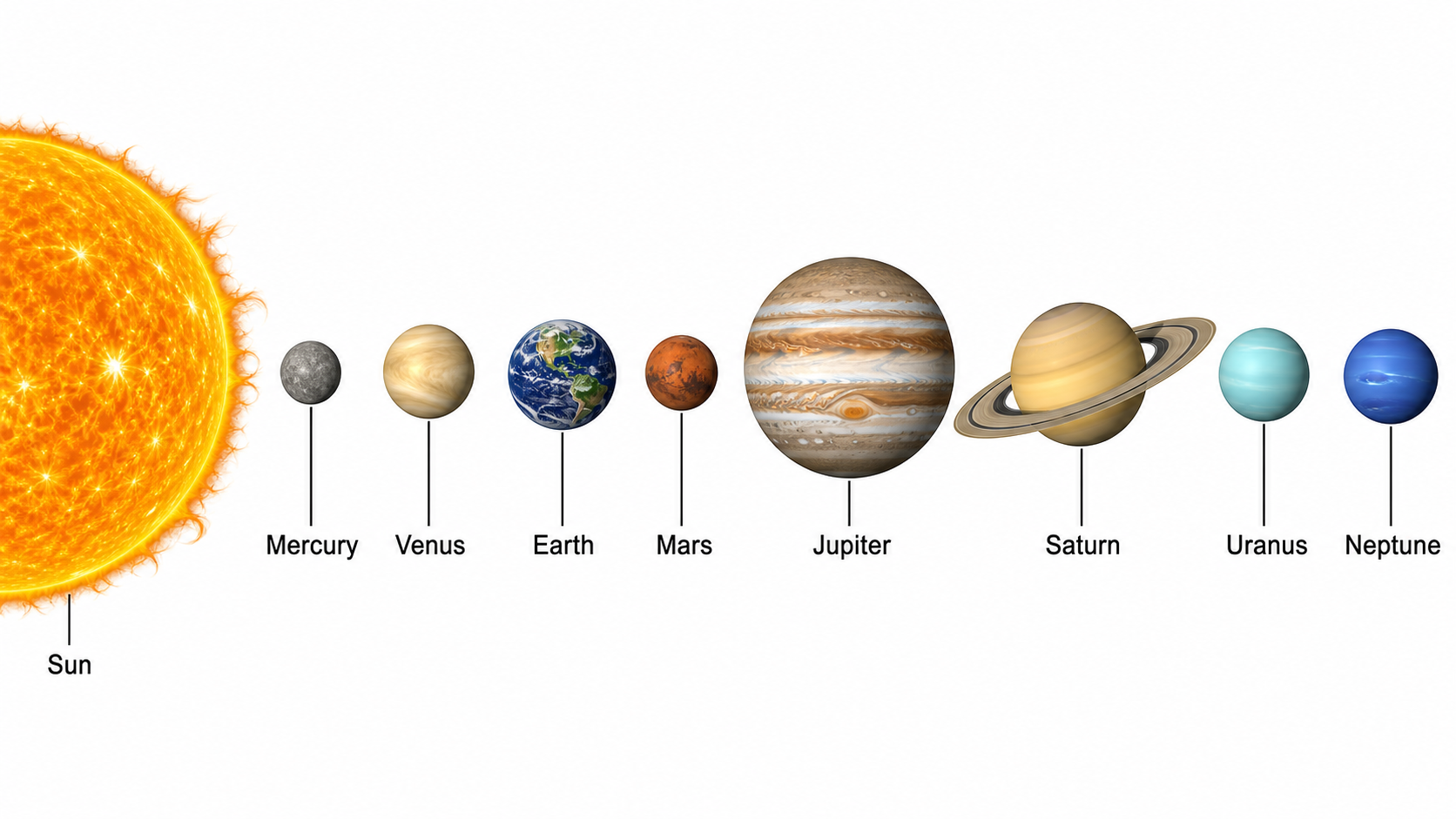
Un diagramma del sistema solare (chiamato anche modello del sistema solare o diagramma dei pianeti) è un disegno etichettato che mostra il Sole al centro e gli otto pianeti disposti in ordine, spesso con le loro orbite e la fascia degli asteroidi. Questo creatore di diagrammi del sistema solare trasforma una descrizione testuale in una figura pulita ed etichettata — descrivi il Sole, i pianeti, il loro ordine ed eventuali orbite o etichette che vuoi, e l'IA produce un diagramma ben proporzionato con i pianeti nominati e richiami ordinati, il tutto senza alcuna abilità di disegno.
Perché usare un creatore di diagrammi del sistema solare
- I diagrammi del sistema solare sono il modo standard per insegnare l'ordine dei pianeti, i pianeti interni ed esterni e la struttura del nostro sistema solare.
- Disegnare a mano o in un software un modello del sistema solare ordinato e accurato richiede tempo che distoglie dalla lezione.
- Gli studenti che imparano i pianeti li comprendono molto meglio da un diagramma del sistema solare chiaramente etichettato che da un elenco di nomi.
- Insegnanti e studenti hanno bisogno di diagrammi dei pianeti rapidi e presentabili per slide, schede, poster e guide di studio.
- Cambiare il focus — ordine dei pianeti, confronto delle dimensioni o una versione vuota — e rigenerare è molto più veloce che ridisegnare a mano.
Come creare un diagramma del sistema solare
Descrivi ciò che vuoi mostrare: il Sole e gli otto pianeti in ordine, le orbite attorno al Sole o la fascia degli asteroidi tra Marte e Giove. Poi aggiungi le caratteristiche che ti servono: etichette con i nomi dei pianeti, una divisione tra pianeti interni ed esterni, un confronto delle dimensioni o una versione vuota da far etichettare agli studenti. Genera il diagramma del sistema solare, verifica l'ordine dei pianeti e le etichette, e affina la descrizione se qualcosa non è chiaro.
Parti di un diagramma del sistema solare
- Il Sole — la stella al centro del sistema solare, di solito disegnata più grande e su un lato o al centro.
- Gli otto pianeti — Mercurio, Venere, Terra, Marte, Giove, Saturno, Urano e Nettuno, mostrati in ordine dal Sole.
- Orbite — i percorsi che i pianeti seguono attorno al Sole, spesso disegnati come anelli in una vista dall'alto.
- Fascia degli asteroidi — la fascia di corpi rocciosi tra le orbite di Marte e Giove.
- Pianeti interni vs. esterni — i pianeti terrestri rocciosi vicini al Sole rispetto ai giganti gassosi esterni.
- Etichette — testo a richiamo che nomina il Sole, ogni pianeta e altre caratteristiche come la fascia degli asteroidi.
FAQ sul creatore di diagrammi del sistema solare
Che cos'è un diagramma del sistema solare?
Un diagramma del sistema solare è un disegno etichettato che mostra il Sole e gli otto pianeti, di solito disposti in ordine procedendo dal Sole verso l'esterno, spesso con le loro orbite e la fascia degli asteroidi. Si usa per insegnare e imparare i nomi e l'ordine dei pianeti, la differenza tra pianeti interni ed esterni e la struttura complessiva del nostro sistema solare.
Come creo un diagramma del sistema solare online?
Digita una breve descrizione di ciò che vuoi, come un diagramma etichettato del sistema solare che mostra il Sole e gli otto pianeti in ordine, ed elenca le caratteristiche che vuoi mostrare. SciDraw AI disegna poi un diagramma del sistema solare pulito e accurato con etichette ordinate. Puoi regolare il testo e rigenerare finché il diagramma corrisponde a ciò che ti serve.
Quali pianeti e quale ordine mostra il diagramma?
Un diagramma standard del sistema solare mostra il Sole al centro e gli otto pianeti in ordine procedendo verso l'esterno: Mercurio, Venere, Terra e Marte sono i pianeti terrestri interni, poi la fascia degli asteroidi, seguita dai giganti gassosi esterni Giove, Saturno, Urano e Nettuno. Puoi chiedere che siano tutti etichettati, o concentrarti solo sui pianeti interni o esterni.
Può disegnare orbite, la fascia degli asteroidi o un confronto delle dimensioni?
Sì. Puoi generare una vista dall'alto con le orbite planetarie disegnate come anelli attorno al Sole, segnare la fascia degli asteroidi tra Marte e Giove, o creare un confronto affiancato delle dimensioni relative del Sole e dei pianeti. Basta nominare le caratteristiche e le etichette che vuoi, e lo strumento le disegna.
Il creatore di diagrammi del sistema solare è gratuito?
Sì, puoi iniziare gratis. Crea un account e ricevi crediti gratuiti per generare diagrammi del sistema solare subito, con piani a pagamento disponibili se hai bisogno di realizzare molti diagrammi dei pianeti e tabelle di astronomia con regolarità.
Posso usarlo per la lezione di scienze o le lezioni di astronomia?
Assolutamente. I diagrammi sono adatti alle scienze della scuola primaria e secondaria di primo grado, alle lezioni di astronomia e allo studio, oltre che a schede, flashcard, poster e slide. Genera un diagramma del sistema solare etichettato o una versione vuota per l'esatta lezione o compito che stai insegnando.
Scopri altri strumenti
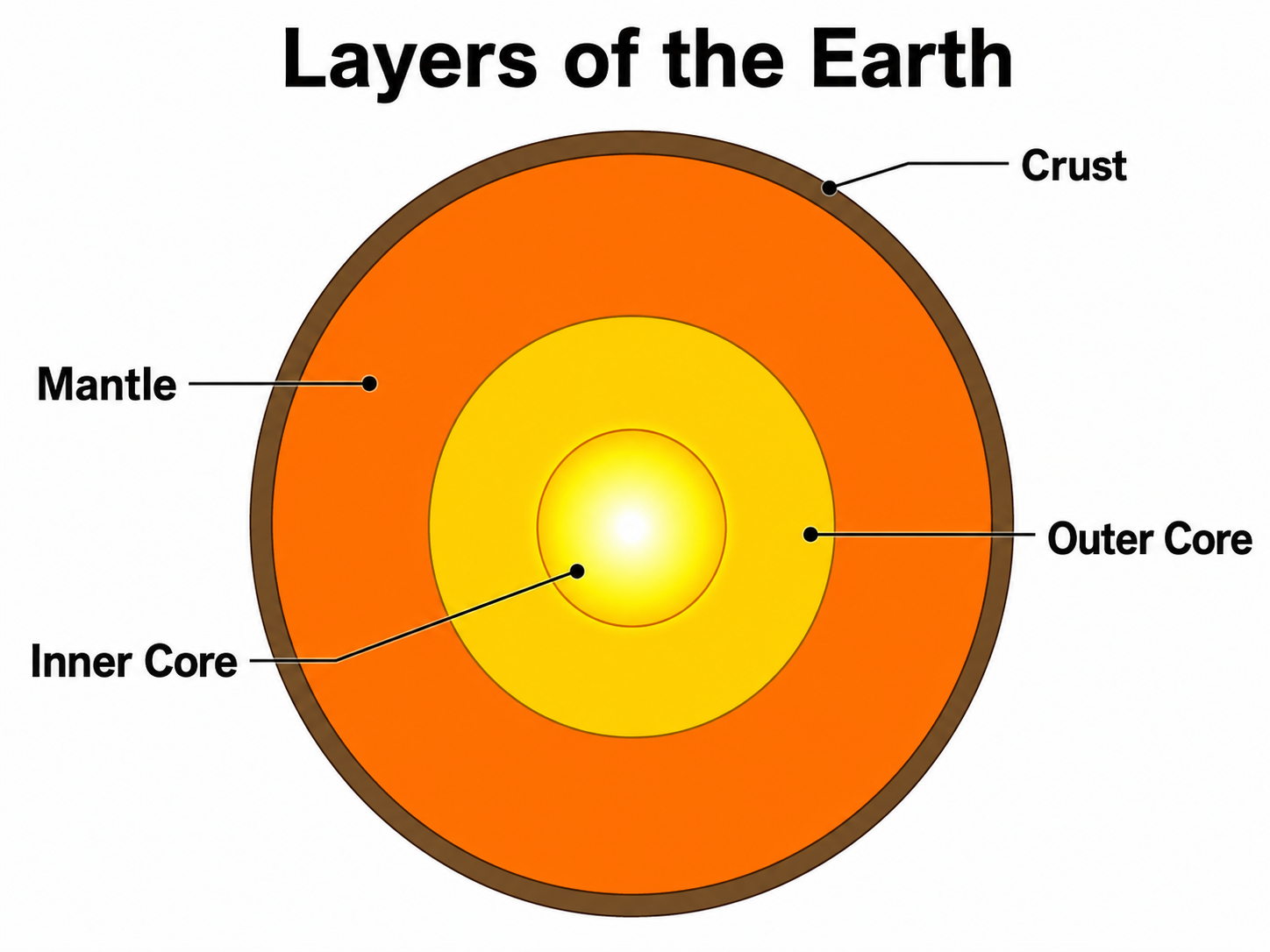
Diagramma degli strati della Terra
Disegna una sezione etichettata degli strati della Terra — crosta, mantello, nucleo esterno e nucleo interno.
Provalo gratis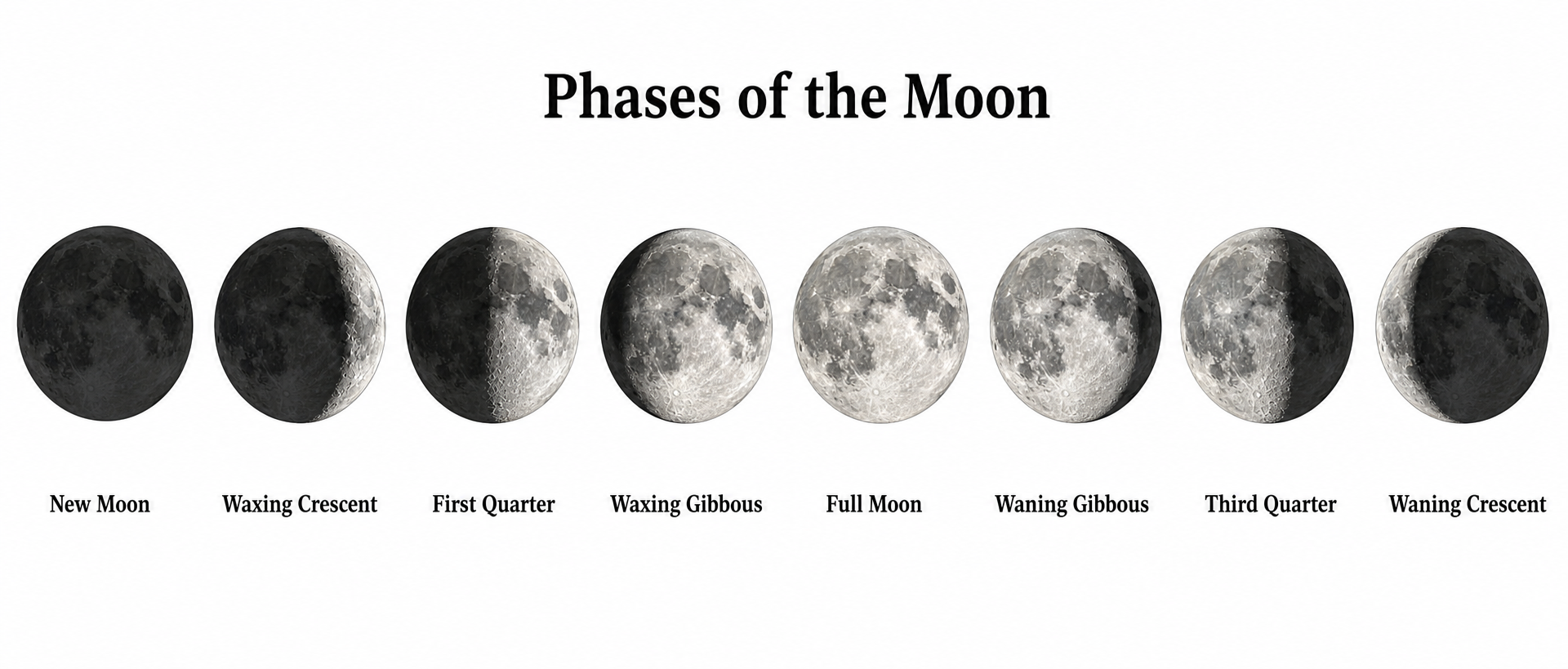
Diagramma delle fasi lunari
Disegna le otto fasi lunari etichettate e la geometria Sole-Terra-Luna che le determina.
Provalo gratis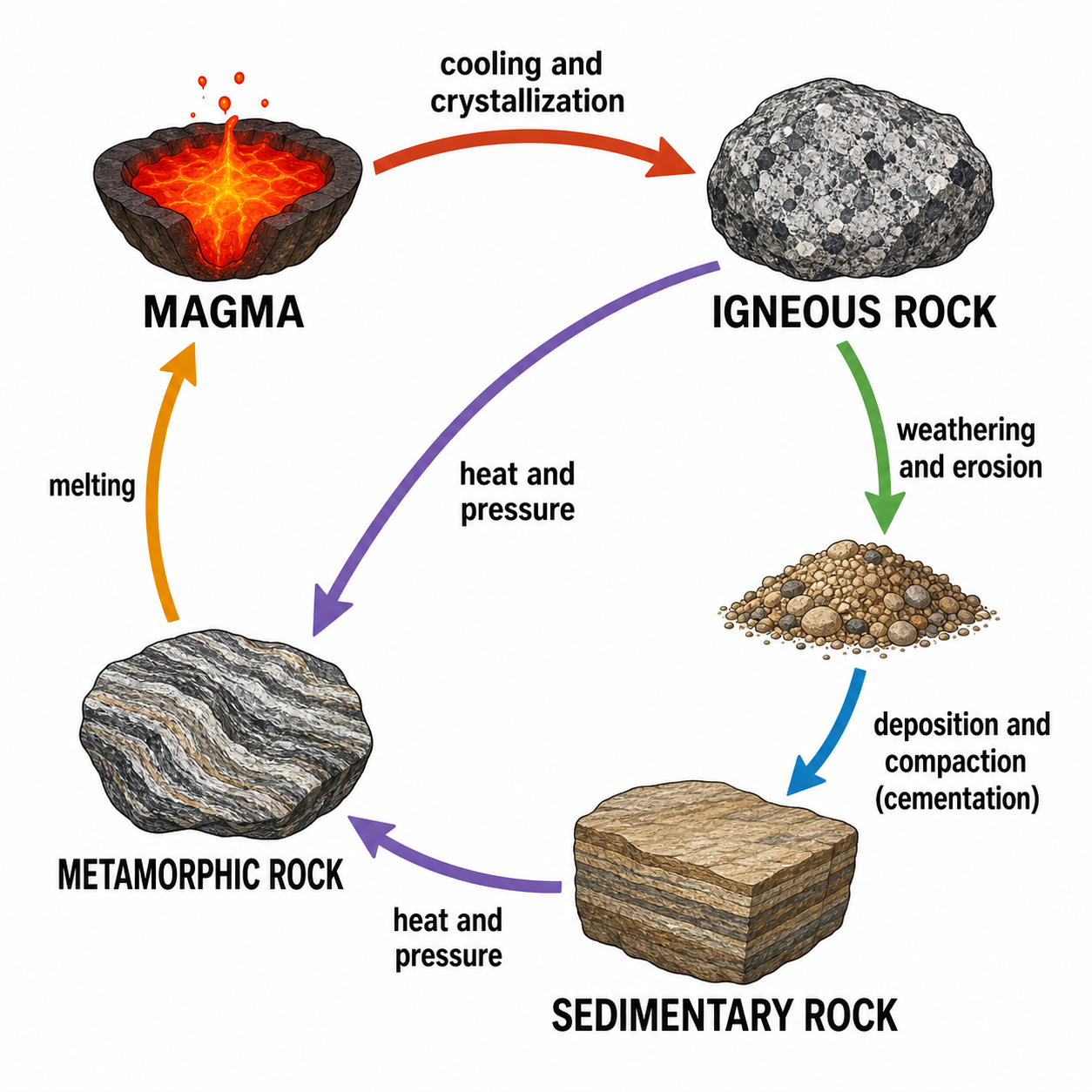
Generatore di diagrammi del ciclo delle rocce
Disegna diagrammi del ciclo delle rocce etichettati con rocce ignee, sedimentarie e metamorfiche con l'IA.
Provalo gratisDisegna ora il tuo diagramma del sistema solare
Descrivi il Sole, i pianeti e le orbite che ti servono e ottieni un diagramma del sistema solare pulito ed etichettato in pochi secondi. Inizia gratis con SciDraw AI.