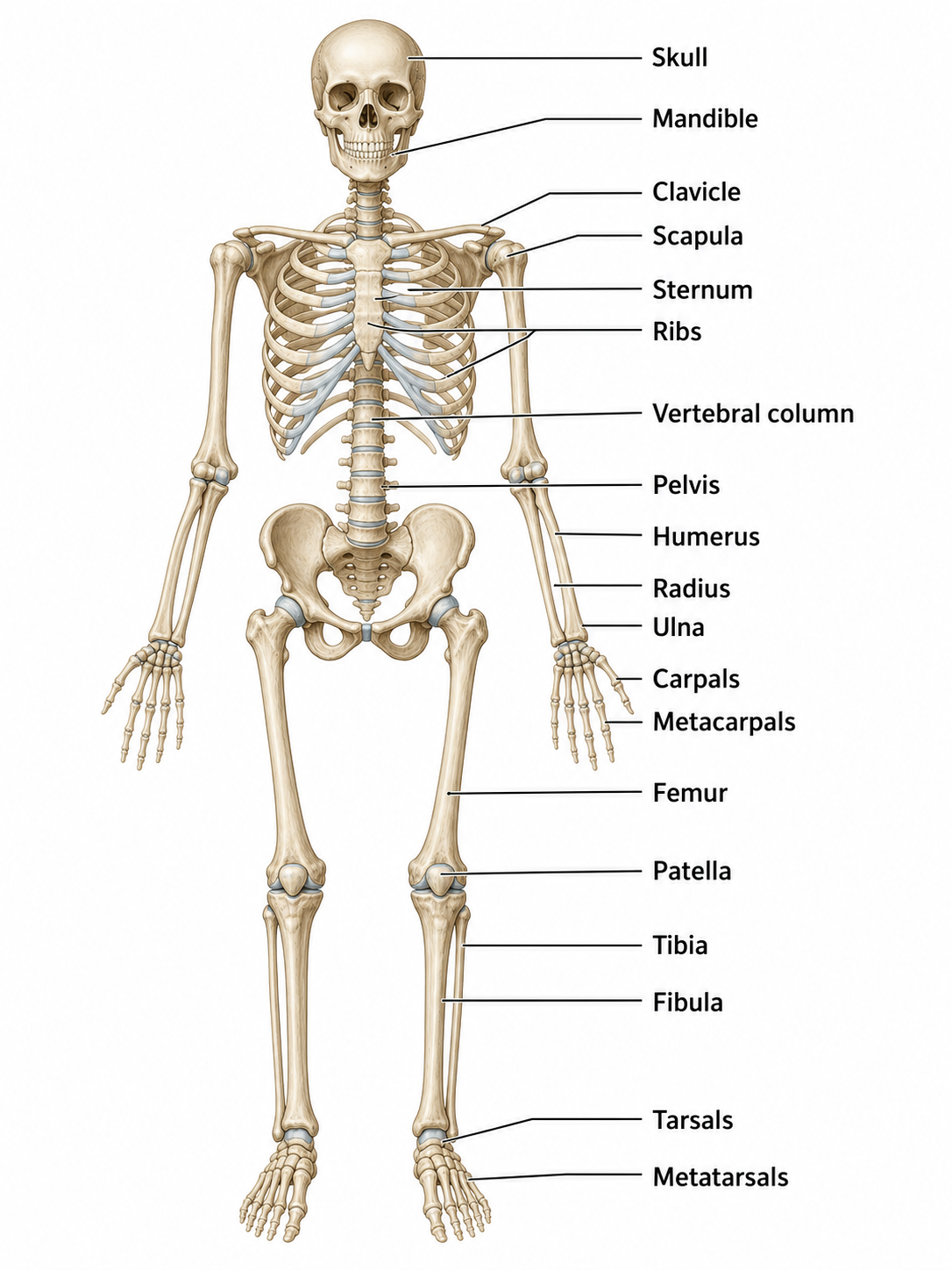
Skeletal System Diagram Generator
Labeled skeletons, bone groups, blank worksheets, and answer keys
Describe the skeletal view and bones you want to show. Generate a full human skeleton, an axial-versus-appendicular comparison, or a classroom worksheet.
Skeletal System Diagram Examples
Explore labeled skeletons, bone-group comparisons, worksheets, and answer keys.
What is a skeletal system diagram?
A skeletal system diagram shows the bones of the human body and how they are organized into the axial and appendicular skeletons. It can present the complete skeleton, focus on one region, or provide a blank outline for students to label.
Why use a skeletal system diagram?
- Study the major bones in anatomical position.
- Compare the axial and appendicular divisions.
- Prepare worksheets, quizzes, slides, and study guides.
- Focus on the skull, spine, thorax, pelvis, or limbs.
- Create a custom level of detail for school, nursing, or anatomy courses.
How to make a skeletal system diagram
Choose an anterior, posterior, or regional view, then list the bones and bone groups to include. Specify whether the diagram should be fully labeled, color-coded by division, or left blank with numbered leader lines for a worksheet.
Major parts of the skeletal system
- Skull and facial bones.
- Vertebral column, sacrum, and coccyx.
- Ribs and sternum.
- Pectoral girdle and upper limbs.
- Pelvic girdle and lower limbs.
- Axial and appendicular skeleton divisions.
Frequently Asked Questions
How many bones are in the adult human skeleton?
The adult human skeleton is commonly described as having 206 bones, although small anatomical variations and counting conventions can change the total.
What is the difference between the axial and appendicular skeleton?
The axial skeleton includes the skull, vertebral column, ribs, and sternum. The appendicular skeleton includes the shoulder and pelvic girdles and the bones of the arms and legs.
Can I create a labeled skeleton diagram?
Yes. Name the bones or regions you want labeled and specify an anterior, posterior, or regional view.
Can I make a blank skeleton worksheet?
Yes. Ask for an unlabeled skeleton with numbered leader lines and empty answer boxes, then create a matching labeled answer key.
Can I focus on one part of the skeleton?
Yes. You can request the skull, spine, rib cage, pelvis, hand, foot, upper limb, lower limb, or another specific region.
Is the skeletal system diagram generator free to try?
You can start with free credits and use additional credits or a subscription when you need more diagrams.
Explore More Tools
Create a skeletal system diagram
Generate a labeled skeleton, a bone-group comparison, or a blank anatomy worksheet.