Создание схемы «растительная или животная клетка»
Превратите описание в понятное сравнение клеток или диаграмму Венна
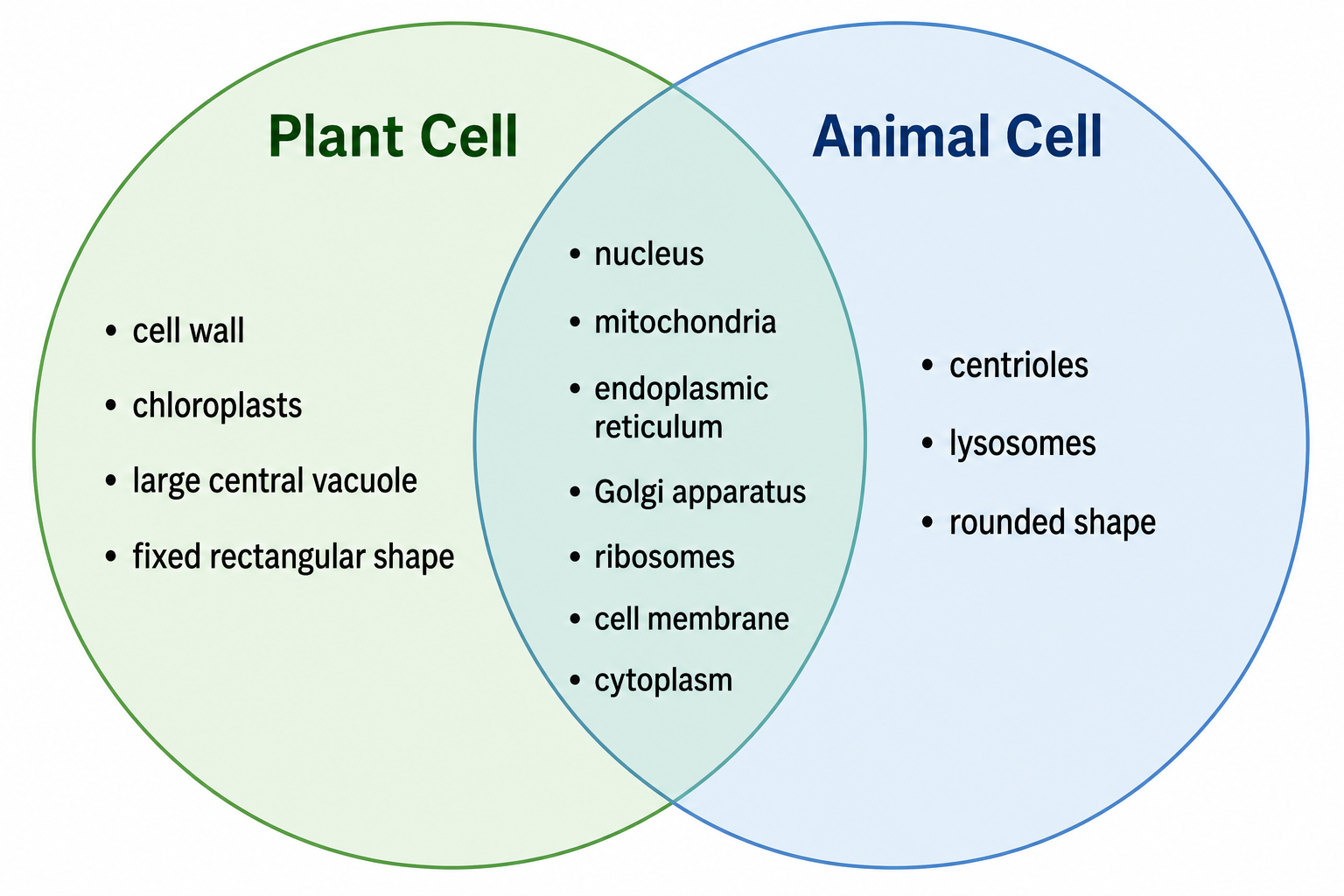
Опишите нужное сравнение, и ИИ нарисует растительную и животную клетки бок о бок или в виде диаграммы Венна — общие органоиды в пересечении и подписанные уникальные клеточная стенка, хлоропласты, центральная вакуоль, центриоли и лизосомы — готовое для домашних заданий, рабочих листов и уроков.
Примеры «растительная или животная клетка»
Нажмите на любой пример, чтобы загрузить его запрос, или используйте его как отправную точку для собственного сравнения клеток.
Что делает этот конструктор схемы «растительная или животная клетка»?
Он превращает короткое описание в понятное сравнение растительной и животной клеток — в виде диаграммы Венна, пары бок о бок или сравнительной таблицы. Вы указываете, какие структуры показать и как их расположить, а ИИ рисует клетки, размещает общие органоиды, такие как ядро, митохондрии, эндоплазматическая сеть, аппарат Гольджи и рибосомы, там, где обе клетки пересекаются, и выделяет уникальное: клеточную стенку, хлоропласты и крупную центральную вакуоль растительной клетки, а также центриоли и лизосомы животной клетки. Диаграмма Венна делает общие и уникальные органоиды очевидными с первого взгляда. Всё подписано, без рисования и компоновки вручную.
Зачем нужен конструктор схемы «растительная или животная клетка»
- Сравнение растительной и животной клеток — одно из самых частых заданий по биологии.
- Диаграмма Венна делает общие и уникальные органоиды очевидными с первого взгляда.
- Нарисовать обе клетки аккуратно и подписать каждый органоид вручную долго.
- Учителям и студентам нужны аккуратные рисунки для рабочих листов, слайдов и повторения.
- Заново сгенерировать рисунок по описанию быстрее, чем перерисовывать его при смене подписей или компоновки.
Как сделать сравнение растительной и животной клеток
Выберите компоновку — диаграмму Венна, две клетки бок о бок или сравнительную таблицу. Перечислите общие структуры обеих клеток (ядро, митохондрии, эндоплазматическая сеть, аппарат Гольджи, рибосомы, клеточная мембрана, цитоплазма) для пересечения или столбца «обе». Затем перечислите особенности только растений (клеточная стенка, хлоропласты, крупная центральная вакуоль, прямоугольная форма) и только животных (центриоли, лизосомы, округлая форма). Сгенерируйте рисунок, затем проверьте подписи и расположение и дорабатывайте, пока он не станет точным.
Ключевые различия растительной и животной клеток
- Клеточная стенка — жёсткий внешний слой у растительных клеток, отсутствует у животных.
- Хлоропласты — осуществляют фотосинтез только у растительных клеток.
- Вакуоль — одна крупная центральная вакуоль у растительных клеток; мелкие или отсутствуют у животных.
- Центриоли — присутствуют у животных клеток, организуют деление клетки.
- Лизосомы — обычны у животных клеток, редки у растительных.
- Общее — у обеих есть ядро, митохондрии, ЭПС, Гольджи, рибосомы, клеточная мембрана и цитоплазма.
Частые вопросы о схеме «растительная или животная клетка»
В чём главное различие между растительной и животной клетками?
У растительных клеток есть жёсткая клеточная стенка, хлоропласты для фотосинтеза и крупная центральная вакуоль, и они сохраняют фиксированную прямоугольную форму. У животных клеток нет клеточной стенки, они округлые и содержат центриоли и лизосомы. При этом обе по-прежнему имеют общие ядро, митохондрии, эндоплазматическую сеть, аппарат Гольджи, рибосомы, клеточную мембрану и цитоплазму.
Что общего у растительных и животных клеток?
Обе эукариотические и имеют общие ядро, митохондрии, эндоплазматическую сеть, аппарат Гольджи, рибосомы, клеточную мембрану и цитоплазму. На диаграмме Венна эти общие структуры помещаются в центральное пересечение.
Могу ли я сделать диаграмму Венна «растительная или животная клетка»?
Да. Запросите диаграмму Венна, и генератор поместит общие органоиды в пересечение, а уникальные особенности — клеточную стенку, хлоропласты и центральную вакуоль для растений, центриоли и лизосомы для животных — в каждый круг, всё с подписями.
Могу ли я вместо этого сделать сравнительную таблицу?
Да. Запросите сравнительную таблицу бок о бок, и генератор перечислит каждую особенность в двух столбцах с галочками и крестиками, показывающими, присутствует ли она у растительной клетки, у животной клетки или у обеих.
Подходит ли это для школы и домашних заданий?
Да. Схемы используют стандартные органоиды, соответствующие учебной программе, и чёткие подписи, поэтому хорошо подходят для рабочих листов, домашних заданий, конспектов и классных слайдов — от средней школы до вводной биологии.
Могу ли я экспортировать редактируемую схему?
SciDraw AI может экспортировать в векторные форматы, чтобы вы могли впоследствии изменить подписи, цвета и компоновку. Всегда сверяйте схему с учебником или конспектами, прежде чем сдавать её.
Как сделать диаграмму Венна растительной и животной клеток?
Запросите диаграмму Венна «растительная или животная клетка», и генератор нарисует два пересекающихся круга: в центральном пересечении перечислены структуры, общие для обеих клеток (ядро, митохондрии, клеточная мембрана, рибосомы), в круге только растений — клеточная стенка, хлоропласт и крупная центральная вакуоль, а в круге только животных — центриоли и лизосомы. Каждая область подписана, поэтому сходства и различия видны с первого взгляда.
Каковы ключевые различия между растительной и животной клетками?
Ключевые различия в том, что у растительных клеток есть жёсткая клеточная стенка, хлоропласты для фотосинтеза и одна крупная центральная вакуоль, и они сохраняют фиксированную прямоугольную форму, тогда как у животных клеток всё это отсутствует, они округлые и содержат центриоли и лизосомы. При этом обе по-прежнему имеют общие ядро, митохондрии, эндоплазматическую сеть, аппарат Гольджи, рибосомы, клеточную мембрану и цитоплазму — именно это и помещается в пересечение диаграммы Венна «растительная или животная клетка».
Пишете статью, диплом или заявку на грант?
SciDraw AI также делает научные иллюстрации для публикаций: графические аннотации, схемы механизмов, рабочие процессы и концептуальные модели.
Другие инструменты
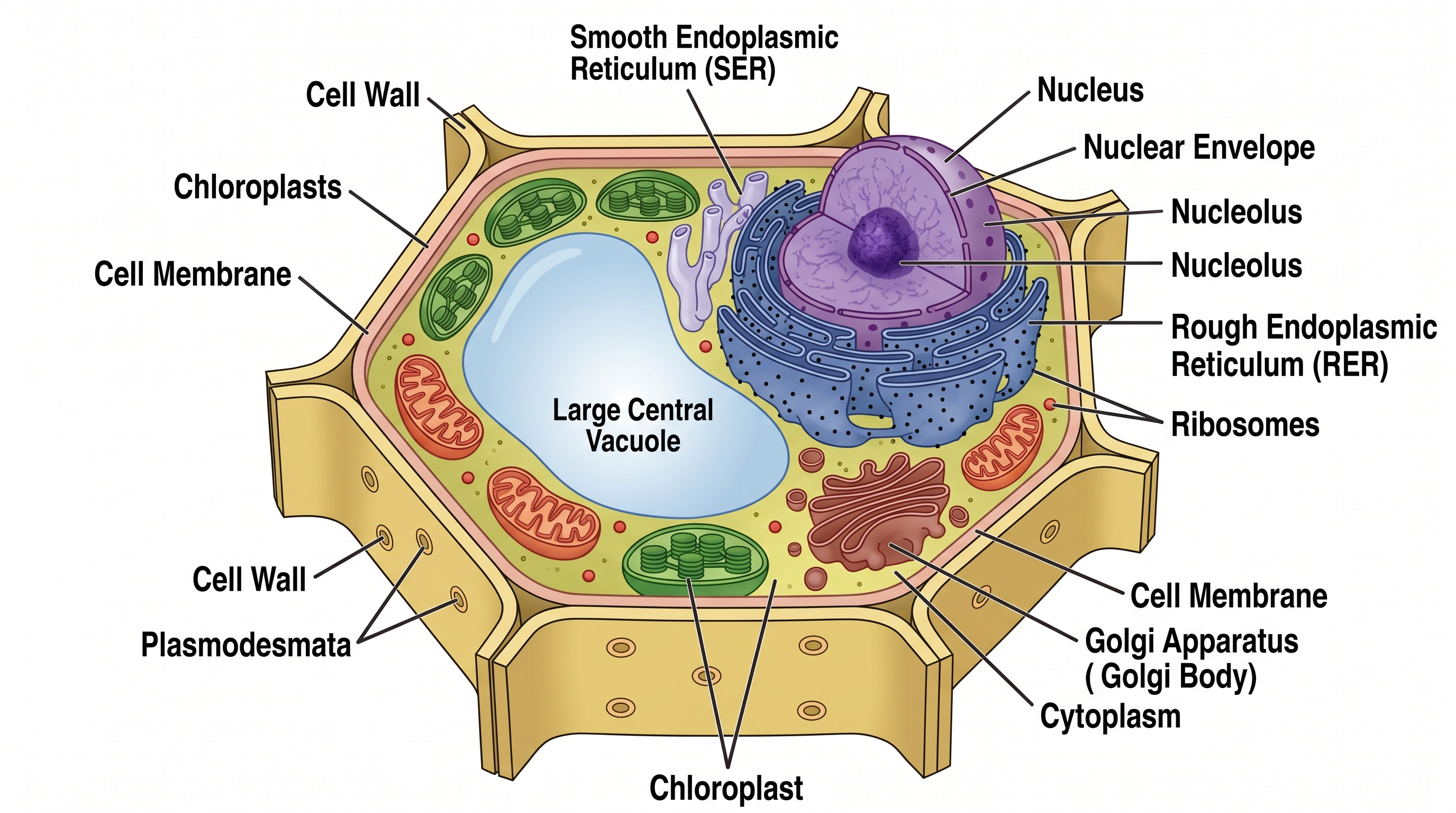
Схема растительной клетки
Создавайте подписанные схемы растительной клетки со всеми органеллами.
Попробовать бесплатно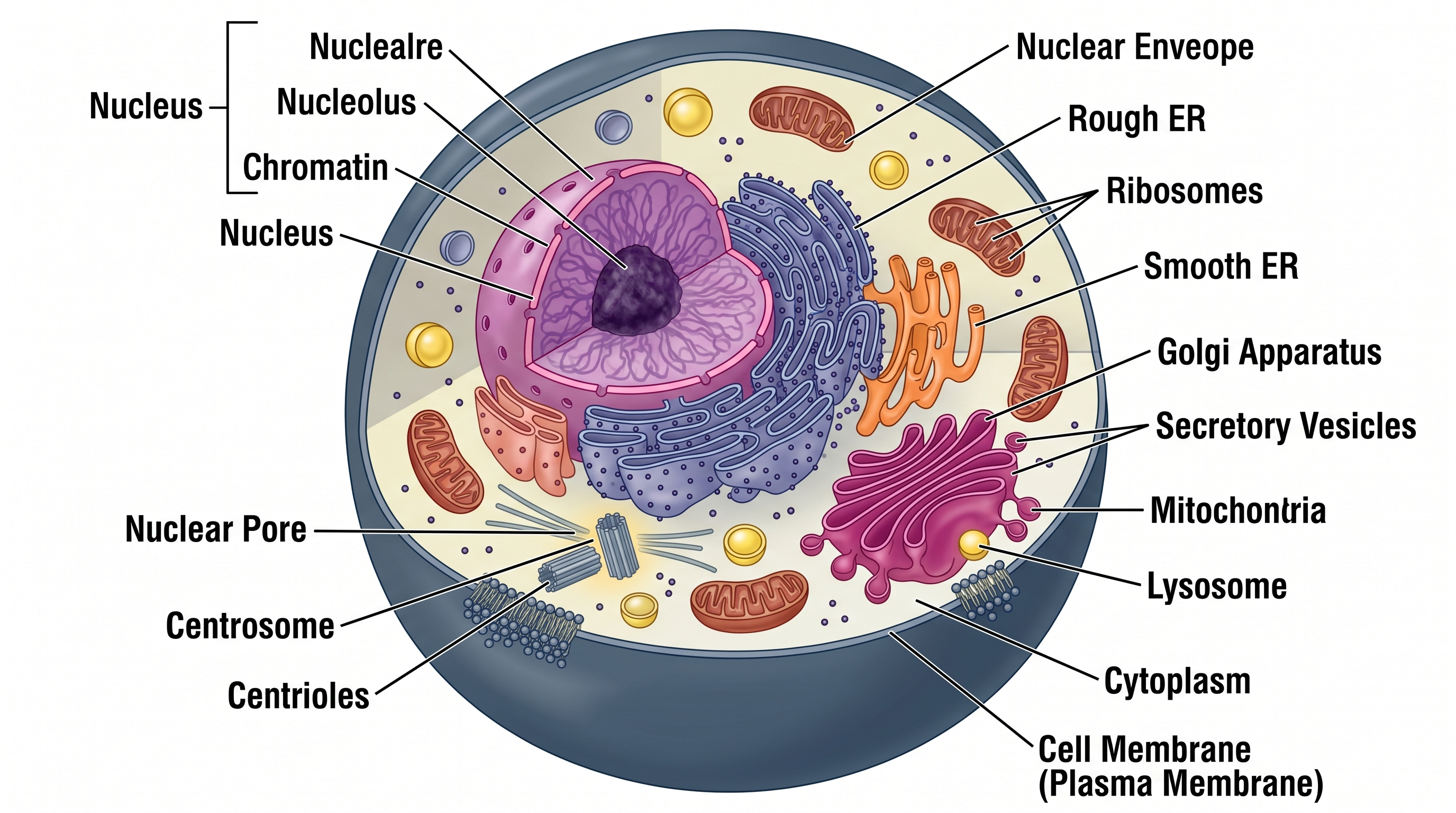
Схема животной клетки
Создавайте подписанные схемы животной клетки со всеми органеллами.
Попробовать бесплатно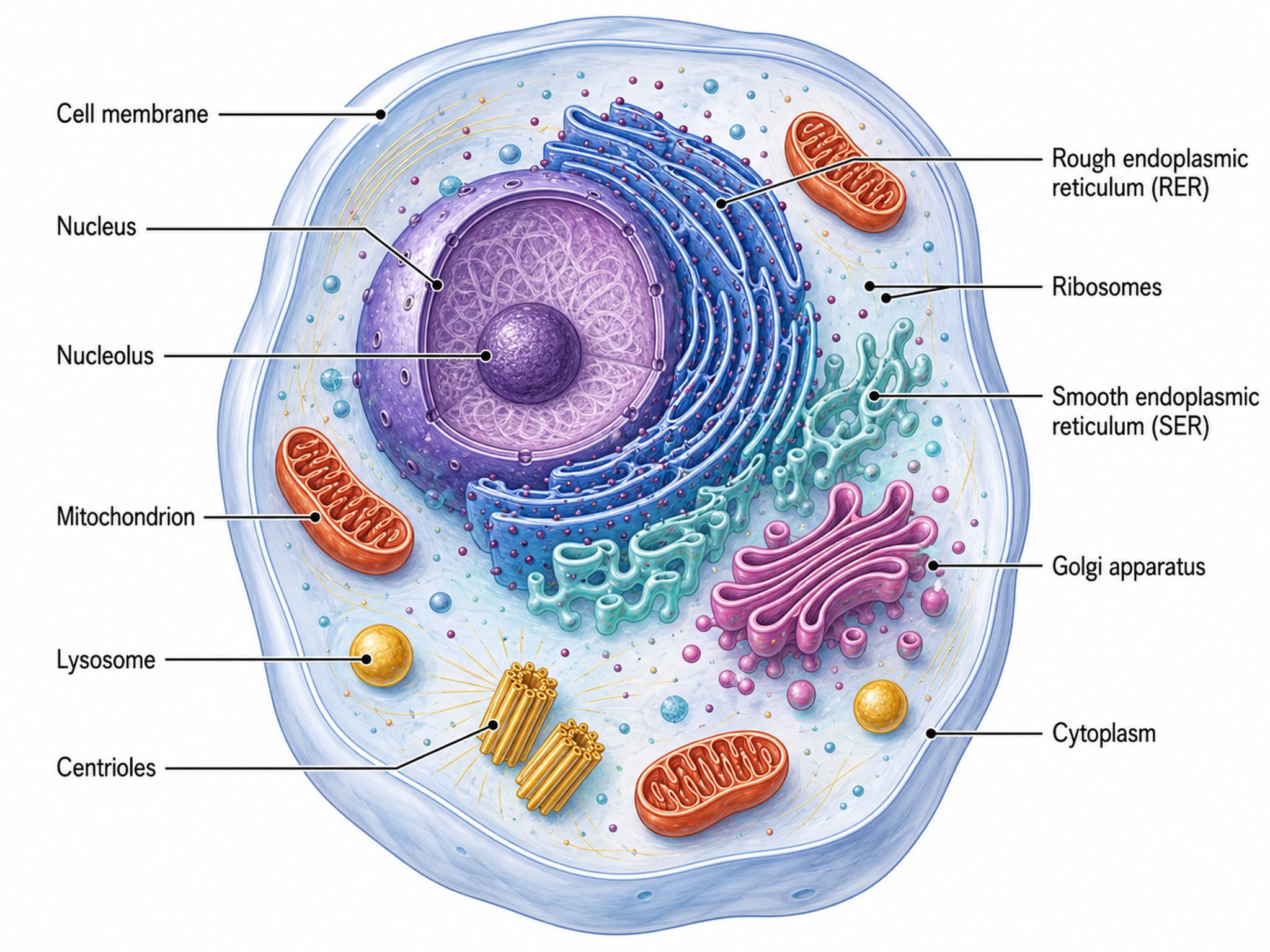
Генератор иллюстраций клеток
Создавайте диаграммы клеточной биологии, схемы органелл и иллюстрации клеточных процессов
Попробовать бесплатноНужны другие биологические схемы?
Создавайте подписанные схемы клеток, рисунки биологических процессов и другие научные иллюстрации с SciDraw AI.