一位教材作者出版前把有丝分裂图重画了 5 次。不是科学错了——每次都对。而是出版社的编辑反复退稿:细胞颜色和两页前那张图对不上,箭头样式跟第 12 章的减数分裂图不一样,学生得把视觉语言学两遍。
这就是教材插图的真实成本。论文图自己独立存在;教材图必须和另外二十张图共存,要跨三个版次、两种语言,还要把同一个概念讲得一模一样。AI 降低的是画的成本,不是一致性的成本。这篇文章讲的是怎么把两者都控制住。
教材图被退稿的几种常见原因
- 把每张图当论文图画——论文图证明结果,教材图教概念。审稿人能接受的密度会压垮大二学生。
- 跨章节没有 style sheet——第 3 章的细胞 A 是蓝色,第 9 章变绿色,学生以为是两种细胞。配色和图标系统一次性确定,然后死守。
- 把定义塞进图里——长标签让图变成词汇表。定义放在正文段落或图注,不放在图里。
- AI 出的卡通图无视课程难度——对高中生物刚好的图,给研究生细胞生物学章节就太浅了。在 prompt 里明确写年级。
- 不导出可编辑格式——翻译版本要换标签(德语、西班牙语、简体中文),只有 SVG 才换得了,扁平栅格不行。
烂提示词 vs 改写后的提示词
以有丝分裂章节图为例:
太短,出来的是一张脱离课程的通用卡通图:
帮我做一张有丝分裂的教材插图。重写后,得到一张能放进章节里的图:
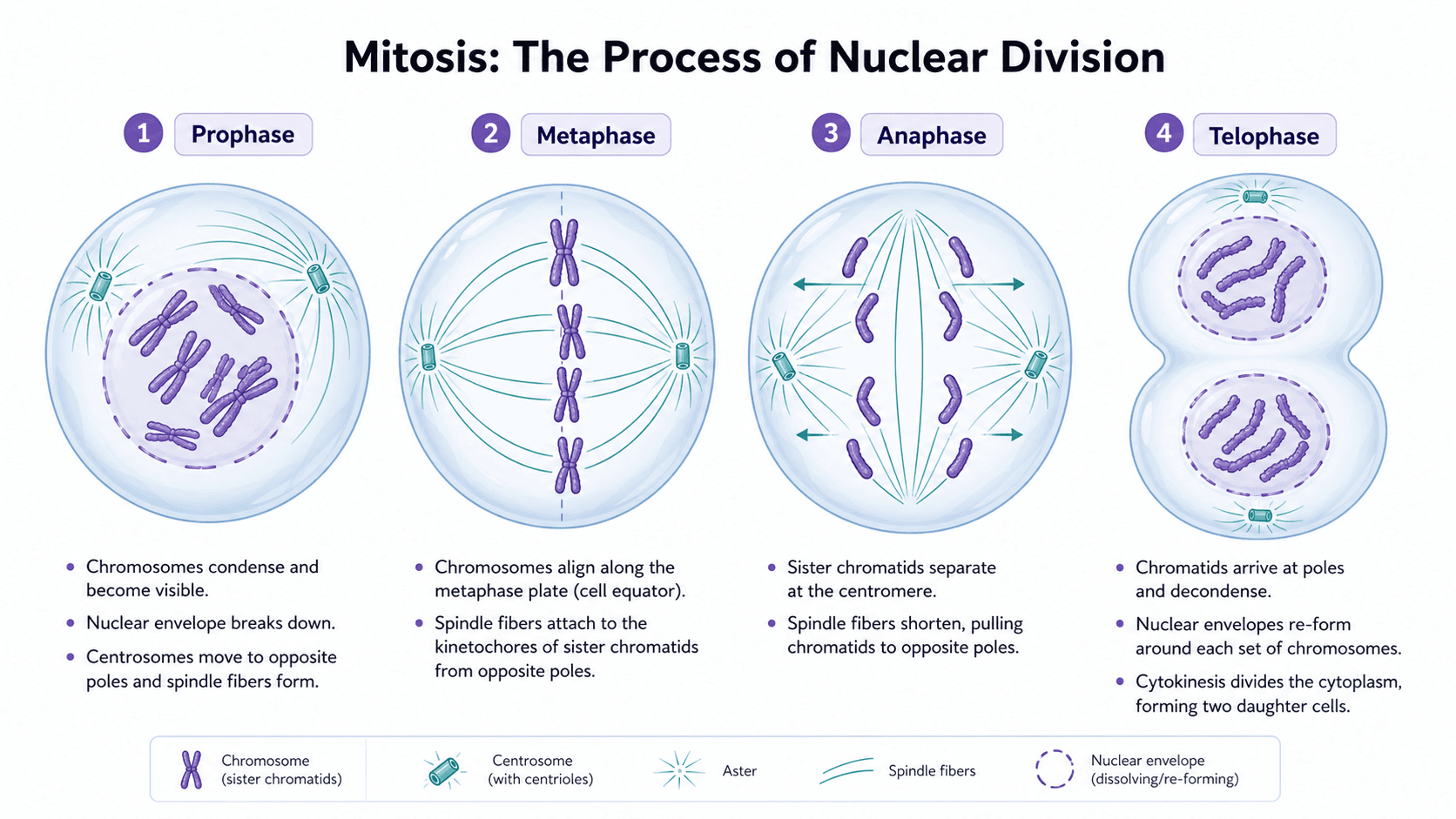
Create a four-panel textbook illustration of mitosis stages for an undergraduate cell biology chapter.
Panel 1 (prophase): chromosomes condense, nuclear envelope intact.
Panel 2 (metaphase): chromosomes aligned at the metaphase plate, mitotic spindle visible.
Panel 3 (anaphase): sister chromatids pulled to opposite poles.
Panel 4 (telophase): two nuclear envelopes reforming, cell beginning to cleave.
Use a teal cytoplasm and a warm pink for chromosomes — match our chapter palette.
Same cell outline style as our meiosis figure: 2 px stroke, rounded oval.
Labels: short single-word callouts ("chromosome", "spindle", "centrosome"). Definitions stay in the caption, not the image.
Output as editable SVG so labels can be swapped for the German and Spanish editions.
结构化的 prompt 锁定了style sheet 和教学密度——这是教材图一致性的两块基石。
写在前面:示例提示词保留英文。当前主流模型对英文 token 还原最稳定,中文写脚本、英文写提示词是科研社区通行做法。
必须先定义的教材 style sheet
写任何 prompt 之前,先决定并写下:
- 配色:跨章节通用的 4-6 种颜色(细胞类型、亚细胞器、分子)。
- 线宽和笔触:细胞外轮廓、箭头、引线。
- 标签风格:字体、字号、缩写还是全名、单词标签还是短语。
- 图标系统:细胞、器官、仪器、分子每次怎么画。
- 图注规范:定义放哪里、最长多少字、术语规则。
把它整理成一页参考,每个 prompt 都粘进去。少了它,AI 每张图都会自创一套 style sheet,编辑会全部退稿。
示例图
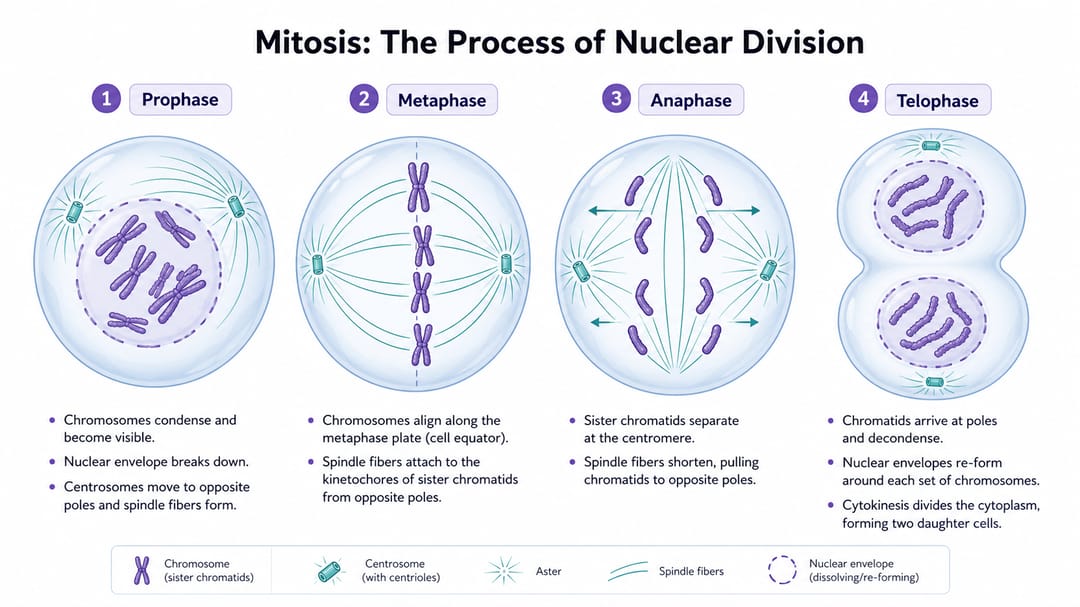
要看的细节:四个面板权重相等;标签都是单词;定义和机制描述不进图,留在外面;四个面板细胞颜色和线条完全一致,学生比较的是阶段而不是画风。
按图类型分的可复用模板
把方括号里的内容换成你章节的内容。Style sheet 粘在每个 prompt 的最前面。
1. 生物过程分步图
Create a textbook illustration explaining [process] for [grade level / course] students.
Show [stage 1], [stage 2], [stage 3], and [stage 4] in equally weighted panels with matching aspect ratio.
Use the palette and icon system from our style sheet: [paste style sheet excerpt].
Labels: single-word callouts only. No definitions in the image — those go in the caption.
Movement arrows between stages: thin, single direction, no decorative curves.
White background. Editable SVG output.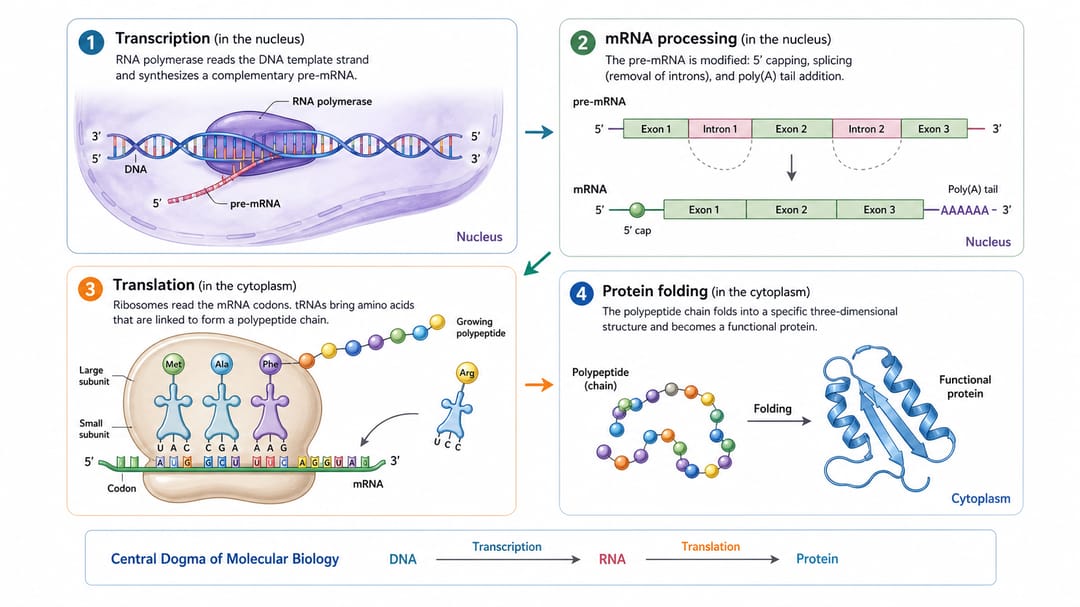
2. 医学章节图(正常 vs 病理)
Create a medical textbook illustration for [condition or organ system] for medical students.
Show four states: [anatomical normal], [early disease change], [advanced disease change], and [clinical or radiological correlate].
Use the same anatomical viewpoint across all four states so students compare changes, not perspectives.
Labels: abbreviated anatomical names. Mark pathology with a dashed outline, not red — color blindness compliance.
Style: educational atlas, no graphic content, calm clinical palette from style sheet.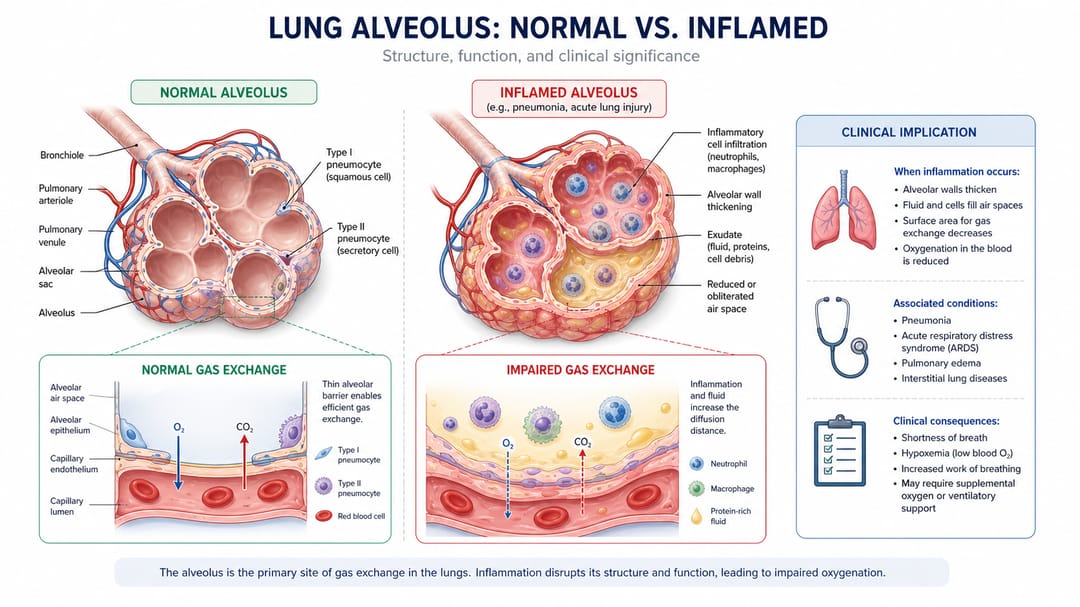
3. 对比 / 反差图
Design a textbook figure comparing [concept A] and [concept B] for [grade level] students.
Use two columns of equal width with identical row structure: [mechanism], [structure], [function], [example].
Matching icons on left and right within each row, so the difference is visible at a glance.
Short labels, definitions in caption.
Use the chapter palette; A in [color 1], B in [color 2]. SVG output.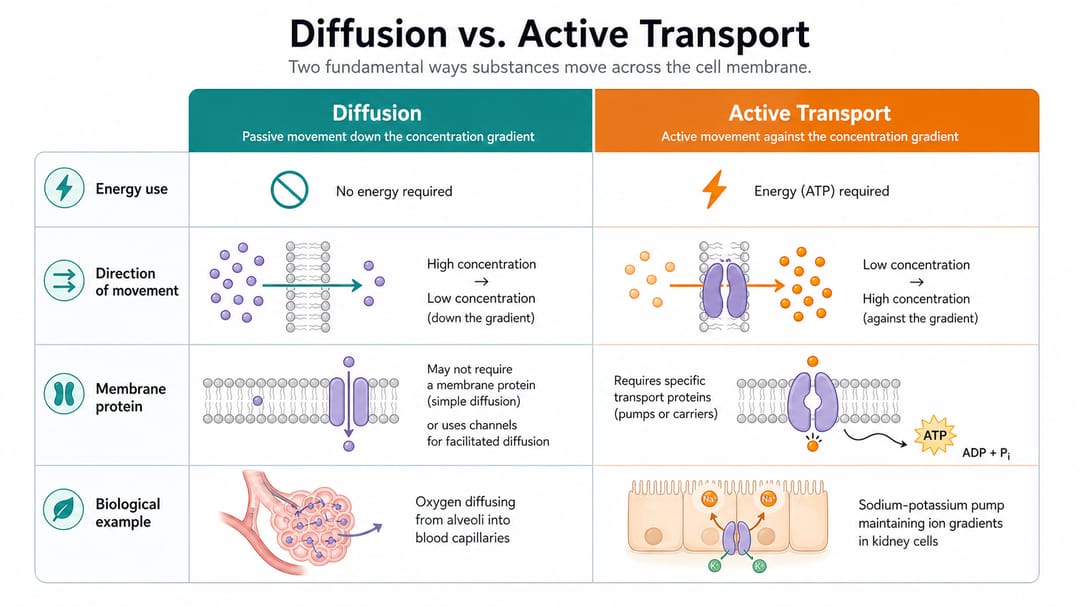
4. 解剖标注图
Create a labeled anatomy illustration of [organ or system] for [grade level / course] students.
View: [sagittal / coronal / axial / 3-D oblique], specify a single perspective.
Label the following structures: [list every structure to label]. Do not label other structures.
Use leader lines, not arrows. Place labels outside the body outline so the anatomy stays readable.
Style: educational atlas, matching the rest of our anatomy figures (palette and stroke from style sheet).
Output as layered SVG so labels can be translated for international editions.
不同角色的使用建议
- 第一次写教材的作者:在写 prompt 之前先写 style sheet。大部分被退稿的图,问题不在 prompt,在没有 style sheet。
- 编辑 / 制作负责人:入稿时就强制 style sheet。任何 prompt 没粘 style sheet 的图,先退回再说科学内容。
- 负责国际版的合著者:每张图都必须导出 SVG。有 SVG 翻译就是换文字层,没 SVG 就是整张重画。
- 课程 / 教学设计者:模板 1 给过程图、模板 3 给对比图。这两个模板覆盖大部分学习目标。
- 配合 AI 草稿的医学插画师:用模板 2 拿布局,解剖部分最终自己重画。AI 擅长构图,不擅长临床准确性。
在 SciDraw AI 里真正可执行的工作流
- 先锁定 style sheet:一页:配色、线宽、标签、图标、图注。每个 prompt 都粘上。
- 按图的教学职责选模板:过程、对比、解剖,还是医学状态。
- 生成一个变体,立刻对照章节核对:细胞颜色和两页前那张对得上吗?箭头样式跟第 12 章一致吗?
- 导出 SVG,放回章节草稿里:不要孤立看,要和周围图一起看。
- 翻译靠在 SVG 里换文字:不要重新生成。同一张图不同语言只差文字层。
- 建一份章节级图谱,合著者一眼看完所有图,校样前就发现不一致。
付印前 checklist
- 本章每张图对应的 prompt 都粘了 style sheet。
- 跨章节细胞类型、器官、仪器使用同一种颜色和轮廓。
- 标签是短 callout;定义放图注或正文。
- 没有编造的数字、没有真实病例数据、没有期刊 logo。
- SVG 导出分层,文字在独立图层(翻译就绪)。
- 配色通过色盲安全对比(不能只用红绿编码)。
- 在印刷尺寸下,目标年级两秒能读完。
相关 SciDraw AI 工作流
教材插图生成器 · 书籍插图生成器 · 面向教育者 · 医学插图生成器
常见问题
教材插图和论文图有什么不同?
论文图是给专家证明结果;教材图是给非专家教概念,并且会和同章节另外 19 张图一起出现。教材图在密度、标签风格、跨章节一致性上的要求都比论文图严格。
教材图要写详细标签吗?
物体名用单词 callout,定义和机制描述放图注或正文。一张满是定义的图就不再是图,而是词汇表。
同一张图能复用到 slides 或 handouts 吗?
可以——前提是导出了 SVG 且文字在独立图层。slides 缩短标签、handouts 隐藏定义、翻译版换语言,三种都是换文字层,不是重新生成。
这和一般书籍插图有什么不同?
教材插图首先是教学清晰度和跨章节一致性。一般书籍插图还包括章节开篇、装饰跨页、编辑性视觉,这些对一致性要求没那么高。
怎么阻止 AI 每张图都换新风格?
每个 prompt 都粘 style sheet。模型默认追求最大多样性,除非你显式约束配色、线宽和图标。「match our chapter style」加上不写规格 = 模型听不懂。
解剖准确性 AI 靠谱吗?
早期草稿可以,最终医学教材的解剖必须由合格的医学插画师或解剖学家审核。AI 会自信地画错临床细节,必须在付印前由编辑流程拦下来。