一位教材作者在出版前把有絲分裂圖重畫了 5 次。不是科學錯了——每次都對。而是出版社的編輯反覆退稿:細胞顏色和兩頁前那張對不上、箭頭樣式跟第 12 章的減數分裂圖不一樣、學生得把視覺語言學兩遍。
這就是教材插圖的真實成本。期刊論文圖是獨立存在的;教材圖必須跟另外二十張圖共存,跨三個版次、兩種語言,還要把同一個概念講得一模一樣。AI 降低的是畫的成本,不是一致性的成本。這篇文章講的是怎麼把兩者都控制住。
教材圖被退稿的常見原因
- 把每張圖當論文圖畫——論文圖證明結果,教材圖教概念。審稿人能接受的密度會壓垮大二學生。
- 跨章節沒有 style sheet——第 3 章的細胞 A 是藍色,第 9 章變綠色,學生以為是兩種細胞。配色和圖示系統一次性確定,然後死守。
- 把定義塞進圖裡——長標籤讓圖變成詞彙表。定義放在內文或圖註,不放在圖裡。
- AI 出的卡通圖無視課程難度——對高中生物剛好的圖,給研究生細胞生物學章節就太淺。prompt 裡明確寫年級。
- 不匯出可編輯格式——翻譯版本要換標籤(德語、西班牙語、簡體中文),只有 SVG 才換得了,扁平點陣不行。
爛提示詞 vs 改寫後的提示詞
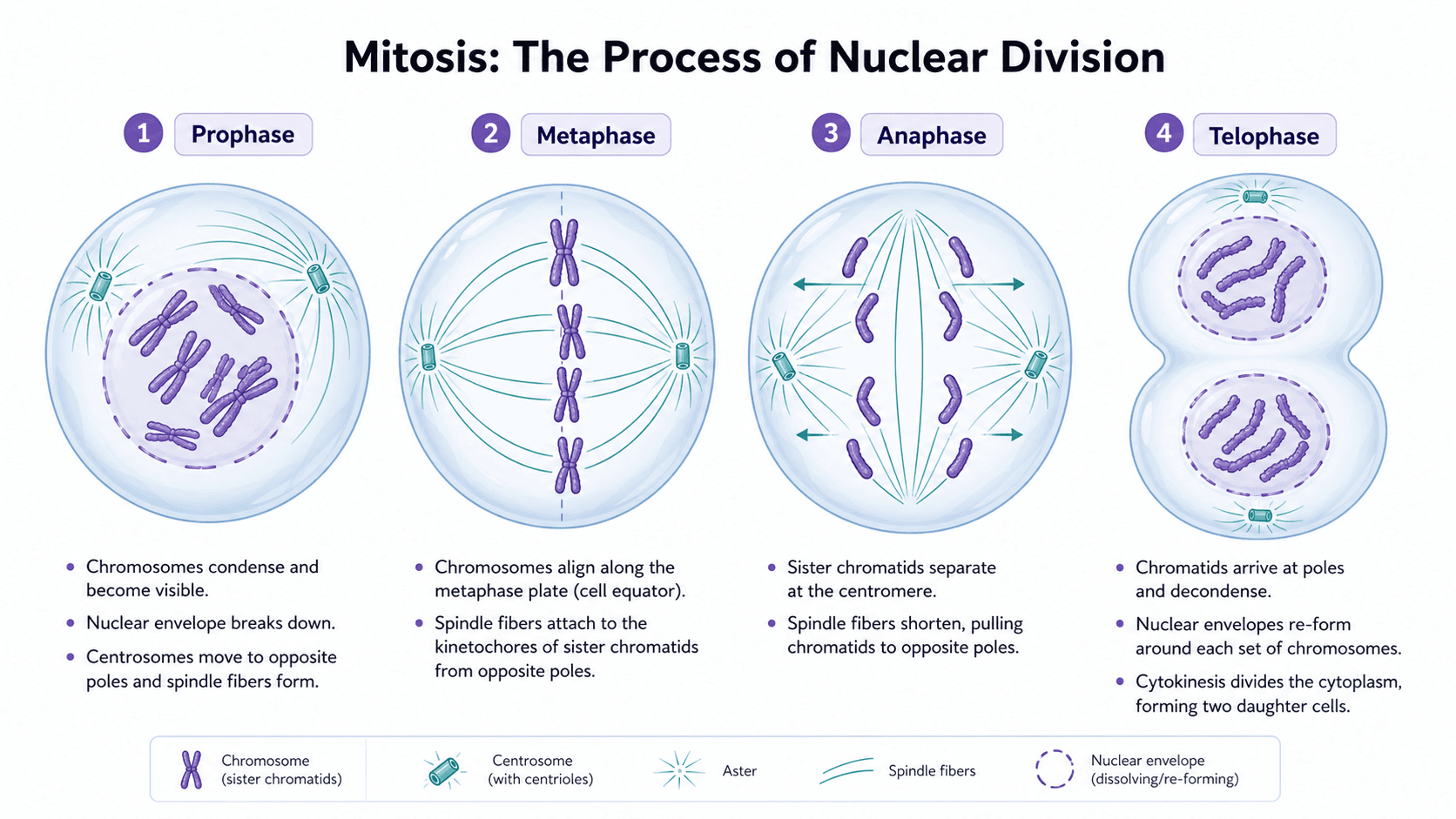
以有絲分裂章節圖為例:
太短,出來的是一張脫離課程的通用卡通圖:
幫我做一張有絲分裂的教材插圖。改寫後,得到一張能放進章節的圖:
Create a four-panel textbook illustration of mitosis stages for an undergraduate cell biology chapter.
Panel 1 (prophase): chromosomes condense, nuclear envelope intact.
Panel 2 (metaphase): chromosomes aligned at the metaphase plate, mitotic spindle visible.
Panel 3 (anaphase): sister chromatids pulled to opposite poles.
Panel 4 (telophase): two nuclear envelopes reforming, cell beginning to cleave.
Use a teal cytoplasm and a warm pink for chromosomes — match our chapter palette.
Same cell outline style as our meiosis figure: 2 px stroke, rounded oval.
Labels: short single-word callouts ("chromosome", "spindle", "centrosome"). Definitions stay in the caption, not the image.
Output as editable SVG so labels can be swapped for the German and Spanish editions.
結構化的 prompt 鎖定了 style sheet 和教學密度——這是教材圖一致性的兩塊基石。
寫在前面:示例提示詞保留英文。當前主流模型對英文 token 還原最穩定,中文寫腳本、英文寫提示詞是科研圈通行做法。
必須先定義的教材 style sheet
寫任何 prompt 之前,先決定並寫下:
- 配色:跨章節通用的 4-6 種顏色(細胞類型、胞器、分子)。
- 線寬與筆觸:細胞外輪廓、箭頭、引線。
- 標籤風格:字型、字級、縮寫或全名、單字標籤或短語。
- 圖示系統:細胞、器官、儀器、分子每次怎麼畫。
- 圖註規範:定義放哪裡、最長多少字、術語規則。
整理成一頁參考,每個 prompt 都貼上。少了它,AI 每張圖都會自創一套 style sheet,編輯會全退稿。
範例圖
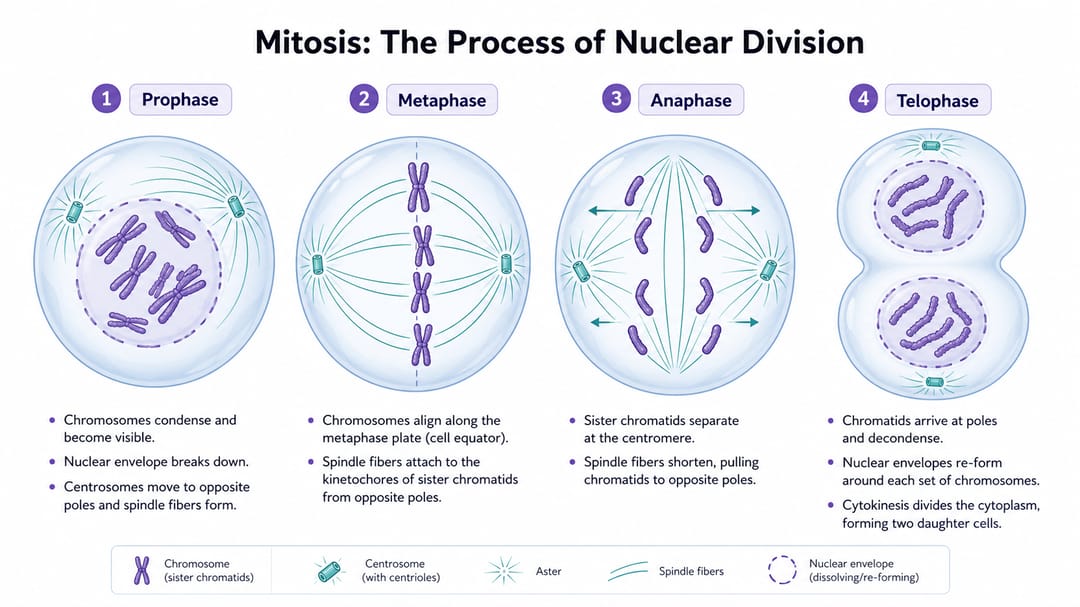
要看的細節:四個面板權重相等;標籤都是單字;定義和機制描述不進圖,留在外面;四個面板細胞顏色與線條完全一致,學生比較的是階段而不是畫風。
依圖類型分的可重用模板
把方括號裡的內容換成你章節的內容。Style sheet 貼在每個 prompt 最前。
1. 生物過程分步圖
Create a textbook illustration explaining [process] for [grade level / course] students.
Show [stage 1], [stage 2], [stage 3], and [stage 4] in equally weighted panels with matching aspect ratio.
Use the palette and icon system from our style sheet: [paste style sheet excerpt].
Labels: single-word callouts only. No definitions in the image — those go in the caption.
Movement arrows between stages: thin, single direction, no decorative curves.
White background. Editable SVG output.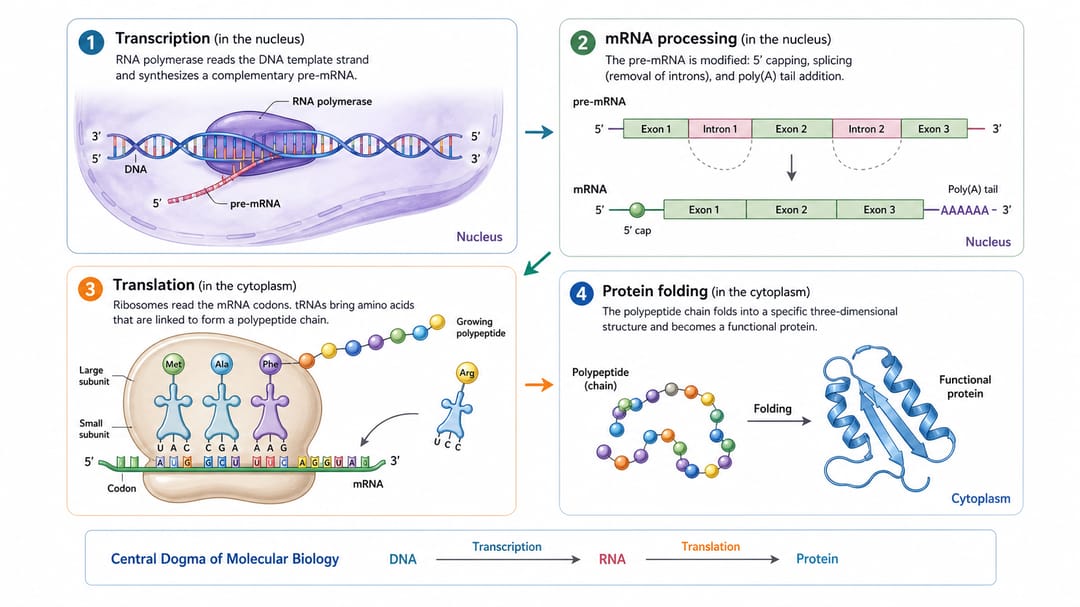
2. 醫學章節圖(正常 vs 病理)
Create a medical textbook illustration for [condition or organ system] for medical students.
Show four states: [anatomical normal], [early disease change], [advanced disease change], and [clinical or radiological correlate].
Use the same anatomical viewpoint across all four states so students compare changes, not perspectives.
Labels: abbreviated anatomical names. Mark pathology with a dashed outline, not red — color blindness compliance.
Style: educational atlas, no graphic content, calm clinical palette from style sheet.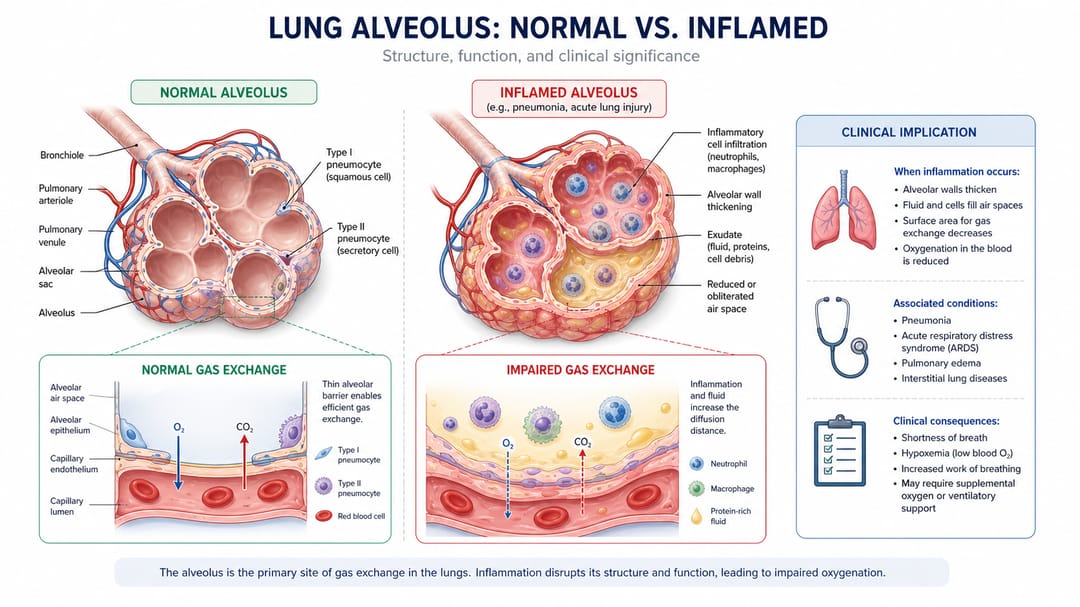
3. 對比 / 反差圖
Design a textbook figure comparing [concept A] and [concept B] for [grade level] students.
Use two columns of equal width with identical row structure: [mechanism], [structure], [function], [example].
Matching icons on left and right within each row, so the difference is visible at a glance.
Short labels, definitions in caption.
Use the chapter palette; A in [color 1], B in [color 2]. SVG output.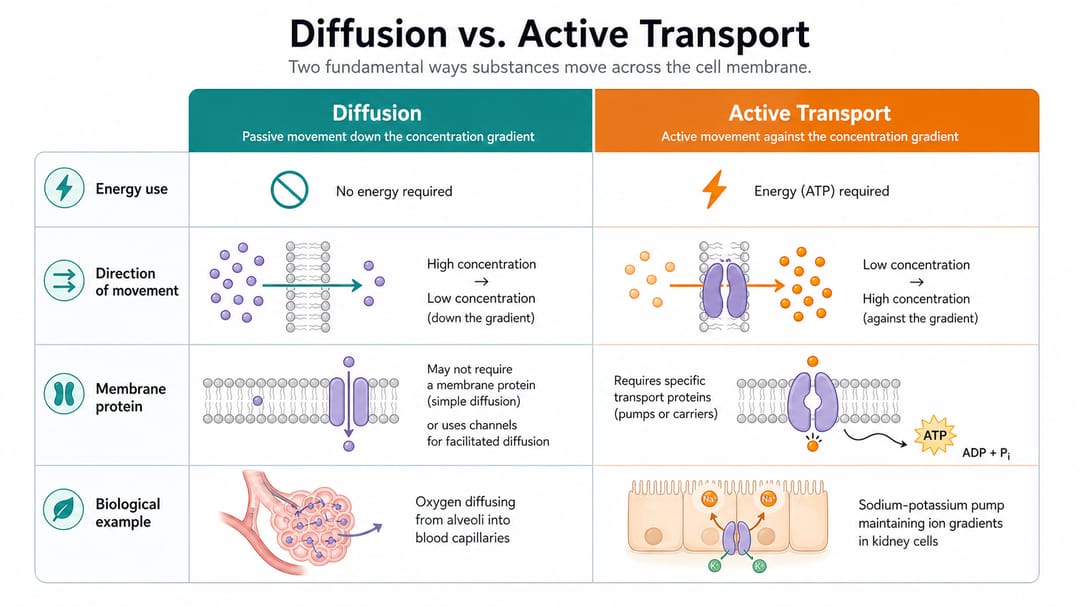
4. 解剖標註圖
Create a labeled anatomy illustration of [organ or system] for [grade level / course] students.
View: [sagittal / coronal / axial / 3-D oblique], specify a single perspective.
Label the following structures: [list every structure to label]. Do not label other structures.
Use leader lines, not arrows. Place labels outside the body outline so the anatomy stays readable.
Style: educational atlas, matching the rest of our anatomy figures (palette and stroke from style sheet).
Output as layered SVG so labels can be translated for international editions.
不同角色的使用建議
- 第一次寫教材的作者:寫 prompt 之前先寫 style sheet。大部分被退稿的圖,問題不在 prompt,在沒有 style sheet。
- 編輯 / 製作負責人:入稿時就強制 style sheet。任何 prompt 沒貼 style sheet 的圖,先退回再說科學內容。
- 負責國際版的合著者:每張圖必須匯出 SVG。有 SVG 翻譯就是換文字層,沒 SVG 就是整張重畫。
- 課程 / 教學設計者:模板 1 給過程圖、模板 3 給對比圖。這兩個模板覆蓋大部分學習目標。
- 配合 AI 草稿的醫學插畫師:用模板 2 拿版面,解剖部分最終自己重畫。AI 擅長構圖,不擅長臨床準確性。
在 SciDraw AI 裡真正可執行的工作流
- 先鎖定 style sheet:一頁:配色、線寬、標籤、圖示、圖註。每個 prompt 都貼上。
- 按圖的教學職責選模板:過程、對比、解剖,或醫學狀態。
- 生成一個變體,立刻對照章節核對:細胞顏色和兩頁前那張對得上嗎?箭頭樣式跟第 12 章一致嗎?
- 匯出 SVG,放回章節草稿:不要孤立看,要和周圍圖一起看。
- 翻譯靠在 SVG 裡換文字:不要重新生成。同一張圖不同語言只差文字層。
- 建一份章節級圖譜,合著者一眼看完所有圖,校樣前就發現不一致。
付印前 checklist
- 本章每張圖對應的 prompt 都貼了 style sheet。
- 跨章節細胞類型、器官、儀器使用同一種顏色和輪廓。
- 標籤是短 callout;定義放圖註或內文。
- 沒有編造的數字、沒有真實病例資料、沒有期刊 logo。
- SVG 匯出分層,文字在獨立圖層(翻譯就緒)。
- 配色通過色盲安全對比(不能只用紅綠編碼)。
- 在印刷尺寸下,目標年級兩秒能讀完。
相關 SciDraw AI 工作流
教材插圖生成器 · 書籍插圖生成器 · 面向教育者 · 醫學插圖生成器
常見問題
教材插圖和論文圖有什麼不同?
論文圖是給專家證明結果;教材圖是給非專家教概念,並且會和同章節另外 19 張圖一起出現。教材圖在密度、標籤風格、跨章節一致性上的要求都比論文圖嚴格。
教材圖要寫詳細標籤嗎?
物體名用單字 callout,定義和機制描述放圖註或內文。一張滿是定義的圖就不再是圖,而是詞彙表。
同一張圖能複用到 slides 或 handouts 嗎?
可以——前提是匯出了 SVG 且文字在獨立圖層。slides 縮短標籤、handouts 隱藏定義、翻譯版換語言,三種都是換文字層,不是重新生成。
這和一般書籍插圖有什麼不同?
教材插圖優先教學清晰度和跨章節一致性。一般書籍插圖還包括章節開頭、裝飾跨頁、編輯性視覺,這些對一致性要求沒那麼高。
怎麼阻止 AI 每張圖都換新風格?
每個 prompt 都貼 style sheet。模型預設追求最大多樣性,除非顯式約束配色、線寬和圖示。「match our chapter style」沒寫規格=模型聽不懂。
解剖準確性 AI 可靠嗎?
早期草稿可以,最終醫學教材的解剖必須由合格的醫學插畫師或解剖學家審核。AI 會自信地畫錯臨床細節,必須在付印前由編輯流程攔下來。