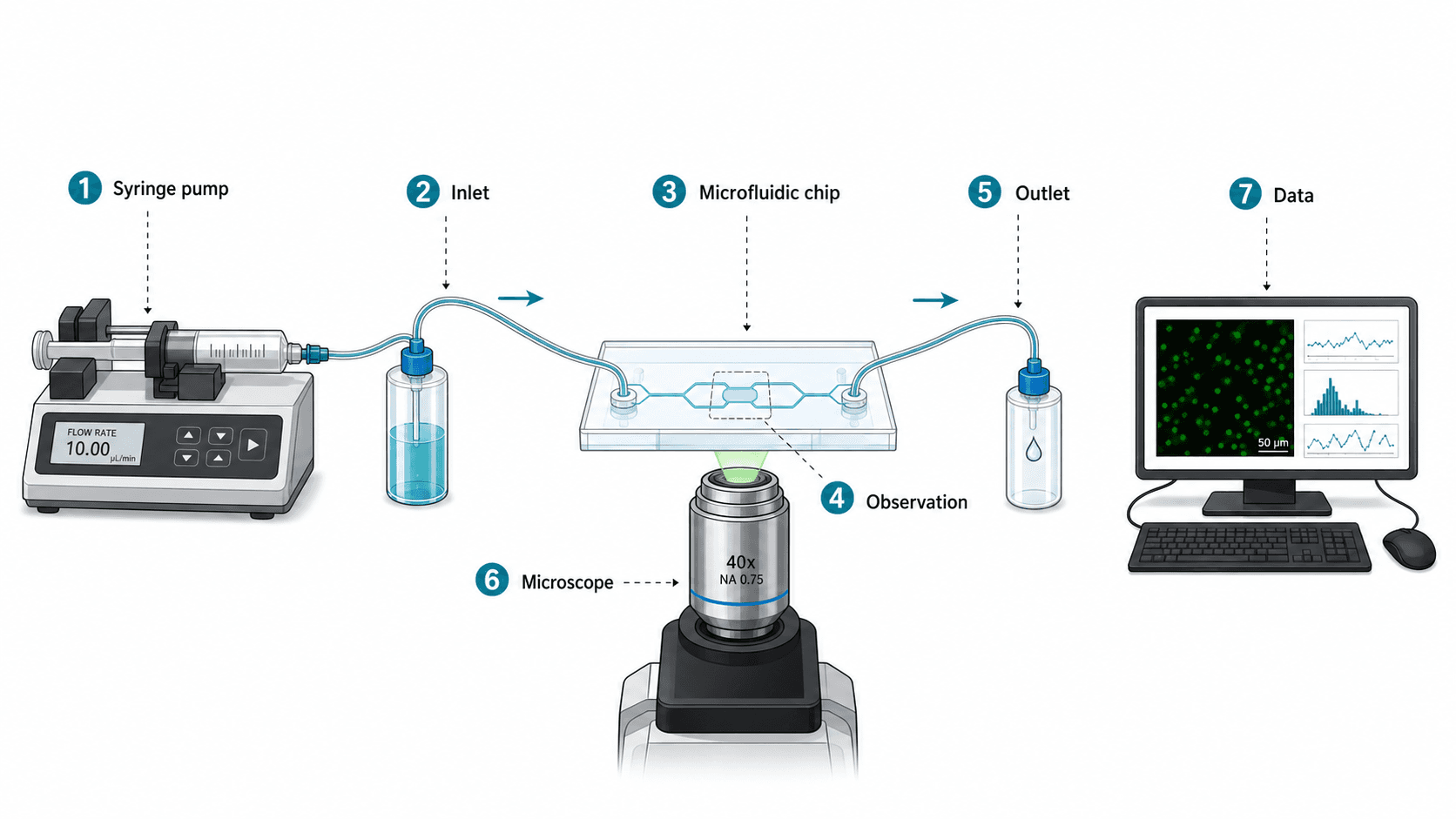
一篇微流控論文被三位審稿人各自獨立寫了同樣的話退回修改:「我看不出什麼流入、什麼流出。」示意圖很漂亮——直接從 CAD 渲染的寫實晶片圖,連管路、注射泵、實驗台背景都在。團隊以為細節越多越可信,審稿人卻覺得這張圖是裝飾。
示意圖的本質就是「不是照片」。它解釋:輸入、加工、觀察、輸出。審稿人要在三秒內由左往右把實驗讀完。本文給的是物理與工程類研究最常用的四類示意圖模板,對應的 prompt 強制模型出功能模組而非裝飾性 CAD。
讓示意圖被退稿的常見錯誤
- 把示意圖當文件——示意圖是解釋,不是紀錄。CAD 文件是紀錄,示意圖是溝通工具。
- 寫實渲染——看著唬人,讀著像填充。審稿人要知道每個元件做什麼,不是長什麼樣。
- 箭頭無方向,或所有訊號用同一種箭頭——流體、電訊號、光路、數位資料需要不同箭頭。多數圖所有箭頭都一樣。
- 元件密度蓋過實驗本身——每根管、接頭、螺絲都畫上,反而看不到輸入 → 測量 → 輸出主線。
- 裝飾性的實驗台背景——實驗台、手、背景儀器,對解釋科學沒用。
爛提示詞 vs 改寫後的提示詞
以一個微流控裝置示意圖為例:
太短,出來的是一張寫實 CAD 風格、看不出流向的圖:
幫我畫一張我們微流控晶片實驗的科研示意圖。改寫後,得到一張由左到右的功能模組示意圖:
Create a clean scientific schematic of a microfluidic experiment for a Lab on a Chip submission.
Left to right flow with four functional blocks: (1) input — two syringe pumps with reagent labels, (2) control — three-way valve, (3) chip — PDMS microfluidic device with a Y-junction and a 5 mm observation channel, (4) detection — fluorescence microscope with CMOS camera, (5) output — waste reservoir and a labeled "data" arrow to a computer block.
Use solid arrows for fluid flow, dashed arrows for optical path, dotted arrows for digital data.
Numbered callouts (1–5) at each component. White background, vector style, room for a legend below.
No photoreal rendering, no decorative lab bench, no realistic tubing — schematic only.
Output as layered SVG.第二版讓圖自己講故事:不同訊號不同箭頭、編號 callout、由左到右的閱讀順序、明令禁止裝飾。
寫在前面:示例提示詞保留英文。當前主流模型對英文 token 還原最穩定,中文寫腳本、英文寫提示詞是科研圈通行做法。
能過審稿的示意圖三條規則
- 閱讀方向是審稿人眼睛第一件事。先定下來——通常由左到右,有時由上到下。在 prompt 寫明。
- 箭頭種類承擔意義。不同物理量 → 不同箭頭風格。流體(實線)、光路(虛線)、資料(點線)、機械(粗箭頭)。每種箭頭都在圖例定義。
- 編號 callout 勝過散落標籤。五個編號 callout + 每號一句描述,幾秒就讀完。十二個散落標籤要幾分鐘——多數審稿人不會讀。
範例圖
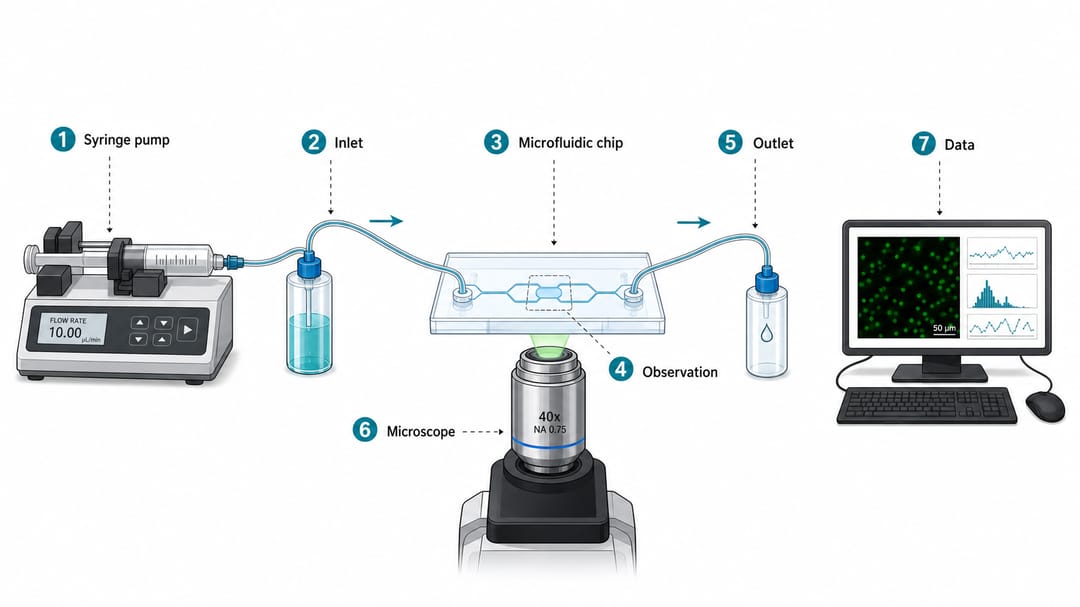
要看的細節:物理裝置可辨但簡化為功能模組;流向、觀察點、資料輸出視覺分離;由左到右幾秒讀完;標籤短到 SVG 裡可編輯。
依示意圖類型分的可重用模板
把方括號裡的內容換成你的裝置。務必明確箭頭類型與閱讀方向。
1. 微流控 / 反應器 / 感測器裝置
Create a clean scientific schematic of a [microfluidic / continuous-flow reactor / sensor] setup for a [target journal] submission.
Left to right flow with these functional blocks: [input source], [control element], [main chip or device], [observation point], [outlet], [data acquisition].
Use solid arrows for [fluid / gas] flow, dashed arrows for optical signal, dotted arrows for digital data.
Numbered callouts (1–N) at each component, with a legend below.
White background, vector-style schematic, no photoreal rendering, no decorative lab bench.
Output as layered SVG so I can refine labels in Illustrator.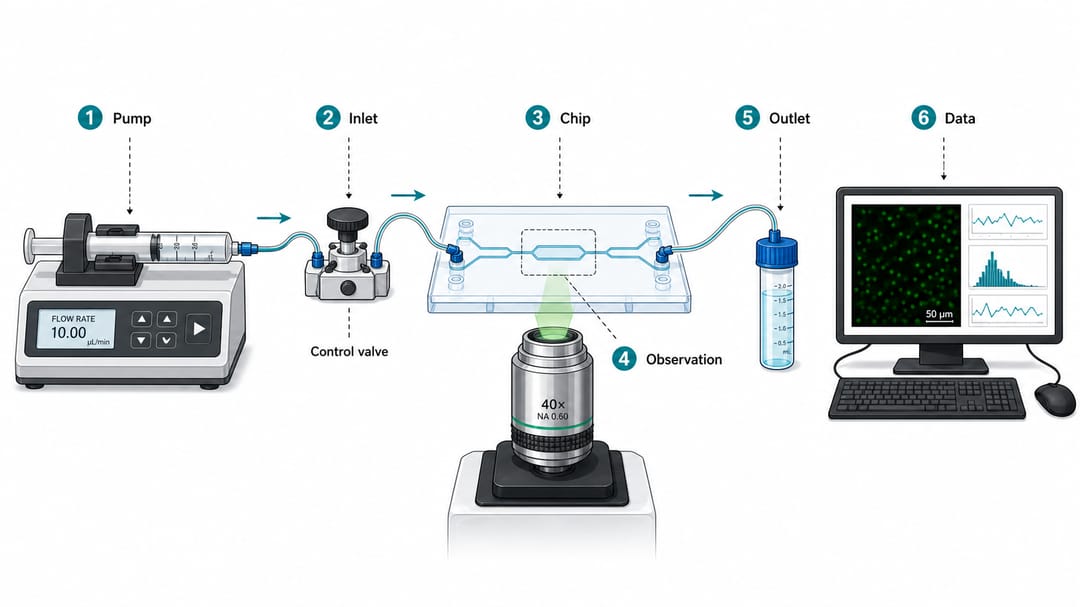
2. 光路示意圖
Draw an optical path schematic for [experiment name, e.g., confocal Raman setup].
Components in order: [light source], [collimator], [filter / dichroic], [objective], [sample stage], [beam splitter if any], [detector], [data acquisition].
Use straight beam lines for optical paths; mark wavelength range on each segment if relevant.
Label key components only; no decorative bench, no shadows, no perspective tricks.
Vector style, white background. Output as layered SVG.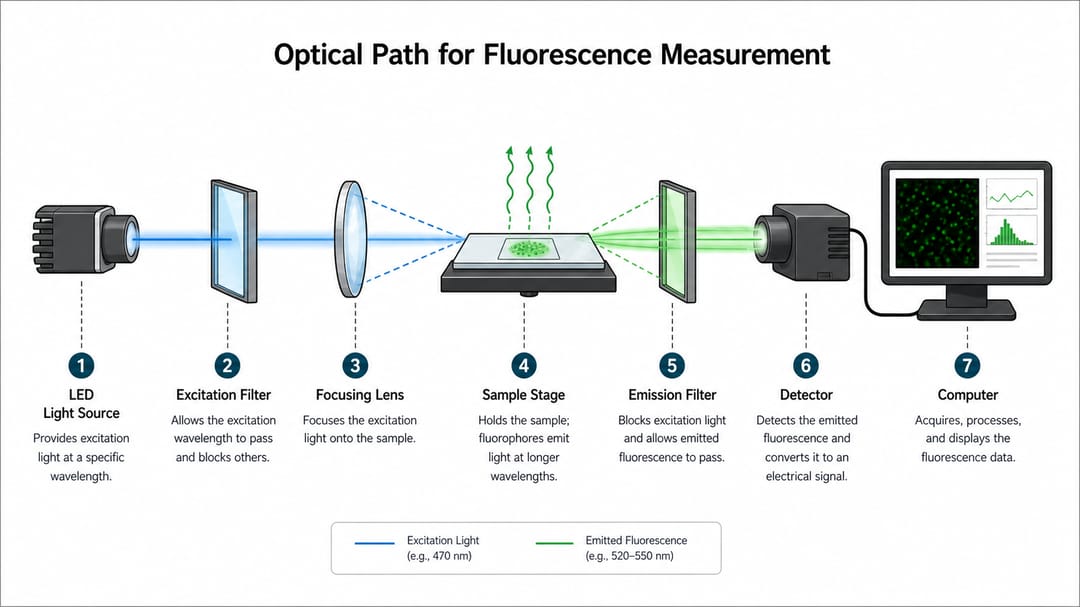
3. 元件剖面圖
Create a device cross-section schematic of [device name, e.g., perovskite solar cell].
Show layers from bottom to top: [substrate], [bottom electrode], [transport layer], [active layer], [transport layer], [top electrode], [encapsulation].
Use distinct material fills, simple cross-hatching where helpful, layer thickness labels in nanometers or micrometers.
Add a measurement contact callout if there is one. No isometric 3D, no shading — a flat schematic cross-section.
Vector style, layered SVG, room for thickness annotations.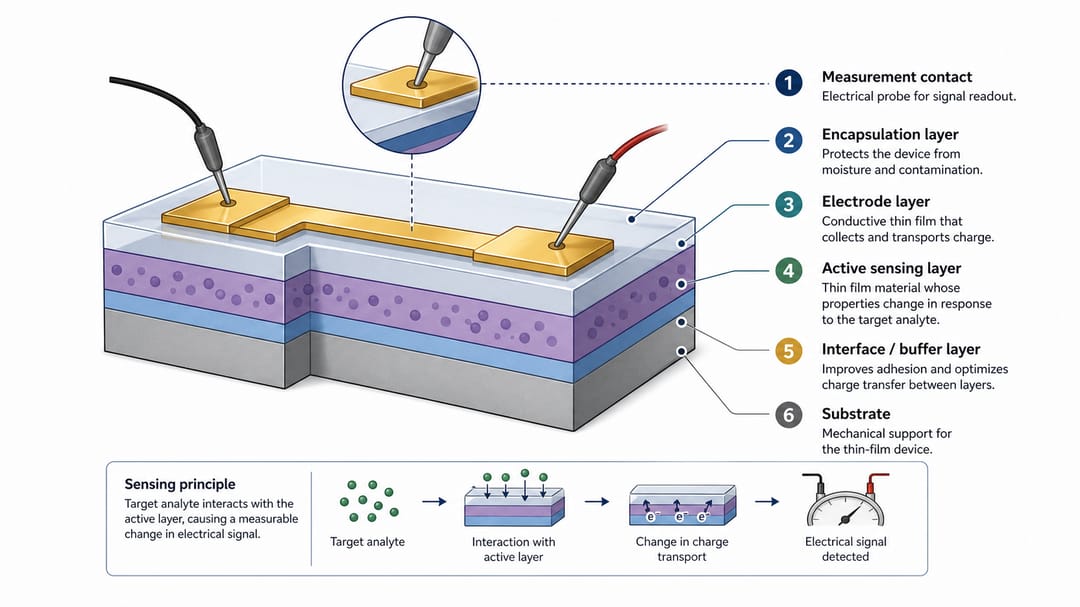
4. 訊號鏈 / 資料擷取示意圖
Draw a signal-chain schematic for [sensor or measurement system].
Left to right blocks: [transducer / sensor], [analog conditioning — amplifier, filter], [ADC], [microcontroller or DAQ], [host computer], [analysis output].
Use dotted arrows for digital signal, solid arrows for analog signal, block arrows for mechanical or actuated coupling.
Label sampling rates, gain, or bandwidth on the relevant arrows.
No oscilloscope screenshots embedded in the figure. Vector style, layered SVG.如果需要畫的是前端的實際電路(電阻、運算放大器與接線,使用標準符號)而不是方塊圖,可以改用電路圖繪製工具。
不同角色的使用建議
- 寫方法學圖的博士生:依領域先從模板 1(微流控/反應器)或模板 2(光路)入手。忍住「每個接頭都畫」的衝動。
- 準備 revision 的博後:審稿說「分不清誰是誰」,就用編號 callout + 不同箭頭重做。通常一改就解決大半「不清楚」意見。
- 審稿中的 PI:先看閱讀方向與箭頭圖例,再看其他。這兩樣不清楚,圖就還沒準備好。
- 應用類期刊的工程團隊:模板 3(剖面)或模板 4(訊號鏈)。工程審稿人期待的是材料層與頻寬標註,不是審美 CAD。
- 寫白皮書 / 產品簡介的產業作者:模板 1 或 4,但更簡化。白皮書每個元件比期刊少一層細節——每個標籤都消耗讀者注意力。
在 SciDraw AI 裡真正可執行的工作流
- 寫一句話實驗摘要——例如「兩種試劑進入 Y 型微流控晶片,於觀察通道混合,以螢光成像,資料流到桌機」。一句話寫不出,示意圖也說不清。
- 依閱讀順序列功能模組——5-7 塊是單面板的甜蜜點。多於此就拆兩面板。
- 生成前定義每種箭頭——實線/虛線/點線/粗箭頭對應流體/光路/資料/機械。prompt 與圖例都要寫。
- 生成一個變體,讓沒看過實驗的同事三秒內追輸入 → 輸出。追不到,版面有問題——改 prompt,不要再用同一 prompt 抽卡。
- 匯出 SVG,在 Illustrator 或 Inkscape 清標籤。尤其編號 callout 與單位(nm、MHz、mL/min)——模型很少一次出乾淨。
- 物理準確性對照實機——AI 會畫實驗室裡不存在的元件。和實物對,不是和審美對。
投稿前 checklist
- 閱讀方向明確(左到右或上到下)。
- 每種箭頭只有一個意義,並寫在圖例。
- 編號 callout + 一句描述,不要散落標籤。
- 單面板 5-7 個元件,多於此就拆。
- 沒有寫實渲染、沒有裝飾實驗台、沒有等距 3D。
- 單位、增益、取樣率、波長標在相應箭頭。
- 分層 SVG,投稿前能改標籤。
- 沒看過裝置的同事三秒能追輸入 → 輸出。
相關 SciDraw AI 工作流
示意圖生成器 · 流程圖生成器 · 材料科學配圖生成器 · 科研示意圖生成器
常見問題
要不要用寫實裝置圖?
只在物理位置即訊息時(緊湊低溫裝置、幾何決定流場的工業反應器)。多數論文圖,簡化示意圖比寫實渲染傳達更快。
AI 能畫精確尺寸嗎?
AI 用於版面與溝通;精確尺寸從你的 CAD、實驗手冊、量測紀錄取得。AI 會自信地在實際 75 nm 的層上寫「25 nm」——它不知道真值。
單張示意圖最多放幾個元件?
單面板 5-7 個功能模組是可靠上限。讀者得理解超過一條故事就拆——例如「裝置」和「訊號鏈」拆成兩個面板。
流向怎麼畫才不亂?
流體用一種箭頭(實線、大箭頭),只在主流路上。不要每根管子都加箭頭。審稿人能推斷其餘。
示意圖要不要含資料分析流程?
只有當分析流程是方法學故事的一部分時。硬體導向論文,示意圖在資料擷取結束,分析圖另外引用。兩張清楚勝過一張超載。
等距或 3D 示意圖呢?
留給教科書系統概覽或基金封面。論文方法圖,平面示意圖讀更快,且黑白列印不丟資訊。
怎麼阻止模型加裝飾實驗台?
在 prompt 加明確負向約束:"No decorative lab bench, no hands, no instruments in the background, no shadows, no perspective." 沒明令,模型預設會加「科學主題」裝飾。