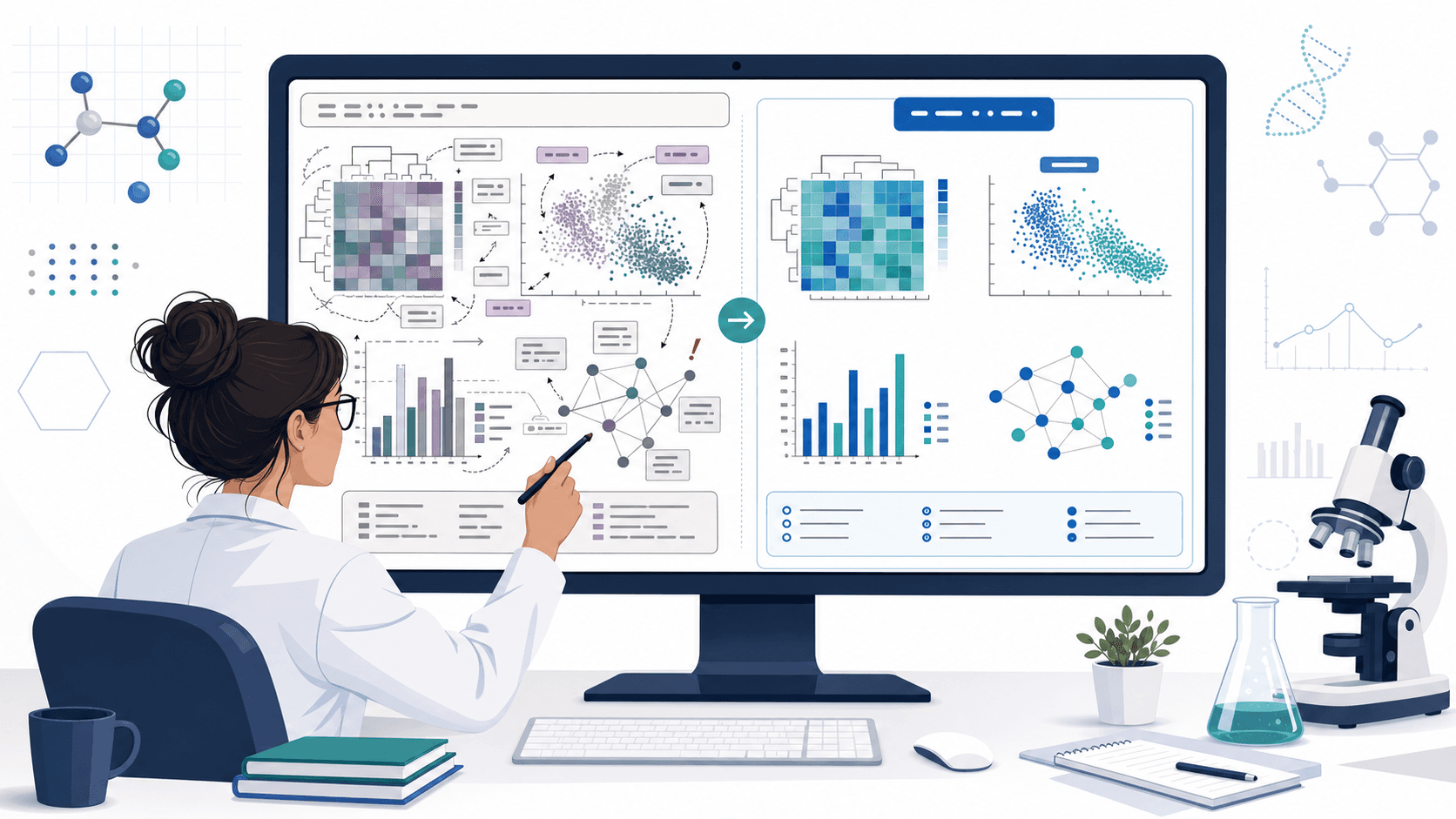
交圖前的週日晚上。指導教授在 30 分鐘的組會上隨手畫了模型,你拍了一張白板照片,回家一看——照片有點糊,有兩根箭頭看不清方向,頂上那個回路到底是回饋還是降解步驟全憑印象。你要麼瞎猜然後圖畫錯,要麼寄信問教授然後整晚泡湯。
AI 科研繪圖工作流不會代替你把會議筆記記清楚。但它能把重畫這部分從你手裡拿走——不用 11 點還在 Illustrator 裡推像素。這篇文章講的是科研人真正在用的工作流:照片或草圖進去,結構化提示詞在中間,可編輯 SVG 出來。
把工作流變成返工的幾種常見錯誤
- 把 AI 輸出當成最終圖——模型會給你一張「看起來已經完成」的精修圖,但裡面的科學關係仍然是你的責任。一定要匯出 SVG,標籤和箭頭都能改。
- 只丟一張照片不寫描述——image-to-image 模型會照畫面有的畫,而模糊的像素經常被腦補成不存在的連線。文字描述必須和照片同時給。
- 寫「請做成 Nature 那種風格」——出來的是裝飾,不是清晰度。結構關係必須先於風格描述。
- 遺失方向性——草圖裡的箭頭通常是「這影響那」,但科研圖必須區分激活、抑制、跨膜轉位、時間方向。必須明確寫。
- 跳過核對環節——AI 生成的圖經常憑空加節點、加標籤。匯出前一定要把原圖和輸出並排核對。
爛提示詞 vs 改寫後的提示詞
以一張磷酸化級聯(kinase cascade)的白板照片為例:
太短,得到一張風格化但無法核對的卡通圖:
把這張白板照片改成一張乾淨的科研圖。改寫後,得到一張可信、可編輯的圖:
Convert the attached whiteboard photo into a clean schematic of a kinase signaling cascade.
The sequence is: extracellular ligand → membrane receptor → MAPKKK → MAPKK → MAPK → nuclear transcription factor → target gene.
Use right-arrows for phosphorylation steps, dashed arrows for translocation across the nuclear membrane, and a separate panel for the inhibitor (small molecule blocking MAPKK).
Preserve the exact node names from the photo: do not invent additional proteins or substrates.
Style: clean vector schematic, white background, room for editable labels, no 3D rendering.
Output as a layered SVG so I can correct labels in Illustrator.
結構化版本做了兩件事是短版本做不到的:明確列出所有節點(模型沒法亂加),明確寫出每種箭頭的意義(模型沒法瞎猜)。
寫在前面:示例提示詞保留英文。當前主流模型對英文 token 還原最穩定,中文寫腳本、英文寫提示詞是科研圈通行做法。
哪些 AI 可以猜,哪些必須你來寫
這個工作流最關鍵的決策是:你需要在 prompt 裡講到多細。一個有用的分法:
| AI 可以推斷 | 你必須寫明 |
|---|---|
| 視覺風格、圖示設計、配色 | 每一個元件的名稱和標籤 |
| 版面比例與間距 | 每根箭頭的方向 |
| 背景、裝飾元素 | 每根箭頭的意義(激活 / 抑制 / 轉位) |
| 長寬比、裁切 | 這張圖是概念圖還是真實資料圖 |
| 通用物件的圖示風格(細胞、器官) | 具體分子結構、臨床發現、定量數值 |
右邊那一列就算照片裡畫了,prompt 裡也必須寫一遍。模型從模糊草圖讀科學結構的可靠性很差。
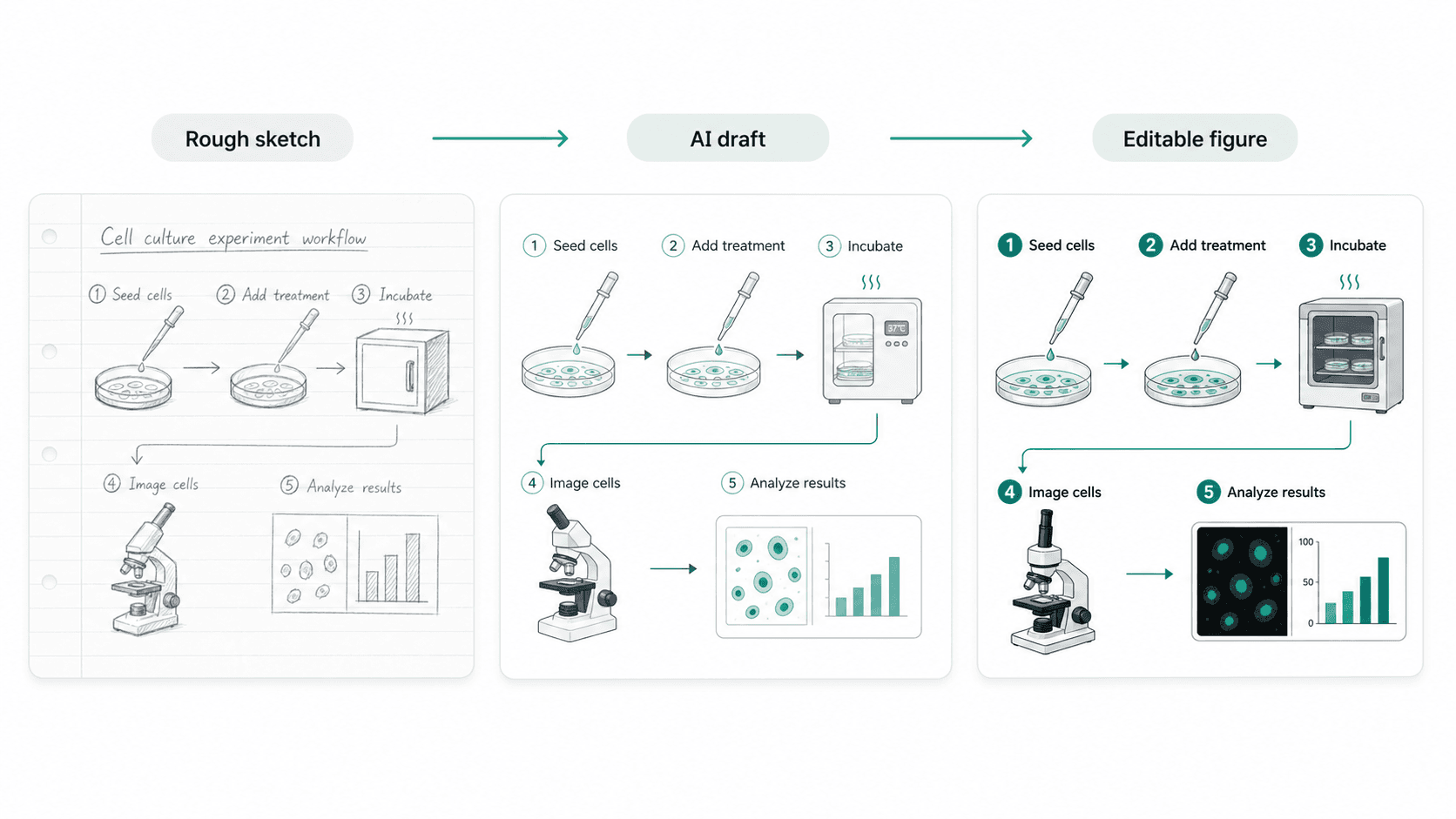
範例圖
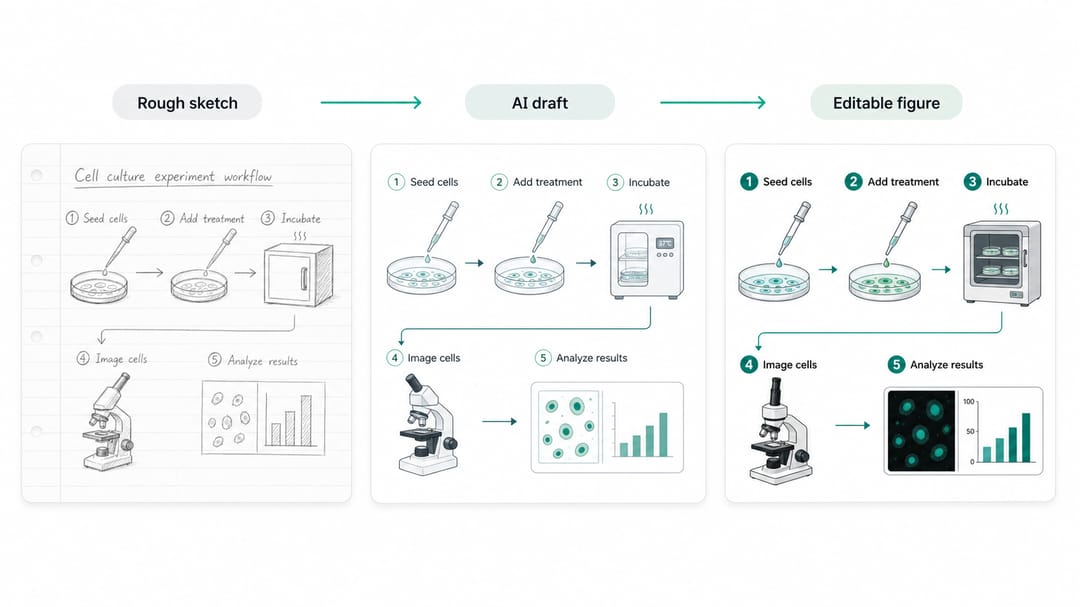
範例明確畫出三個階段:原始草圖、AI 草稿、可編輯圖。科學內容三階段不變,視覺語言一階段比一階段乾淨。注意 AI 草稿不是最終版,可編輯那一層才是。
依素材類型分的可重用模板
把方括號裡的內容換成你自己的研究。
1. 白板照片清理
Convert the attached whiteboard photo into a clean scientific schematic of [topic].
The components are: [list every node visible in the photo, in order].
The connections are: [for each arrow, state source → target and what it means (activation, inhibition, translocation, conversion, transport)].
Preserve exact labels from the photo: do not invent additional components.
Style: clean vector schematic, white background, editable labels, no 3D rendering.
Output as a layered SVG.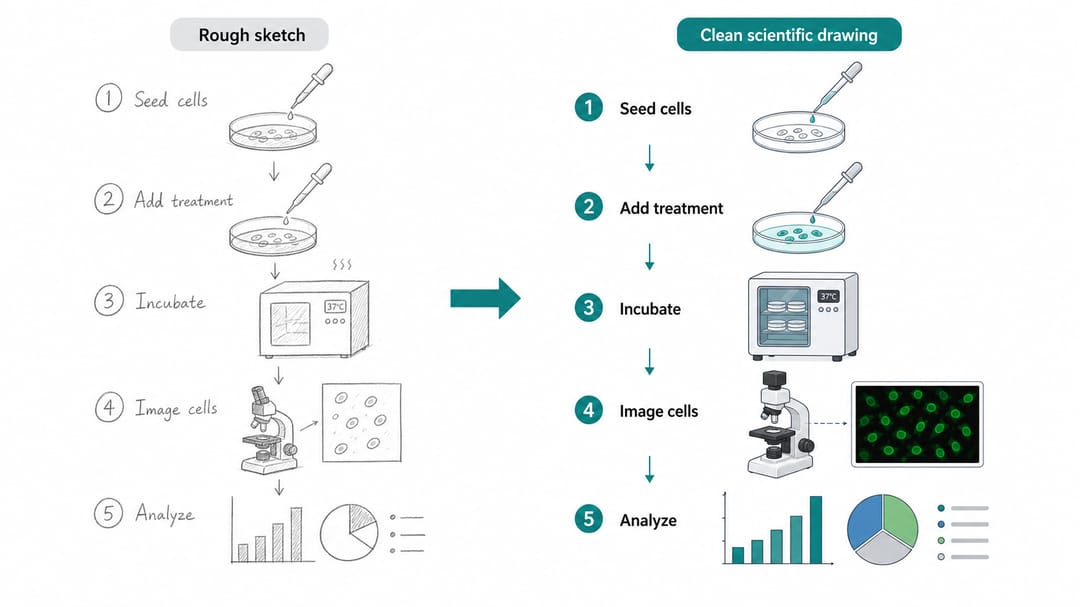
2. 從實驗記錄生成方法學圖
Create a methods figure from the following protocol notes: [paste protocol].
Group steps into four blocks: [sample preparation], [treatment], [measurement], and [analysis].
Use a horizontal workflow with numbered steps. Keep labels short enough to fit a single-column methods figure.
Show the instrument or assay icon at the measurement step; use a simple bar chart or table icon at the analysis step (no real numbers).
Do not invent missing protocol steps. If a step is unclear in the notes, leave it as a labeled placeholder I can fill in later.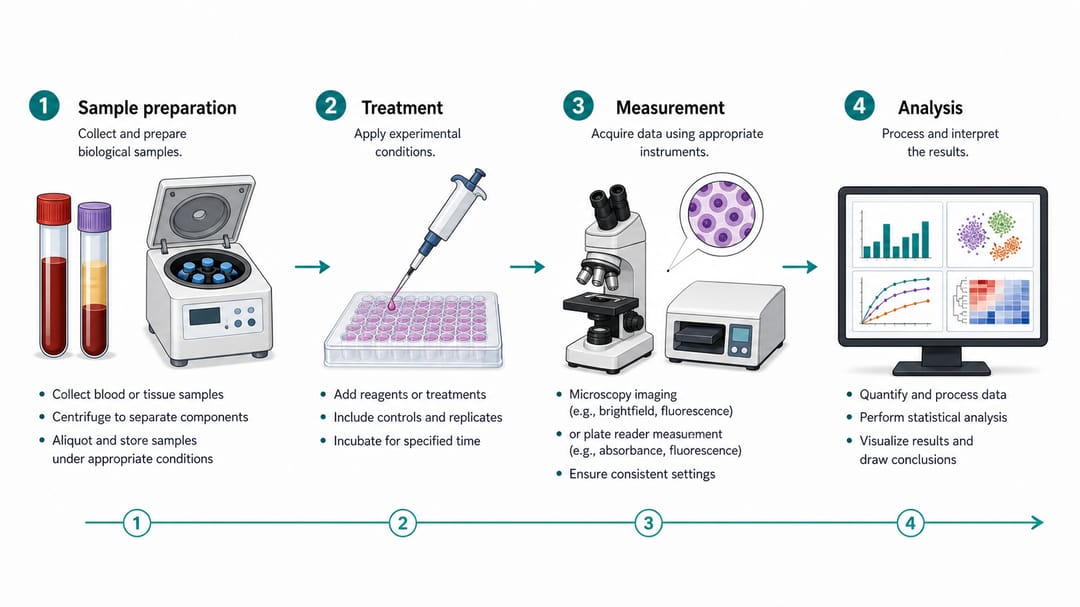
3. 給報告或基金用的概念圖
Draw a conceptual scientific figure explaining [idea or hypothesis].
Components to show: [main actor], [process they undergo], [output or readout], and [feedback or downstream effect].
This is for a [grant panel / department seminar / public talk]. Keep labels readable from 2 meters away.
Use schematic style, not photorealism. No real data values. No journal logos.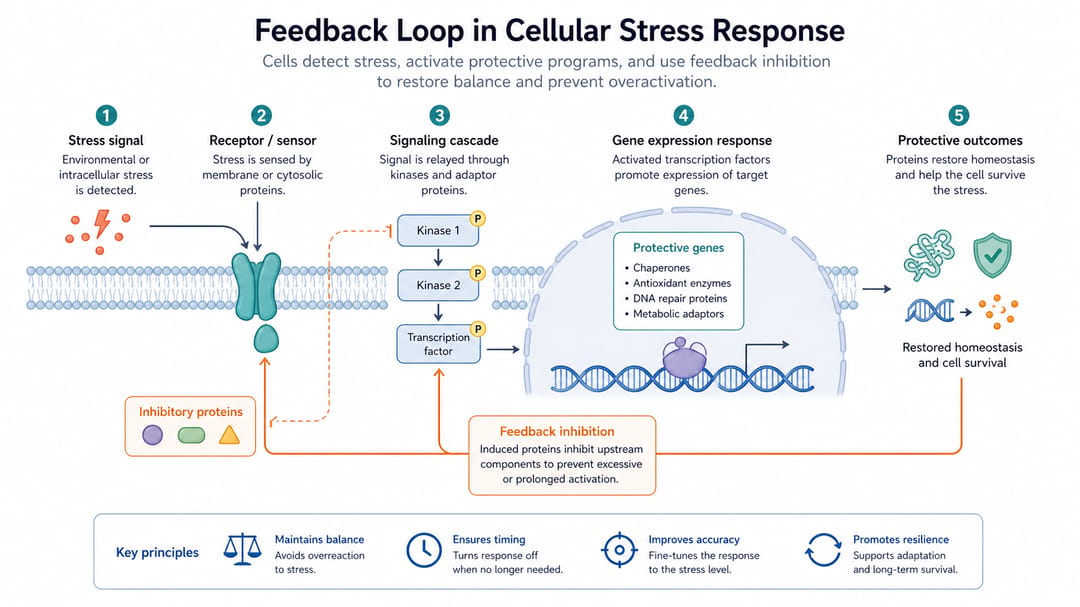
4. 引用已發表論文圖作為版面參考
Use the attached figure from a published paper as a layout reference only.
Recreate the structure for our own study on [topic]: keep the panel arrangement and arrow style, but replace [their component] with [our component], and update labels to: [list of labels].
Do not copy the exact illustrations. The output must be original and not infringe the source figure.
Style: editable vector, consistent with our previous figures.
不同角色的用法
- 第一年研究生:從模板 2(實驗記錄轉方法學圖)開始。你的實驗記錄本身就已經是結構化提示詞,只是要重新排版。
- 審稿中的 PI:要求學生同時給你草圖 + AI 草稿 + 可編輯 SVG。如果學生只有 AI 草稿,代表跳過了核對步驟。
- 準備 talk 的博後:用模板 3。10 分鐘的 talk,一張概念圖上最多 4 個元件。
- 有白板討論文化的實驗室 / PI:組會結束時拍下白板,當週就用模板 1 處理。拖越久,繪圖時的理解漂移越嚴重。
在 SciDraw AI 裡真正可執行的工作流
- 拍乾淨一點:手機拍草圖或白板,光線好,所有元件可見。AI 看到全圖之前不要裁切。
- prompt 和圖片同時準備:開一個 notes,把每個節點和每根箭頭列一遍。這一步強迫你在模型之前先核對自己。
- 先生成一個結構化變體:拿它對照 prompt——不是對照美感。模型保留了每個節點嗎?每根箭頭方向對嗎?
- 改 prompt,不要反覆生成:圖錯了改 prompt 重新生成。用同一個錯的 prompt 反覆抽卡是消耗 credit 最快的方式。
- 匯出 SVG 改標籤:模型只出點陣圖就用 vectorize image 轉。最終標籤編輯在 Illustrator / Inkscape / PowerPoint 完成。
- 和原圖核對:把原始草圖和最終圖並排放,每個節點、每根箭頭都能對上。
匯出前 checklist
- 圖裡每個元件,要麼原草圖有,要麼 prompt 明確加了。
- 每種箭頭只有一種意思。
- 沒有編造的數字、偽造的期刊 logo、虛假的信賴區間。
- 在最終展示尺寸(欄寬 / 海報 / 投影片)下標籤清晰可讀。
- 輸出是可編輯格式(SVG、分層 PDF 或
.ai),不是扁平點陣。 - 涉及臨床或化學內容時,已經過領域專家審核。
相關 SciDraw AI 工作流
科研繪圖 · 科研配圖生成器 · AI 科學插圖 · 影像向量化
常見問題
草圖必須畫得很整齊這套流程才管用嗎?
不需要。草圖可以是麥克筆寫的手畫再拍照。關鍵是你自己清楚每個元件、每根箭頭的意義。AI 沒辦法從你自己的模糊處理中還原結構。
哪些東西絕對不能交給 AI?
精確分子結構、臨床描述、定量數值、學科專屬符號(數學希臘字母、化學 IUPAC 結構、醫學解剖標誌)。生成後必須人工核。
為什麼要匯出 SVG,不直接用 AI 輸出?
因為審稿人一定會讓你改標籤,而標籤是 AI 生成圖最脆弱的部分。SVG 把標籤存成可編輯文字,不是像素。
怎麼判斷 AI 編造了內容?
把輸出與原圖做 diff。把 AI 輸出裡每個節點、每根箭頭走一遍,確認能追到草圖或 prompt 中的某處。追不到的就是 hallucination。
能用在臨床或外科圖嗎?
可以用來做草稿,絕對不能直接當終稿。臨床圖發表或交給病人前,必須由臨床醫師或合格的醫學插畫師審核。AI 是草圖工具,不是臨床權威。
模型一直加我沒要的元素怎麼辦?
在 prompt 裡加明確負向約束:"Do not include any components other than the ones listed above." 顯式負向約束比隱式 "minimal" 要求有效率得多。