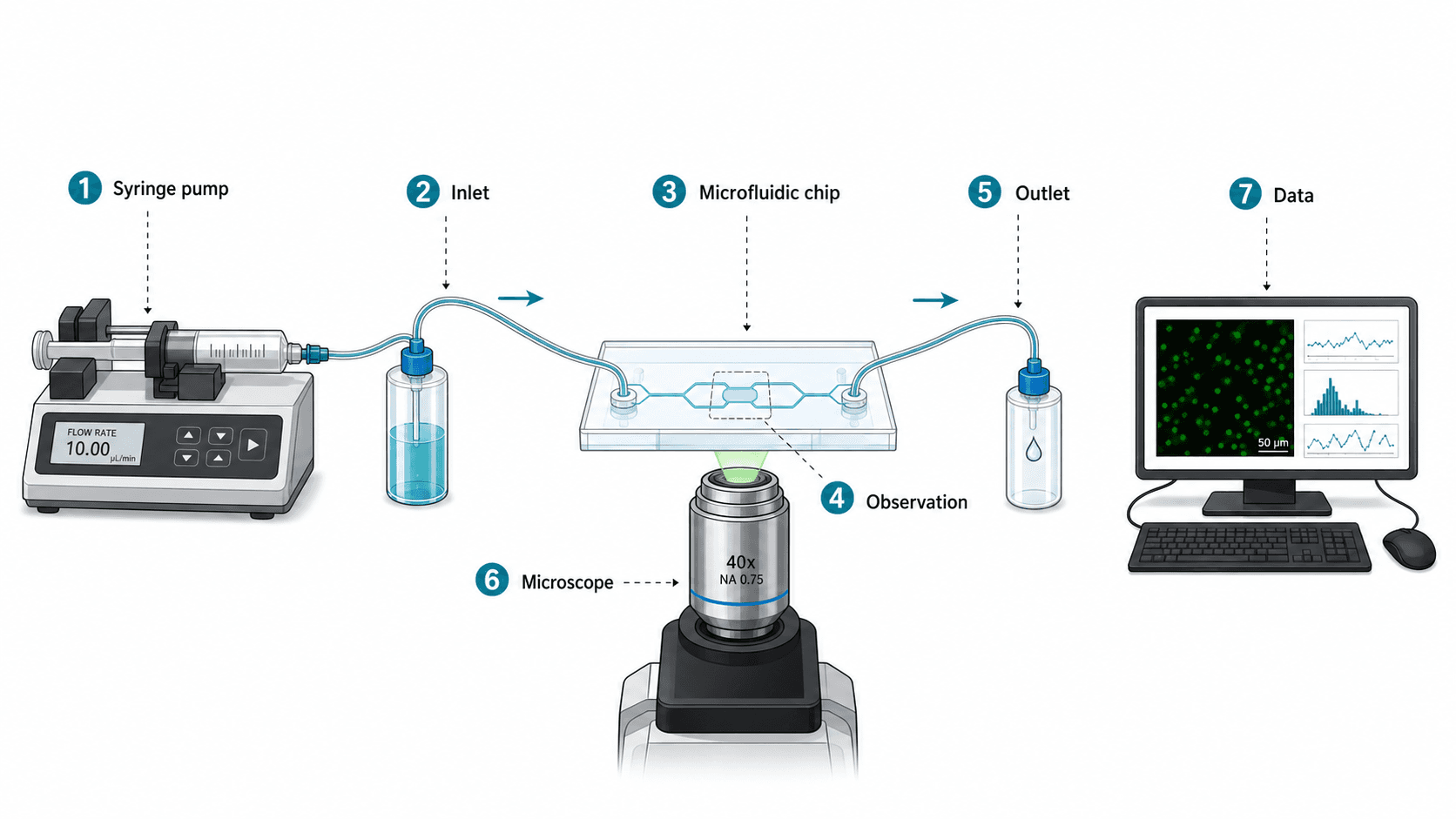
A microfluidics paper went to revision with the same comment three reviewers wrote independently: "I can't tell what enters and what exits." The schematic was beautiful — a photoreal render of the chip from the CAD file, complete with tubing, syringe pumps, and the actual lab bench in the background. The team thought more detail equaled more credibility. The reviewers thought the figure was decoration.
The whole point of a schematic is that it is not a photograph. A schematic explains: input, processing, observation, output. A reviewer needs to follow the experiment from left to right in three seconds. This guide is the four schematic types that cover most experimental setups in physical and engineering sciences, with prompts that produce functional blocks instead of decorative CAD.
Common mistakes that make schematics fail review
- Treating the schematic as documentation. It is an explanation, not a record. The CAD file is documentation. The schematic is communication.
- Photoreal rendering. Looks impressive, reads as filler. Reviewers want to know what each component does, not what it looks like.
- No arrow direction or wrong arrow types. Fluid flow, electrical signal, optical path, and data transfer all need visually distinct arrows. Most schematics use one arrow for everything.
- Component density that hides the experiment. Showing every tube, fitting, and screw obscures the input → measurement → output story.
- Decorative lab backgrounds. Lab benches, hands, instruments in the background. None of it explains the science.
Bad prompt vs. better prompt
A real before/after on a microfluidic setup schematic:
Too short — produces a photoreal CAD-style image with no readable flow:
Draw a scientific schematic of our microfluidic chip experiment.Restructured — produces a left-to-right functional schematic:
Create a clean scientific schematic of a microfluidic experiment for a Lab on a Chip submission.
Left to right flow with four functional blocks: (1) input — two syringe pumps with reagent labels, (2) control — three-way valve, (3) chip — PDMS microfluidic device with a Y-junction and a 5 mm observation channel, (4) detection — fluorescence microscope with CMOS camera, (5) output — waste reservoir and a labeled "data" arrow to a computer block.
Use solid arrows for fluid flow, dashed arrows for optical path, dotted arrows for digital data.
Numbered callouts (1–5) at each component. White background, vector style, room for a legend below.
No photoreal rendering, no decorative lab bench, no realistic tubing — schematic only.
Output as layered SVG.
The second prompt makes the schematic do the explaining: distinct arrow types, numbered callouts, left-to-right reading order, and an explicit ban on decoration.
Note: prompts stay in English. Current image models respond most stably to English tokens. Native-language body + English prompt is standard practice in the scientific community.
Three rules for schematics that pass review
- Reading direction is the first thing the reviewer's eye does. Establish it — usually left to right, sometimes top to bottom. State it in the prompt.
- Arrow type carries meaning. Different physics → different arrow style. Fluid (solid), optical (dashed), data (dotted), mechanical (block arrow). Define every arrow in the legend.
- Numbered callouts beat scattered labels. A schematic with five numbered callouts and a one-line description per number reads in seconds. A schematic with twelve scattered labels reads in minutes — and most reviewers will not bother.
Example figure
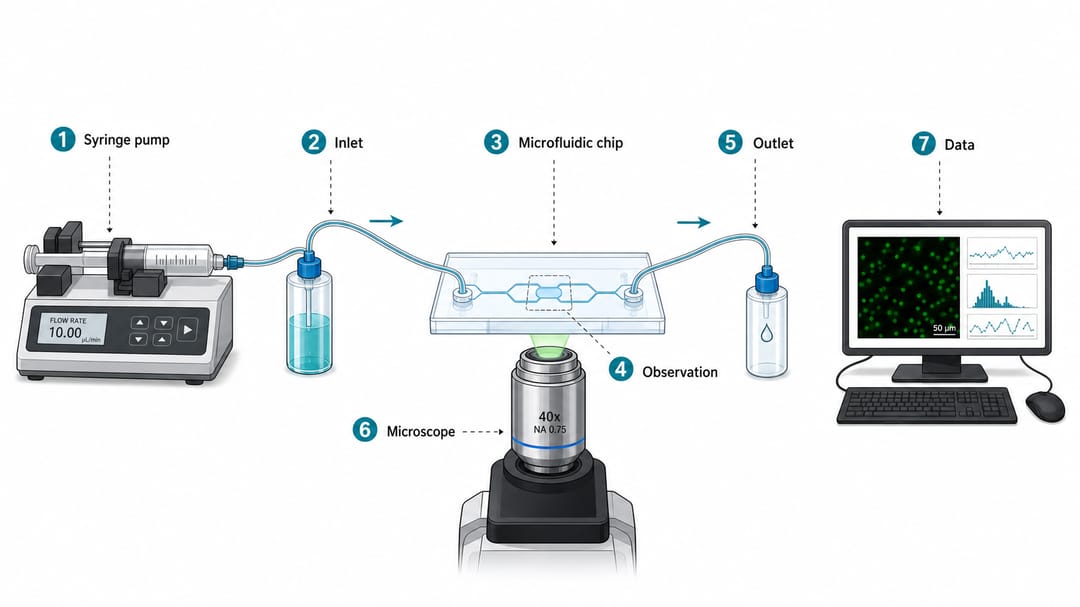
What to notice: the physical setup is recognizable but simplified into functional blocks; fluid direction, observation point, and data output are visually separated; the layout reads left to right in a few seconds; labels are short enough to remain editable in SVG.
Copy-paste templates by schematic type
Replace bracketed text with your setup. Always specify arrow types and reading direction.
1. Microfluidic / reactor / sensor setup
Create a clean scientific schematic of a [microfluidic / continuous-flow reactor / sensor] setup for a [target journal] submission.
Left to right flow with these functional blocks: [input source], [control element], [main chip or device], [observation point], [outlet], [data acquisition].
Use solid arrows for [fluid / gas] flow, dashed arrows for optical signal, dotted arrows for digital data.
Numbered callouts (1–N) at each component, with a legend below.
White background, vector-style schematic, no photoreal rendering, no decorative lab bench.
Output as layered SVG so I can refine labels in Illustrator.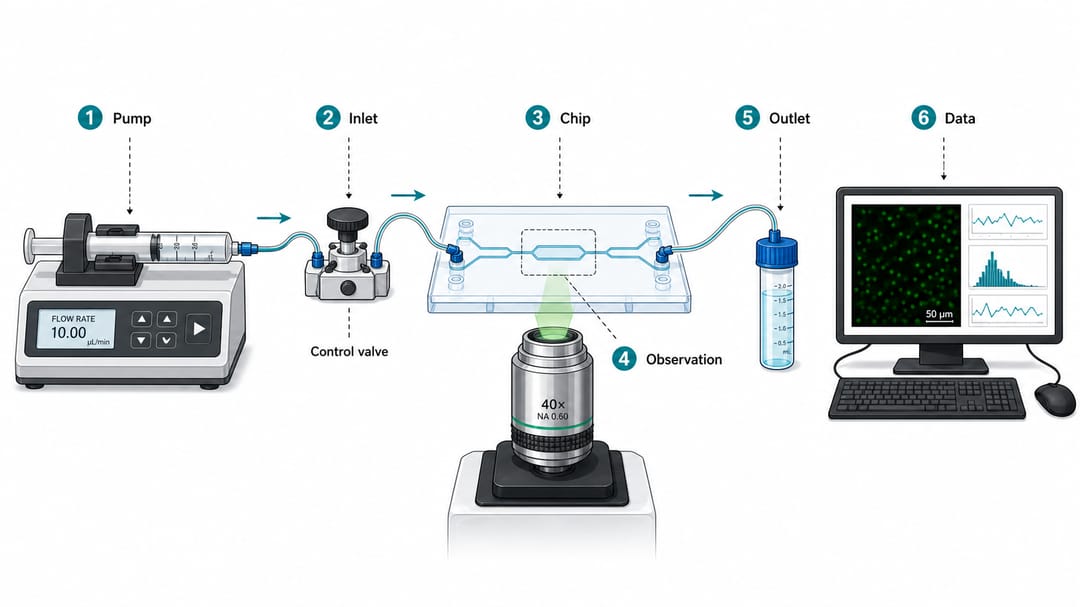
2. Optical path schematic
Draw an optical path schematic for [experiment name, e.g., confocal Raman setup].
Components in order: [light source], [collimator], [filter / dichroic], [objective], [sample stage], [beam splitter if any], [detector], [data acquisition].
Use straight beam lines for optical paths; mark wavelength range on each segment if relevant.
Label key components only; no decorative bench, no shadows, no perspective tricks.
Vector style, white background. Output as layered SVG.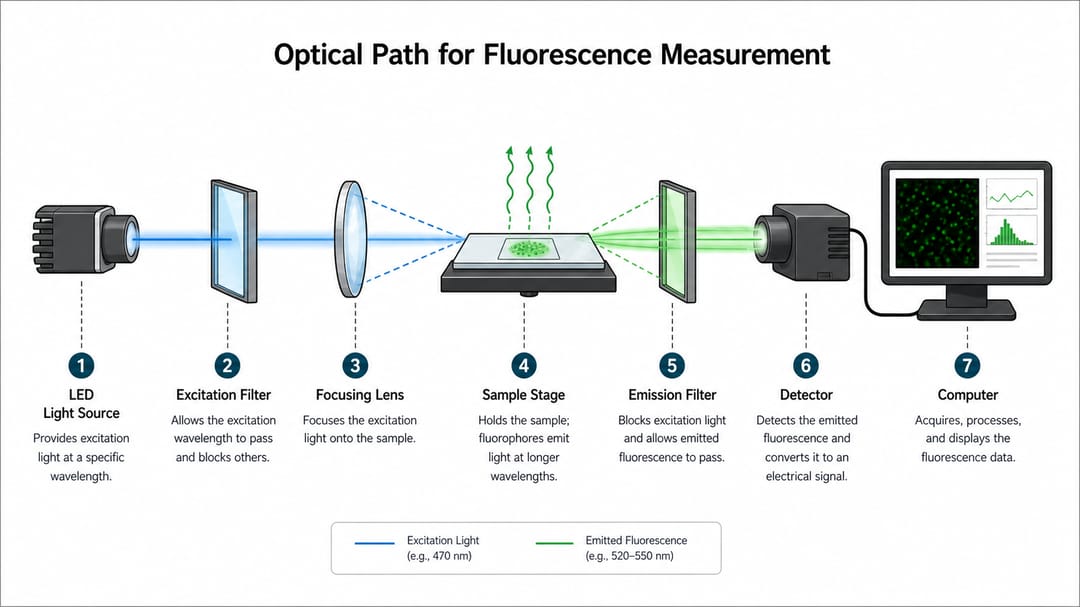
3. Device cross-section
Create a device cross-section schematic of [device name, e.g., perovskite solar cell].
Show layers from bottom to top: [substrate], [bottom electrode], [transport layer], [active layer], [transport layer], [top electrode], [encapsulation].
Use distinct material fills, simple cross-hatching where helpful, layer thickness labels in nanometers or micrometers.
Add a measurement contact callout if there is one. No isometric 3D, no shading — a flat schematic cross-section.
Vector style, layered SVG, room for thickness annotations.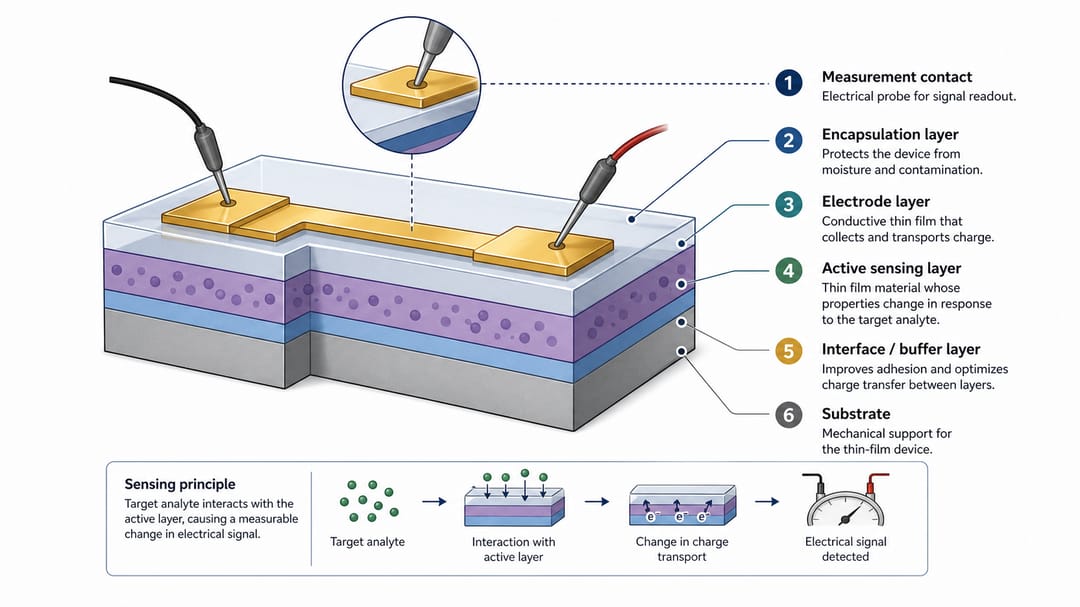
4. Signal chain / data acquisition schematic
Draw a signal-chain schematic for [sensor or measurement system].
Left to right blocks: [transducer / sensor], [analog conditioning — amplifier, filter], [ADC], [microcontroller or DAQ], [host computer], [analysis output].
Use dotted arrows for digital signal, solid arrows for analog signal, block arrows for mechanical or actuated coupling.
Label sampling rates, gain, or bandwidth on the relevant arrows.
No oscilloscope screenshots embedded in the figure. Vector style, layered SVG.
If the figure needs the actual front-end circuit — resistors, op-amps, and wiring with standard symbols — rather than a block diagram, use the circuit diagram maker.
How different readers should use this guide
- PhD student writing a methods figure: start with template 1 (microfluidic/reactor) or template 2 (optical) depending on your field. Resist the urge to include every fitting and tube.
- Postdoc preparing a paper revision: if a reviewer says "I can't tell what does what," redo the schematic with numbered callouts and distinct arrow types. That single change fixes most "unclear" comments.
- Group leader / PI reviewing a draft: ask for the reading direction and the arrow legend before reading the rest. If those are not clear, the figure is not ready.
- Engineering team submitting to applied journals: template 3 (cross-section) or template 4 (signal chain). Engineering reviewers expect labeled material layers and signal bandwidth, not aesthetic CAD.
- Industry author (white paper or product brief): template 1 or 4, but heavily simplified. White papers tolerate one fewer detail per component than a journal — every label costs reader attention.
A realistic SciDraw AI workflow
- Write the one-sentence experiment summary. "Two reagents enter a Y-junction microfluidic chip, mix at the observation channel, are imaged with fluorescence, and the data stream goes to a desktop." If you cannot summarize the experiment in one sentence, the schematic will not be clear either.
- List the functional blocks in reading order. Five to seven blocks is the sweet spot for a single-panel schematic. More than that, split into two panels.
- Define every arrow type before generation. Solid / dashed / dotted / block, mapped to fluid / optical / data / mechanical. Put this in the prompt and in the legend.
- Generate one variant, then verify reading order in three seconds. Show the figure to a colleague who has not seen the experiment. If they cannot trace input → output in three seconds, the layout is not working — fix the prompt, not the same prompt over again.
- Export to SVG and clean up labels in Illustrator or Inkscape. Especially numbered callouts and units (nm, MHz, mL/min) — those rarely come out clean from the model.
- Verify physical accuracy against your real setup. AI happily draws components that do not exist in your lab. Diff the schematic against your bench, not against your aesthetic.
Pre-submission checklist
- Reading direction is unambiguous (left-to-right or top-to-bottom).
- Every arrow type has exactly one meaning, documented in the legend.
- Numbered callouts with one-line descriptions, not scattered labels.
- Component count is 5–7 blocks per panel — split if larger.
- No photoreal rendering, no decorative lab background, no isometric 3D.
- Units, gain, sampling rate, or wavelength labeled on the relevant arrows.
- Layered SVG so labels and units can be corrected before submission.
- A colleague who has not seen the setup can trace input → output in three seconds.
Related SciDraw AI workflows
Schematic Diagram Generator · Workflow Diagram Generator · Materials Science Figure Generator · Scientific Diagram Maker
FAQ
Should I use a realistic apparatus drawing?
Only when physical placement is the message — e.g., a tightly-packed cryostat, an industrial reactor where geometry matters. For most journal figures, a simplified schematic communicates the experiment faster than a realistic render.
Can AI draw exact dimensions?
Use AI for layout and communication; pull exact dimensions from your CAD, protocol, or measurement notes. AI will confidently put "25 nm" on a layer that is actually 75 nm, because it does not know.
How many parts should a schematic include?
5–7 functional blocks per panel is a reliable upper bound. If a reader has to decode more than one main story, split into two panels: e.g., "setup" and "signal chain" as separate panels.
How do I show fluid flow direction without cluttering the figure?
Use one arrow style for fluid (solid, large arrowhead) and put it only on flow-bearing segments. Do not put arrows on every tube — just the main flow path. Reviewers infer the rest.
Should the schematic include the data analysis pipeline?
Only if the analysis pipeline is part of the methods story. For a hardware-focused paper, end the schematic at the data acquisition block and reference the analysis figure separately. Two clear schematics beat one overloaded one.
What about isometric or 3D schematics?
Save them for system-overview figures in textbooks or grant cover pages. For a paper methods figure, flat schematics read faster and survive black-and-white printing without losing information.
How do I prevent the model from including a decorative lab bench?
Negative constraints in the prompt: "No decorative lab bench, no hands, no instruments in the background, no shadows, no perspective." Models default to "scientifically themed" decoration unless explicitly forbidden.