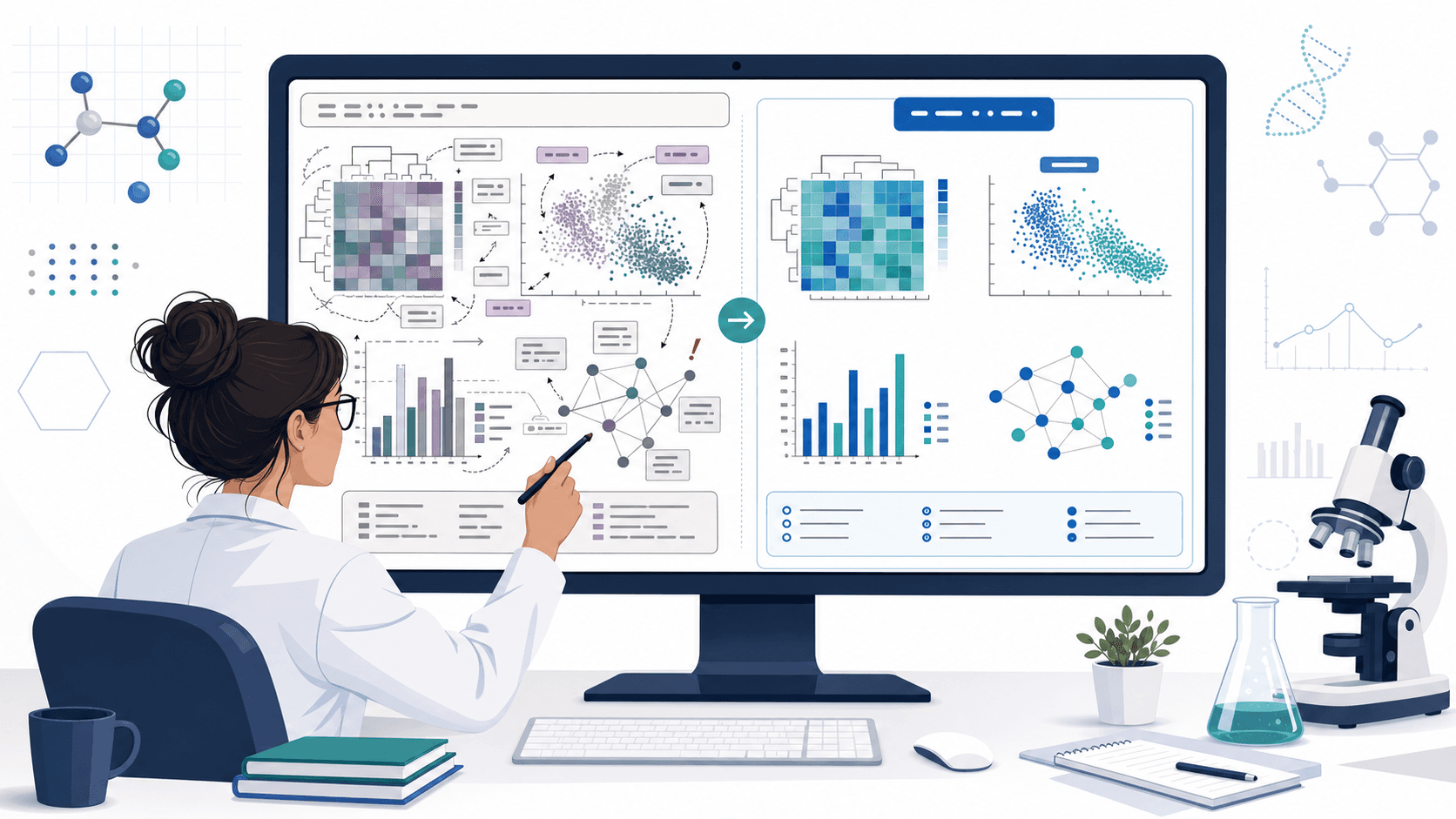
Domenica sera prima della deadline figure. Il professore ha disegnato il modello alla lavagna durante una riunione di 30 minuti, tu hai scattato una foto col telefono. La foto è sfocata, due frecce potrebbero andare in entrambe le direzioni, e quel ciclo in alto era feedback o degradazione? Indovini e rischi la figura sbagliata, oppure mandi un'email e perdi la notte.
Un workflow IA per disegno scientifico non sostituisce gli appunti chiari in riunione. Toglie il ridisegno — il pixel-pushing in Illustrator alle 23. Questa guida è il workflow che i ricercatori usano davvero: foto o schizzo in ingresso, prompt strutturato in mezzo, SVG editabile in uscita.
Errori comuni che trasformano il workflow in doppio lavoro
- Trattare l'output IA come figura finale. Il modello produce un'immagine lucida che sembra finita; le relazioni scientifiche al suo interno sono ancora responsabilità tua. Esporta sempre in SVG per mantenere etichette e frecce editabili.
- Dare una foto da telefono senza descrizione. I modelli image-to-image ridisegnano ciò che vedono, e di solito inventano connessioni che assomigliano ai pixel sfocati. La scienza deve essere in parole accanto alla foto.
- «Fammelo stile Nature.» Dà decorazione, non chiarezza. Specifica prima le relazioni strutturali.
- Perdere la direzionalità. Gli schizzi usano frecce in modo libero — «questo influenza quello». Una figura scientifica deve distinguere visivamente attivazione, inibizione, traslocazione e direzione temporale. Da scrivere esplicitamente.
- Saltare la verifica. Le figure generate da IA inventano regolarmente etichette e componenti mai presenti nello schizzo. Confronta sempre con l'originale prima dell'export.
Prompt scarso vs. prompt migliore
Vero prima/dopo su una foto di lavagna di una cascata chinasica:
Troppo corto — produce un cartoon stilizzato ma non verificabile:
Turn this whiteboard photo into a clean scientific figure.Ristrutturato — produce una figura editabile e affidabile:
Convert the attached whiteboard photo into a clean schematic of a kinase signaling cascade.
The sequence is: extracellular ligand → membrane receptor → MAPKKK → MAPKK → MAPK → nuclear transcription factor → target gene.
Use right-arrows for phosphorylation steps, dashed arrows for translocation across the nuclear membrane, and a separate panel for the inhibitor (small molecule blocking MAPKK).
Preserve the exact node names from the photo: do not invent additional proteins or substrates.
Style: clean vector schematic, white background, room for editable labels, no 3D rendering.
Output as a layered SVG so I can correct labels in Illustrator.
Il prompt strutturato fa due cose che quello corto non può: nomina ogni nodo (il modello non può inventare) e specifica cosa significa ogni tipo di freccia (il modello non può indovinare).
Nota: i prompt restano in inglese. I modelli di immagine attuali rispondono in modo più stabile a token inglesi. Testo in italiano, prompt in inglese è prassi nella comunità scientifica.
Cosa può dedurre l'IA vs. cosa devi specificare
La decisione chiave del workflow è: quanto descrivi in parole. Una divisione utile:
| L'IA può dedurre | Tu devi specificare |
|---|---|
| Stile visivo, design icone, palette | Ogni nome di componente, ogni etichetta |
| Proporzioni e spaziature del layout | Direzione di ogni freccia |
| Sfondo, elementi decorativi | Quali frecce sono attivazione vs. inibizione vs. traslocazione |
| Rapporto d'aspetto e ritaglio | Se la figura è concettuale o mostra dati reali |
| Stile icona per oggetti generici (cellula, organo) | Strutture molecolari specifiche, reperti clinici, valori quantitativi |
Tutto ciò che è nella colonna destra va nel prompt, anche se è anche nella foto. I modelli non leggono in modo affidabile la struttura scientifica da uno schizzo sfocato.
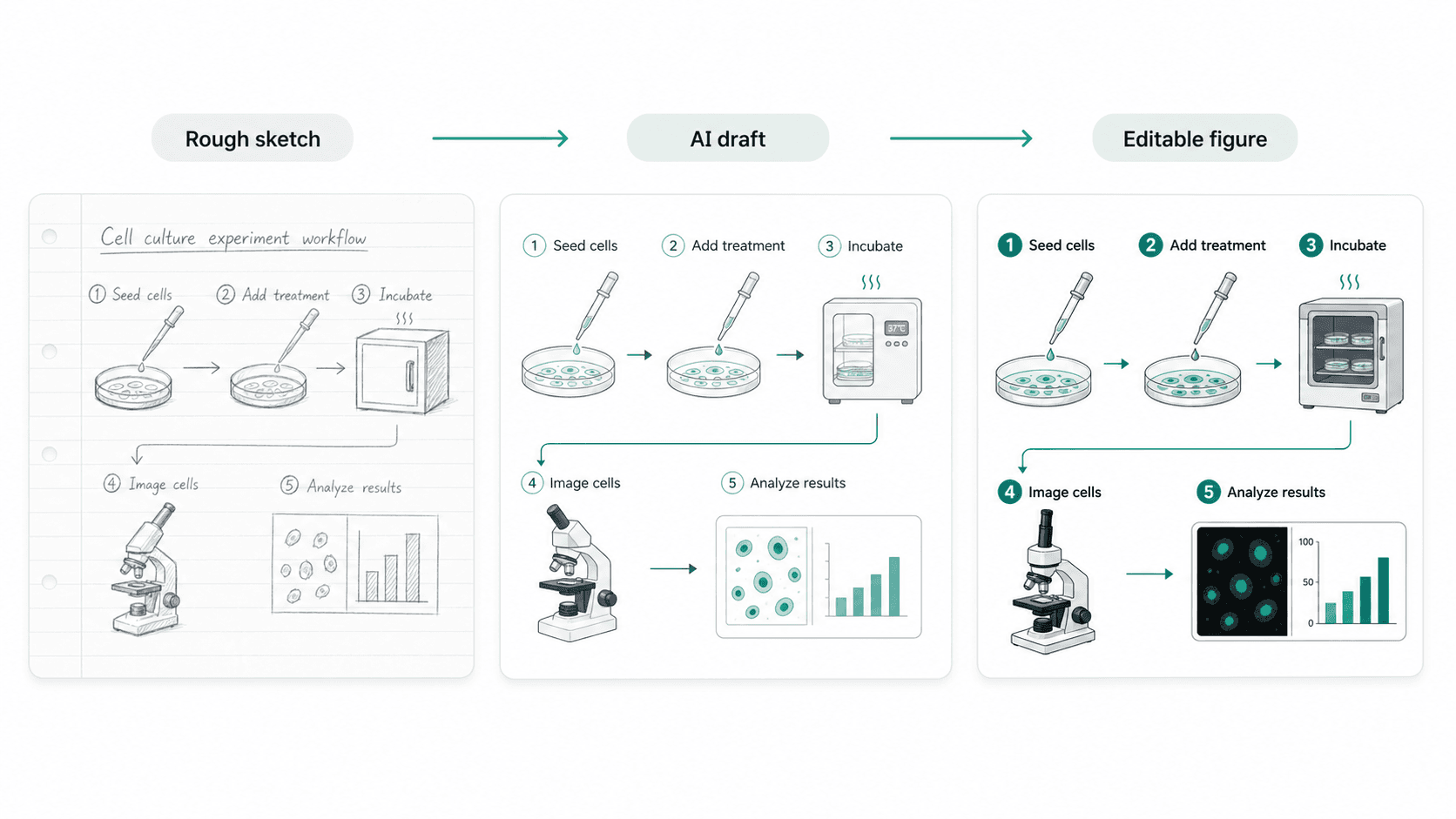
Immagine di esempio
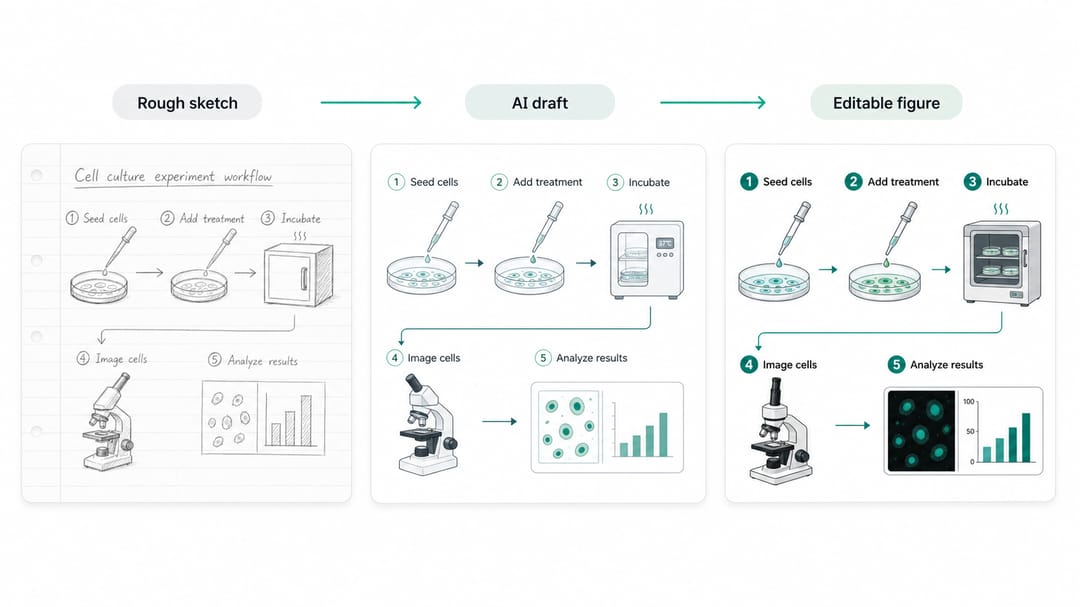
L'esempio mostra le tre fasi: schizzo grezzo, bozza IA, figura editabile. Il contenuto scientifico resta lo stesso; la grammatica visiva si pulisce a ogni passaggio. La bozza IA non è il finale — lo è il livello editabile.
Modelli da copia-incollare per tipo di materiale sorgente
Sostituisci il testo tra parentesi quadre con il tuo studio.
1. Pulizia foto di lavagna
Convert the attached whiteboard photo into a clean scientific schematic of [topic].
The components are: [list every node visible in the photo, in order].
The connections are: [for each arrow, state source → target and what it means (activation, inhibition, translocation, conversion, transport)].
Preserve exact labels from the photo: do not invent additional components.
Style: clean vector schematic, white background, editable labels, no 3D rendering.
Output as a layered SVG.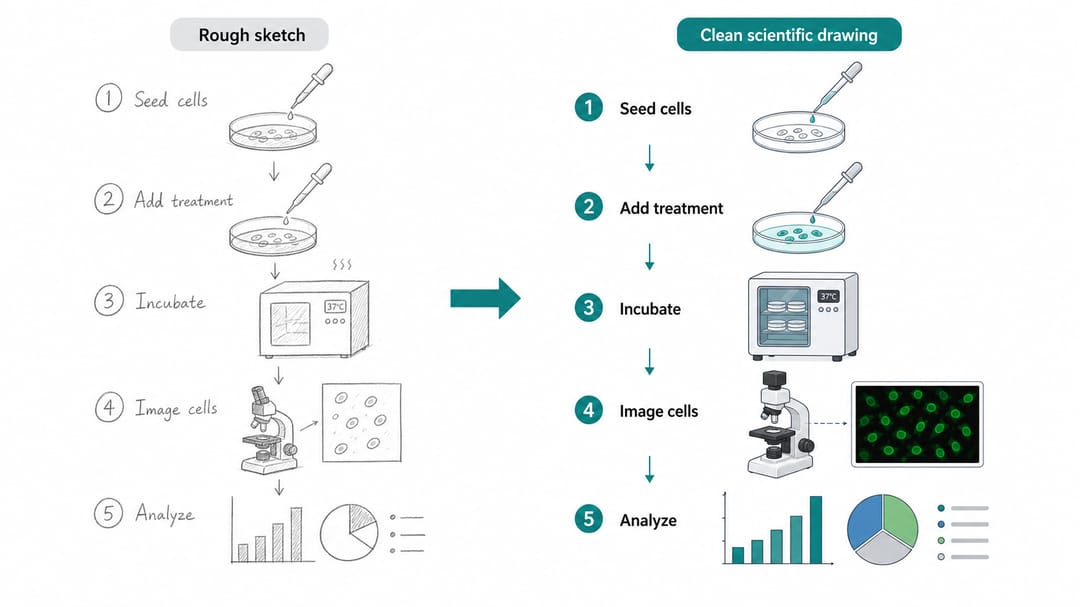
2. Figura metodologica da note di protocollo
Create a methods figure from the following protocol notes: [paste protocol].
Group steps into four blocks: [sample preparation], [treatment], [measurement], and [analysis].
Use a horizontal workflow with numbered steps. Keep labels short enough to fit a single-column methods figure.
Show the instrument or assay icon at the measurement step; use a simple bar chart or table icon at the analysis step (no real numbers).
Do not invent missing protocol steps. If a step is unclear in the notes, leave it as a labeled placeholder I can fill in later.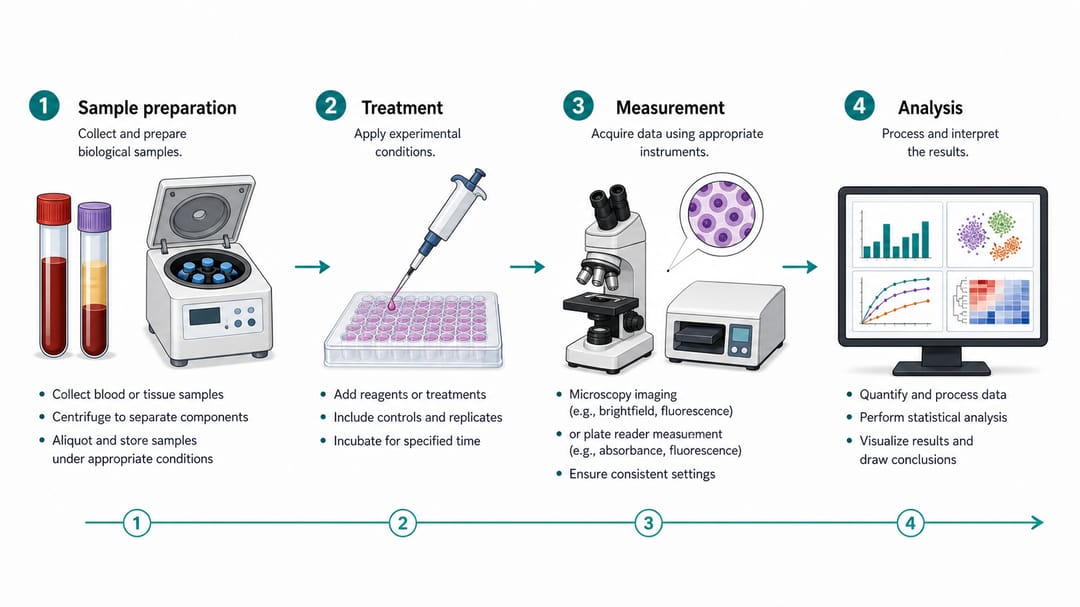
3. Disegno concettuale per talk o grant
Draw a conceptual scientific figure explaining [idea or hypothesis].
Components to show: [main actor], [process they undergo], [output or readout], and [feedback or downstream effect].
This is for a [grant panel / department seminar / public talk]. Keep labels readable from 2 meters away.
Use schematic style, not photorealism. No real data values. No journal logos.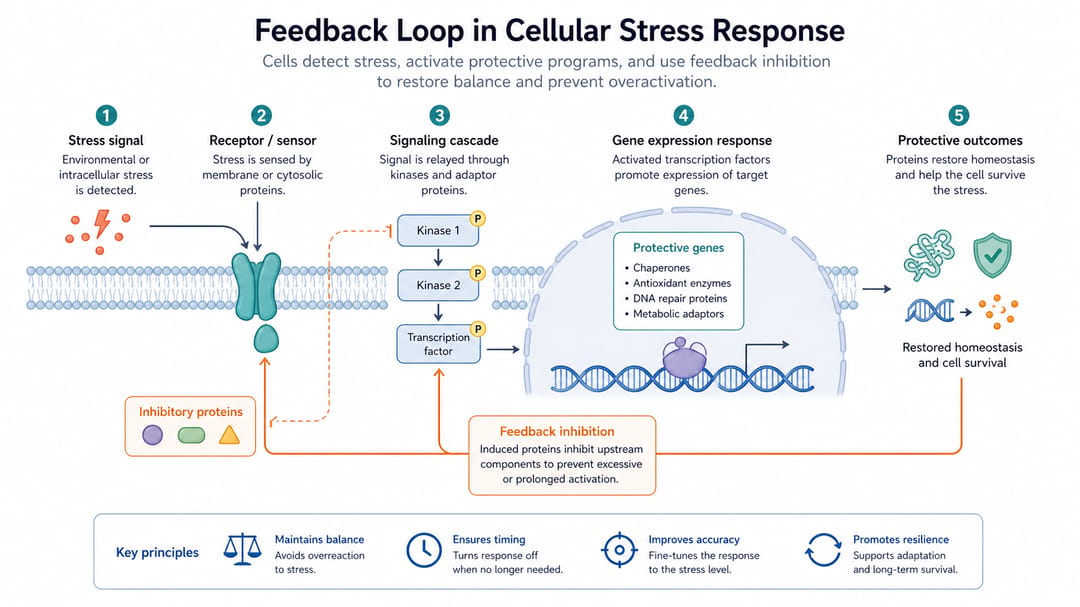
4. Screenshot o figura di paper come riferimento di layout
Use the attached figure from a published paper as a layout reference only.
Recreate the structure for our own study on [topic]: keep the panel arrangement and arrow style, but replace [their component] with [our component], and update labels to: [list of labels].
Do not copy the exact illustrations. The output must be original and not infringe the source figure.
Style: editable vector, consistent with our previous figures.
Come usare questo workflow in base al ruolo
- Dottorando al primo anno: parti dal modello 2 (metodi da note). Il tuo quaderno di laboratorio è già un prompt strutturato — basta riformattare.
- PI che rivede la figura di uno studente: chiedi schizzo e bozza IA e SVG editabile. Se c'è solo la bozza IA, la verifica è stata saltata.
- Postdoc che prepara un talk: il modello 3 è tuo amico. Una figura concettuale per un talk da 10 minuti dovrebbe avere al massimo 4 componenti sullo schermo.
- Lab manager o PI con cultura di lavagna: fotografa la lavagna alla fine di ogni riunione, e usa il modello 1 nella stessa settimana. Più aspetti, più drift di interpretazione entra nella figura.
Workflow realistico in SciDraw AI
- Cattura pulita: foto col telefono dello schizzo o della lavagna, ben illuminata, tutti i componenti visibili. Non ritagliare prima che l'IA abbia visto l'insieme.
- Scrivi il prompt accanto all'immagine: apri un file di note, elenca ogni nodo e ogni freccia. Questo ti costringe a verificare la scienza prima del modello.
- Genera prima una variante strutturata: confrontala col prompt — non col gusto estetico. Il modello ha preservato ogni nodo? Ogni freccia punta nella direzione giusta?
- Itera sul prompt, non sull'immagine: se la figura è sbagliata, sistema il prompt. Rigenerare con lo stesso prompt sbagliato è il modo più rapido per bruciare crediti.
- Esporta in SVG e modifica le etichette: usa vectorize image se l'output è solo raster. Le modifiche finali alle etichette avvengono in Illustrator, Inkscape o PowerPoint.
- Verifica contro la sorgente: metti lo schizzo originale e la figura finale fianco a fianco. Ogni nodo e ogni freccia devono corrispondere.
Checklist prima dell'export
- Ogni componente nella figura era nello schizzo originale o aggiunto esplicitamente nel prompt.
- Ogni tipo di freccia ha un significato coerente.
- Nessun numero inventato, nessun logo rivista falso, nessun intervallo di confidenza fabbricato.
- Le etichette sono leggibili alla dimensione in cui la figura sarà mostrata (colonna, poster, slide).
- L'output è editabile (SVG, PDF a livelli,
.ai), non raster appiattito. - Se la figura tocca contenuti clinici o chimici, un esperto del dominio ha firmato.
Workflow SciDraw AI correlati
Scientific Drawing · Scientific Figure Maker · AI Scientific Illustration · Vectorize Image
FAQ
Lo schizzo deve essere pulito perché il workflow funzioni?
No. Lo schizzo può essere una foto da telefono di un disegno a pennarello. Conta che tu capisca cosa è ogni componente e cosa significa ogni freccia. L'IA non può recuperare dalla tua ambiguità.
Cosa non va mai lasciato all'IA?
Strutture molecolari esatte, affermazioni cliniche, valori quantitativi, simboli disciplinari (lettere greche in matematica, strutture IUPAC in chimica, riferimenti anatomici in medicina). Sempre verifica manuale.
Perché esportare in SVG invece di usare l'output IA direttamente?
Perché i revisori chiedono modifiche di etichette, e le etichette sono la parte più fragile di una figura IA. SVG le mantiene come testo editabile invece di pixel.
Come capisco se l'IA ha inventato qualcosa?
Confronta l'output con la sorgente. Percorri ogni nodo e ogni freccia dell'output e conferma che provenga dallo schizzo o dal prompt. Tutto ciò che non risale è allucinazione.
Posso usarlo per figure cliniche o chirurgiche?
Per la bozza sì, mai per la versione finale. Le figure cliniche devono passare per revisione clinica prima della pubblicazione o distribuzione ai pazienti. L'IA è uno strumento di schizzo, non un'autorità clinica.
Cosa fare se il modello continua ad aggiungere elementi non richiesti?
Aggiungi un vincolo negativo al prompt: "Do not include any components other than the ones listed above." I modelli rispettano meglio i vincoli negativi espliciti delle richieste implicite di minimalismo.