A PI sends back the same comment three times: "This figure doesn't tell me what you did." You rewrite the prompt, the diagram comes back prettier, the comment comes back identical. The problem is almost never the model. It is that the prompt asks for a picture of the study instead of describing the panels, the relationships, and what each arrow is supposed to mean.
This guide gives you the prompt shapes that survive PI review, the mistakes that burn the most credits, and copy-paste templates for the four diagram types that cover ~80% of paper figures.
Common mistakes that waste credits
Before the templates, the patterns that cause regenerations:
- "Make a diagram of my study." No panels, no roles, no relationships. The model invents a layout that you then have to fix in the next prompt anyway.
- Style words before structure. "Beautiful Nature-style figure of CRISPR editing" gets you a polished image with random arrows. Reviewers do not care about polish; they care that the cause-and-effect direction is correct.
- Mixing four diagrams into one. Workflow + mechanism + result + comparison in a single panel produces a busy image no one can read. Split them.
- Asking the model to invent numbers. "Show that condition A is better than B" tells the AI to fabricate values. Use placeholders and add the real numbers in editing.
- No audience. A figure for a grant panel needs a different density than a figure for a methods supplement. State the audience in the prompt.
Bad prompt vs. better prompt
A real before/after on a single CRISPR knock-in study:
Too short — produces a generic gene-editing cartoon:
Make a scientific diagram of our CRISPR knock-in experiment in mouse hepatocytes.Restructured — produces a 4-panel figure you can actually edit:
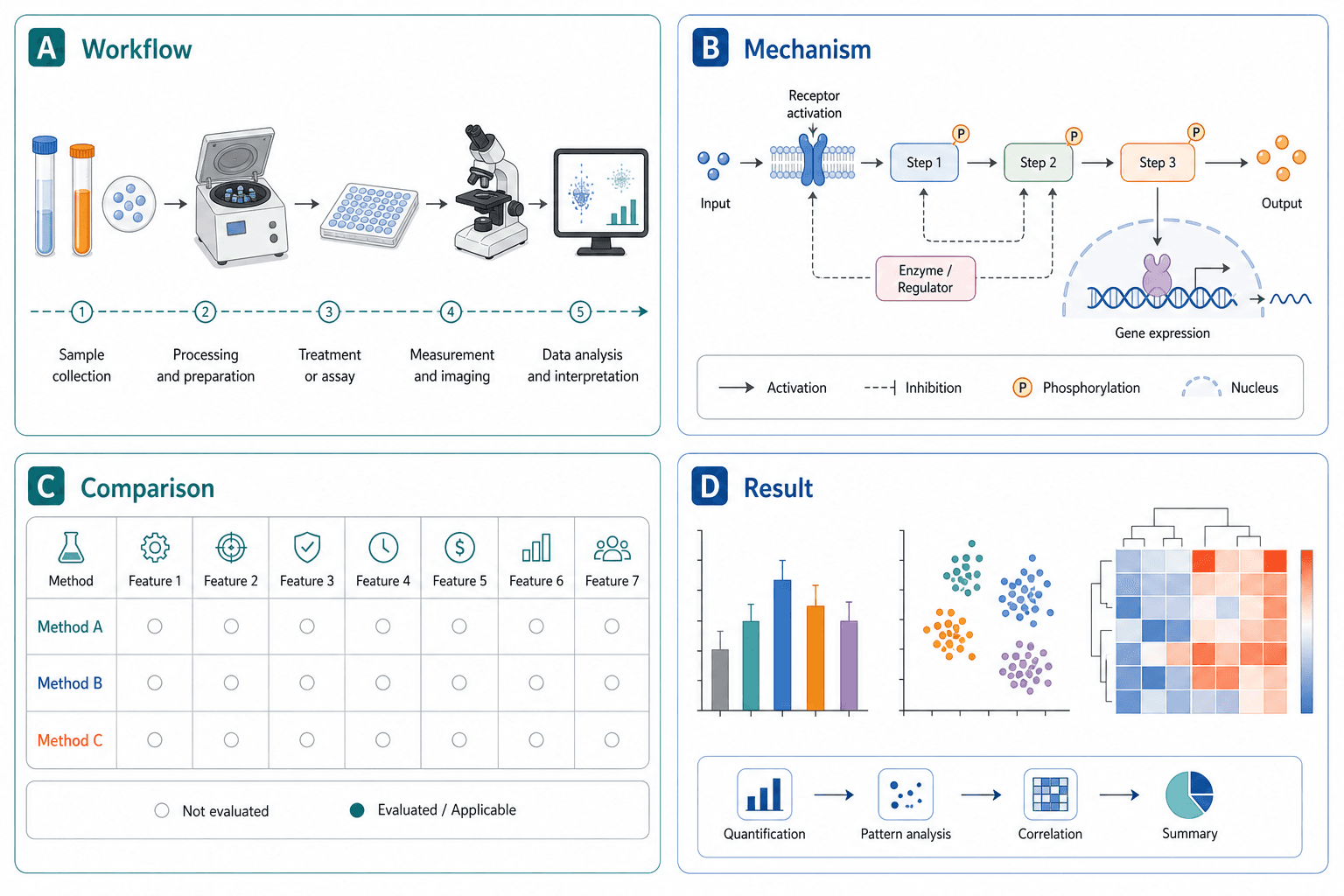
Create a 4-panel scientific figure for a CRISPR knock-in study in primary mouse hepatocytes.
Panel A (workflow): isolation → transfection (Cas9 + guide RNA + donor template) → selection → expansion. Use numbered steps.
Panel B (mechanism): show double-strand break at the target locus, HDR repair using the donor, integration of the knock-in cassette. Use activation arrows for cutting, dashed lines for template binding.
Panel C (comparison): two columns, wild-type vs. knock-in. Leave readout values as placeholders.
Panel D (result summary): three icons for the three downstream assays. No numeric claims, no conclusion text.
Audience: methods reviewer. Style: clean vector, white background, consistent color per panel, room for labels.
The second prompt is longer, but it generates exactly once. The short one usually costs 3–4 regenerations.
Prompt anatomy: the four required pieces
Every diagram prompt above ~80 words follows the same shape. Drop any of these four and the model fills the gap with decoration:
- Audience — who will read this figure. Methods reviewer, grant panel, undergrad, conference poster passerby. Density and label style change for each.
- Structure — name the panels, the steps, or the system blocks. This is the load-bearing part. Style words ("Nature-style", "clean") only work after structure is locked.
- Relationships — what each connector means. Activation vs. inhibition, flow vs. correlation, spatial order vs. temporal order. AI models guess wrong on this constantly.
- Editability — say "leave room for labels", "use placeholders for values", "vector-friendly layout". Otherwise the model packs the image and you cannot fix it after.
Example figure
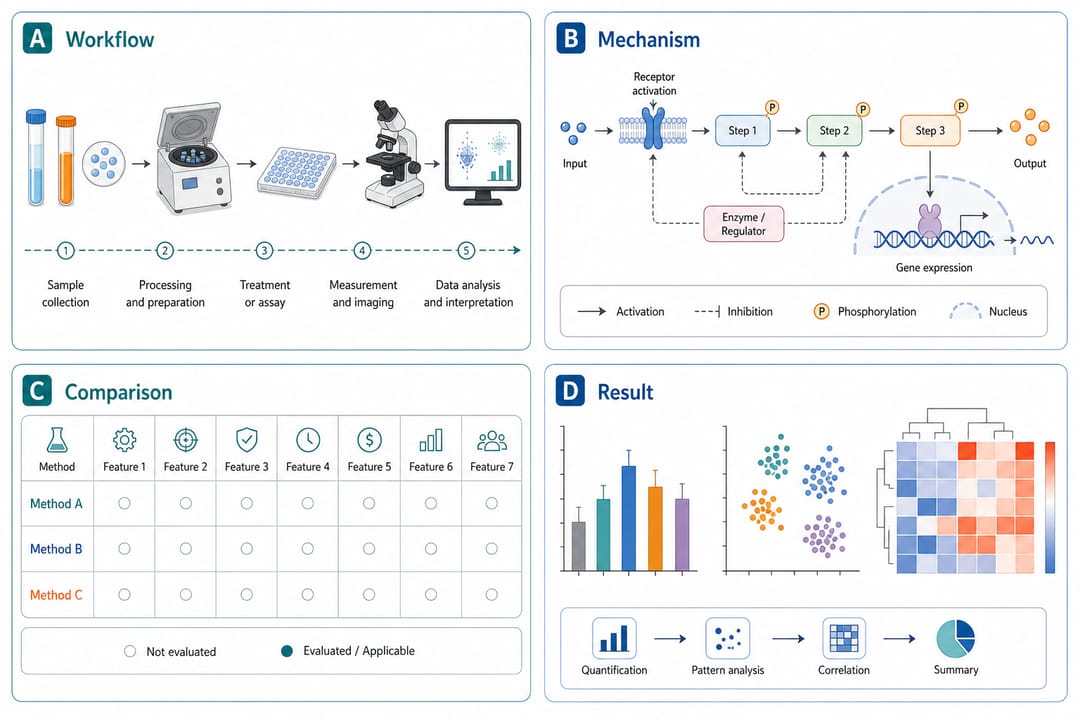
What to notice: panels are functionally separated (workflow, mechanism, comparison, summary), labels are placeholders rather than invented data, and the color system is one-per-panel so the eye knows which block it is reading.
Copy-paste templates by diagram type
Replace bracketed text with your own study. Keep the structural language; drop placeholders only if your study truly does not have that block.
1. Multi-panel paper figure
Create a multi-panel scientific diagram for [study topic].
Panel A: [experimental workflow with 3–5 numbered steps].
Panel B: [mechanism or model — name the molecules, organs, or system blocks].
Panel C: [comparison of groups, conditions, or methods — leave numeric readouts as placeholders].
Panel D: [result summary — icons, not invented values].
Audience: [journal reviewer / grant panel / conference]. Use consistent color per panel, white background, vector-friendly layout, and room for labels.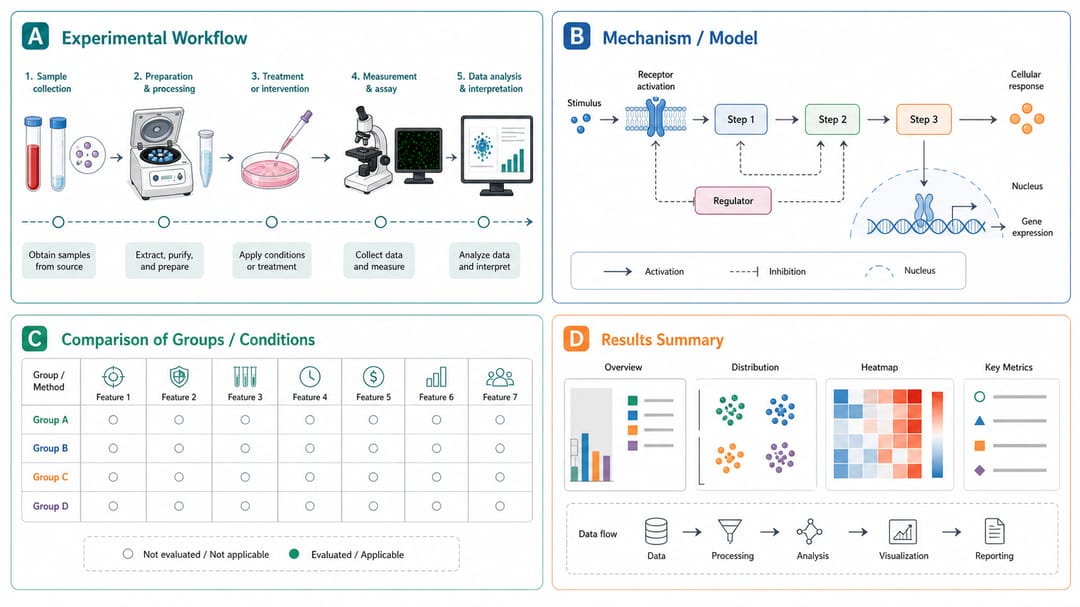
2. Mechanism figure
Create a mechanism diagram for [biological / chemical / physical process].
Show [trigger or upstream signal] leading to [intermediate steps] and [downstream outcome].
Use activation arrows (→), inhibition marks (⊣), and dashed lines for hypothesized links.
Label the major molecules, complexes, or system components. Keep a clean white background.
Do not invent quantitative values. Leave room for adding rate constants or concentrations in editing.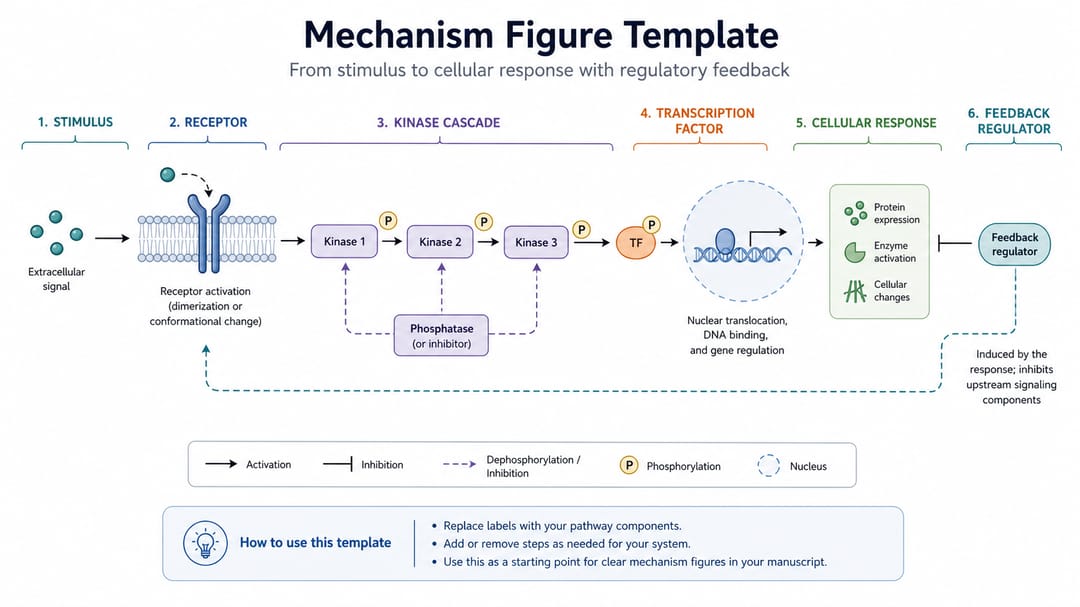
3. Workflow + measurement output
Create a scientific workflow diagram for [method].
Steps: [sample input] → [preparation] → [treatment] → [measurement instrument] → [analysis pipeline] → [final output].
Use numbered steps and short labels suitable for a methods figure or supplementary panel.
Use a horizontal layout. Avoid decorative lab benches or stock photographs.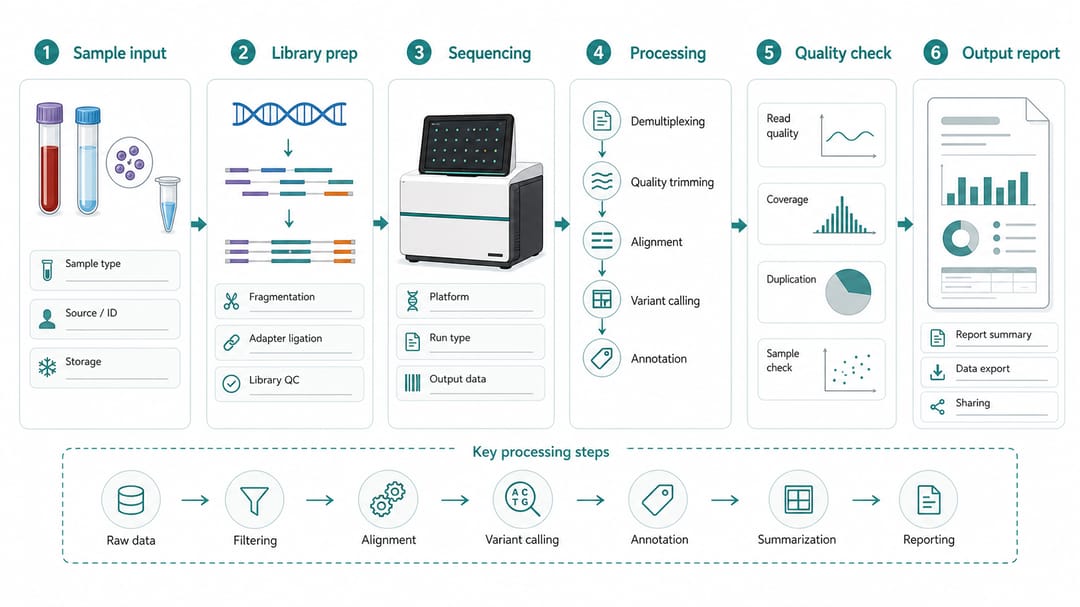
4. Pathway / network diagram
Draw a [signaling / metabolic / regulatory] pathway diagram for [pathway name].
Nodes: [list the major proteins, metabolites, or regulators].
Edges: use activation, inhibition, and translocation arrows where appropriate.
Group nodes by compartment (extracellular, cytoplasm, nucleus, mitochondrion) using subtle background panels.
Style: schematic, journal-ready, no 3D renders, no fabricated kinetic values.
How different readers should use this guide
- Grad student writing a first methods figure: start with template 3 (workflow). It is the most forgiving and the closest to what a lab notebook already looks like.
- PI preparing a grant resubmission: use template 1 (multi-panel) so the reviewer sees the whole study at a glance. Pair it with one clean mechanism figure (template 2).
- Communications team or science illustrator: use template 2 or 4 and explicitly request vector / SVG output so the figure can be re-styled to brand.
- Reviewer-side teaching: the bad-prompt example above is the fastest way to show authors why their figures keep getting rejected.
A realistic SciDraw AI workflow
- Write the one-sentence purpose first — "explain to a methods reviewer how we knocked in a fluorescent reporter at the Alb locus." If you cannot write this sentence, the figure is not ready.
- Pick the template that matches the purpose, paste it into SciDraw AI, and replace the bracketed text.
- Generate 2–3 variants and pick the one with the cleanest hierarchy, not the prettiest one.
- Export as SVG (or convert with the vectorize image workflow) and fix the labels in Illustrator, PowerPoint, or Inkscape.
- Add real numeric values manually. Never let the model write conclusion text.
Pre-submission checklist
- Each panel has one clear job. If two panels are doing the same job, merge them.
- Arrows have one consistent meaning per type (no mixing activation and "next step" with the same arrow).
- No numbers in the image that did not come from your actual data.
- Labels are legible at 100% column width, not just zoomed in.
- If the figure touches medical, chemical, or safety content, a domain expert has reviewed the final version.
Related SciDraw AI workflows
Scientific Diagram Maker · Workflow Diagram Generator · Mechanism Figure Generator · Graphical Abstract Maker
FAQ
Why does my AI diagram look polished but reviewers still reject it?
Polish and structural correctness are independent variables. Most rejected figures are too polished — the model has guessed at relationships you never specified, and those guesses are wrong. Fix this by writing structure and relationships before any style words.
Should every paper have a multi-panel diagram?
No. Use multi-panel only when the reader needs to connect method, mechanism, comparison, and result in one visual. Single-panel mechanism or workflow figures are usually clearer for a single point.
How do I stop the model from inventing data?
Three rules: ask for placeholders explicitly, prohibit conclusion sentences ("no text claiming significance"), and never paste numbers into the prompt that you do not want the model to render verbatim. Add real values in post-editing.
Should prompts describe style first or structure first?
Always structure first. Style words ("Nature-style", "minimal", "clean") only constrain visual finish. They do not constrain the science. Define panels, components, arrows, and labels first; then add 1–2 style words at the end.
Can I use one prompt for both a paper figure and a poster?
No. The information density is different. A paper figure is read at 100% column width with the legend underneath. A poster is read from 1.5 meters with no legend. Rewrite the prompt for each — shorter labels, larger icons, fewer panels for the poster.
How long should a good prompt be?
For a multi-panel figure, 80–150 words. Shorter prompts force the model to invent structure; longer prompts often contradict themselves. If your prompt is over 200 words, you probably have two figures, not one.