Free Bell Curve Generator
Create a labeled normal distribution graph from plain text
Describe your mean, standard deviation, and any shaded probability regions or z-scores, and AI draws a clean, professional bell curve — ready for statistics homework, research papers, and presentations.
Bell curve examples
Click any example to load its prompt, or use it as a starting point for your own normal distribution graph.
What does this bell curve generator do?
It turns a plain-text description of a normal distribution into a clean, labeled bell curve graph. You specify the mean and standard deviation (and optionally z-scores, percentiles, or shaded probability regions), and the AI produces a properly proportioned Gaussian curve with clearly marked axes, annotated reference lines, and colored area fills — all without spreadsheets or coding.
Why use a bell curve generator
- Normal distributions appear in statistics, psychology, education, engineering, and medicine — clear visuals are essential for communication.
- Building a publication-quality curve in Excel or R requires formatting work that distracts from the analysis.
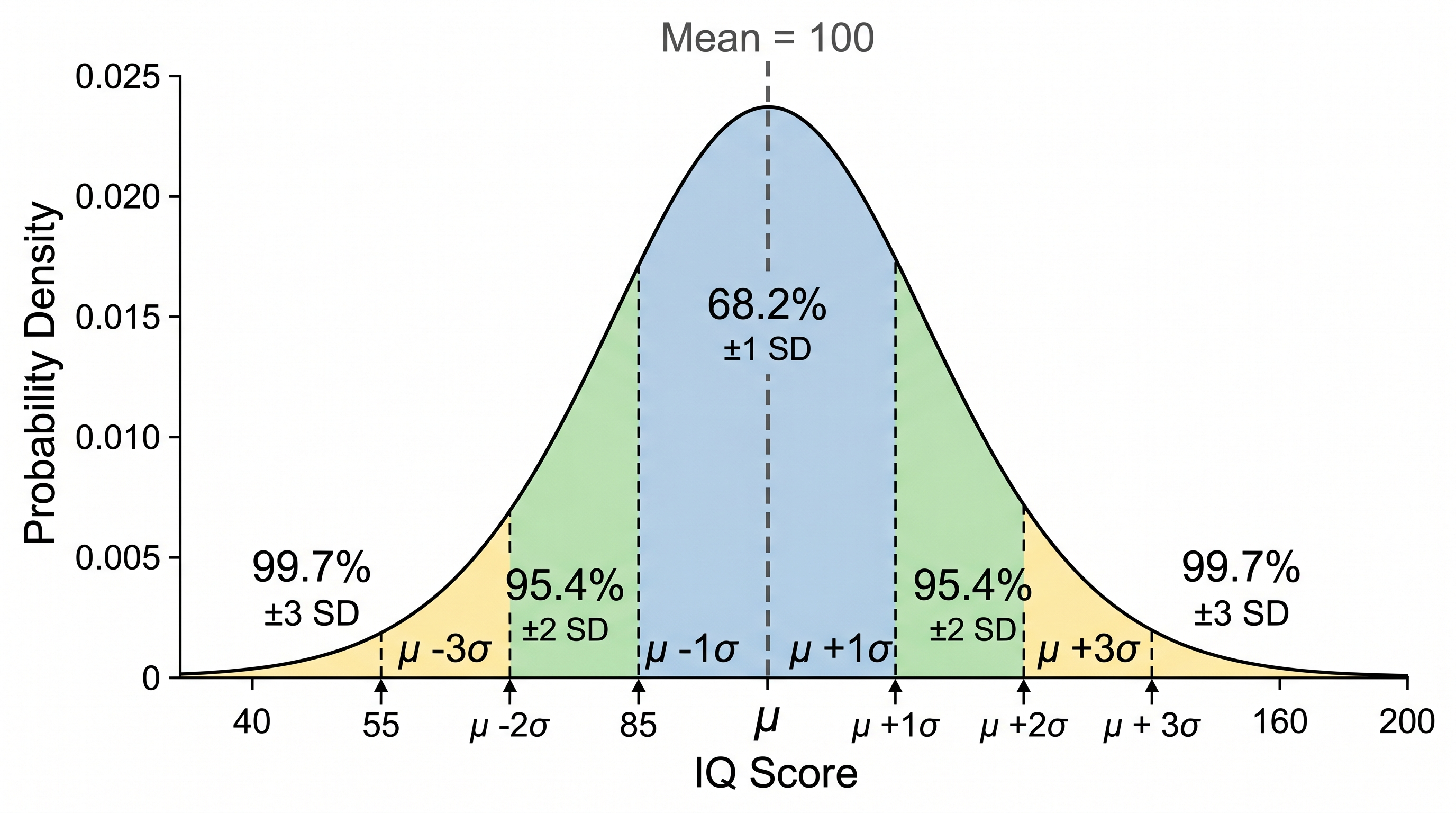
- Students learning the empirical rule (68–95–99.7%) benefit enormously from a clearly shaded diagram.
- Instructors and researchers need quick, presentable figures for slides, textbooks, and reports.
- Changing parameters (mean, SD, shaded region) and regenerating is far faster than editing graph code by hand.
How to make a bell curve graph
State the mean and standard deviation of your distribution. Then describe any visual features you need: shaded probability areas (e.g. ±1 SD, ±2 SD, a specific range), labeled z-scores or percentile markers, vertical reference lines, and axis titles. For a two-group comparison, give the parameters for each curve and indicate whether you want them overlapping. Generate the figure, check the labels and proportions, and refine the description if anything is unclear.
Parts of a bell curve graph
- Bell curve — the symmetric, unimodal Gaussian (normal) probability density function.
- Mean (μ) — the center of the distribution, marked by a vertical line or label on the x-axis.
- Standard deviation (σ) — the spread of the data; tick marks at ±1σ, ±2σ, ±3σ are conventional.
- Shaded regions — colored areas under the curve representing probability or proportion (e.g. 68.2%, 95.4%, 99.7%).
- Z-scores — standardized values on the x-axis showing how many SDs a point lies from the mean.
- Tail areas — the extreme left or right portions of the curve, often shaded to indicate significance levels or rejection regions.
Bell Curve Generator FAQ
What is a bell curve?
A bell curve is the graph of a normal (Gaussian) probability distribution. It is symmetric around the mean, with most values clustered near the center and progressively fewer values toward the tails, creating the characteristic bell shape.
What is the empirical rule (68–95–99.7)?
The empirical rule states that for a normal distribution, approximately 68.2% of values fall within ±1 standard deviation of the mean, 95.4% within ±2 SDs, and 99.7% within ±3 SDs. You can ask the generator to shade these bands automatically.
Can I shade a specific probability region or tail area?
Yes — describe the region you want highlighted, for example 'shade the area to the left of x = 85' or 'shade between z = −1.96 and z = +1.96 and label it 95%'. The AI will fill and annotate the specified area.
How do I create a standard normal (z-score) curve?
Specify mean = 0 and standard deviation = 1 and ask for z-score labels at −3, −2, −1, 0, 1, 2, 3. This is the standard normal distribution used for z-tables and hypothesis testing.
Is this suitable for statistics class or research papers?
Yes. The generator produces clean, labeled figures suitable for homework, lab reports, posters, and publications. Always verify that the parameters and shaded regions match your data before using the figure in a formal report.
Is it free?
Each generation uses a small number of credits. New accounts receive free credits, so you can generate a bell curve without any subscription.
Explore More Tools

Chemistry Diagram Generator
Create chemistry figures, TOC graphics, and molecular visuals
Try it free
Reaction Mechanism Figure Generator
Draft organic, catalytic, and electrochemistry mechanism figures
Try it free
Mechanism Figure Generator
Create signaling pathway and molecular mechanism illustrations
Try it freeNeed other statistical or scientific graphs?
Generate scatter plots, histograms, box plots, and more scientific figures with SciDraw AI.